> ## Documentation Index
> Fetch the complete documentation index at: https://www.pickfu.com/docs/llms.txt
> Use this file to discover all available pages before exploring further.
# Amazon listing conversion (CVR)
> Diagnose why Amazon shoppers don't buy, then test image-stack, title, and bullet copy changes that lift your product detail page conversion rate.
Click-through gets shoppers onto your listing; conversion gets them to buy. This playbook diagnoses
the specific reasons shoppers hesitate, then tests improved image stacks and copy against the live
competitor set until the listing converts.
Where the [Amazon main image playbook](/docs/playbooks/amazon-main-image) optimizes the *thumbnail* that
wins the click, this one optimizes the *detail page* that wins the purchase.
The loop is designed to be run autonomously by an AI agent (Claude, ChatGPT, Cursor, or any client
with PickFu MCP / CLI / API access) with minimal human intervention.
## When to use this playbook
| Use it when | Skip it when |
| ----------------------------------------------------- | ------------------------------------------------------------------------------------------------------------ |
| Shoppers reach your listing but don't buy | Your problem is getting clicks, not conversions. Use the [main image playbook](/docs/playbooks/amazon-main-image) |
| You can change your image stack, copy, or A+ content | You can't change the listing |
| You have 2–3 competitor listings to benchmark against | You're pre-launch — validate the concept first |
## The optimization loop
Show shoppers your live listing and ask what stops them from buying. This surfaces the specific
objections to fix.
Test your current image stack vs. 2–3 competitor stacks. Save this competitor set — you reuse it
in the final validation.
Use the audit feedback to rewrite copy and generate improved images
([generate\_image](/docs/api-reference/media/generate-media) via MCP, CLI, or API).
Run head-to-head or ranked polls comparing improved copy / images against the original until a
variant wins with a score of 70 or higher.
Run a final poll with the improved listing plus the SAME competitor stacks from step 2. A
ranking improvement vs. the baseline indicates higher CVR.
**Sample size and cost.** This playbook defaults to small, cheap polls — **50 respondents** for
the audit, baseline, and final validation, **15 respondents** per iteration. The loop triangulates
across many polls, so a single noisy poll gets corrected by the next. Scale up only when stakes
justify it: bump the **final validation to 100–200** before a costly listing overhaul. Open-ended
audits (steps 1, 3) benefit from a few more responses if you want richer themes — 50–100 is a good
range. See [sample size guidance](/docs/guides/best-practices#consider-sample-size).
## Run this playbook with an AI agent
Paste this prompt into Claude, ChatGPT, Cursor, or any AI agent connected to the
[PickFu MCP server](/docs/integrations/mcp-server), [CLI](/docs/integrations/cli),
or [REST API](/docs/api-reference/introduction). The agent will run the entire loop on your behalf —
creating polls, reading responses, and iterating until a winning variation emerges.
```text wrap theme={null}
You are running the PickFu "Amazon listing conversion (CVR)" playbook end-to-end.
Goal: increase the conversion rate of an Amazon product detail page by diagnosing
purchase blockers, generating improvements, and validating them against the live
competitor set.
Before starting, ask the user for:
- The product and target search term (e.g. "stainless steel water bottle")
- Their current listing (ASIN to import, or image stack + description)
- 2-3 competitor listings/ASINs (the canonical competitor set — fixed across
steps 2 and 5)
- Target audience (default: General; refine only if the user requests it)
Run this loop:
1. AUDIT (50 respondents, open_ended).
Show the user's listing. Question: "Review the listing. What prevents you
from purchasing, and what would change your mind?" Audience: General.
Read the AI summary + written feedback. Produce a numbered list of concrete
conversion blockers (e.g. "no size reference", "benefits not visible in
first 2 images", "missing social proof", "unclear what's in the box").
2. BASELINE (50 respondents, ranked).
Compare the user's image stack against the competitor stacks. Question:
"If you were shopping on Amazon for , which product would you
buy?" Audience: General. Record the baseline ranking and score.
3. GENERATE IMPROVEMENTS.
Address the top blockers from step 1. For images, use generate_image to
produce improved infographic/lifestyle images (e.g. add a size-reference
image, a benefits callout, a what's-in-the-box image). For copy, rewrite
the title/bullets/description to resolve the objections. Make 2-3 variants.
4. ITERATE (15 respondents per poll).
Test each improvement against the original:
- For 2-way image or copy comparisons, use head_to_head (exactly 2 options).
- For 3+ variants, use ranked (3-8 options).
Repeat until a variant wins with a score of 70 or higher.
Stop condition: if 5+ iterations fail to produce a 70+ winner, halt and
report. The blocker may be price, brand, or product — not the listing.
5. RE-VALIDATE (50 respondents, ranked).
Compare the improved listing against the SAME competitor stacks from step 2.
Same question. Compare ranking + score to the step-2 baseline.
- Higher than baseline -> the improvement is real, ship it.
- Unchanged -> the variant won head-to-head but didn't beat the category;
consider larger changes (price positioning, hero image, A+ content).
Final report must include:
- Top 3-5 conversion blockers found in the audit
- Baseline ranking/score vs final ranking/score
- The specific image/copy changes that drove the improvement
- The winning asset URLs / final copy
- Note: Amazon CVR changes surface in performance metrics over days-to-weeks
after the listing update.
Tools to use:
- save_survey + publish_survey — create and launch each poll
- get_survey_responses — read responses
- generate_image — create improved images (step 3)
- upload_media — for assets created outside PickFu
```
Want to run this manually? The same flow is available as a one-click template in the PickFu app
([Start the CVR playbook](https://app.pickfu.com/playbooks/improve_cvr)) with pre-filled poll URLs.
## Step-by-step (human operator view)
### 1. Audit conversion blockers
Show shoppers your live listing and ask what stops them from buying.
| Setting | Value |
| ----------- | ----------------------------------------------------------------------------------------- |
| Poll type | Open-ended |
| Question | "Review the listing. What prevents you from purchasing, and what would change your mind?" |
| Audience | General |
| Sample size | 50 |
**What you'll get:** a prioritized list of objections — missing information, unclear benefits, weak
social proof, confusing images. These become your improvement targets.
[Launch the conversion-blockers audit →](https://app.pickfu.com/ask/survey?q1-type=open_ended\&q1-prompt=Review+the+listing.+What+prevents+you+from+purchasing+and+what+would+change+your+mind%3F\&sample_size=50) · [See an example →](https://app.pickfu.com/results/S5bzJt6LhD)
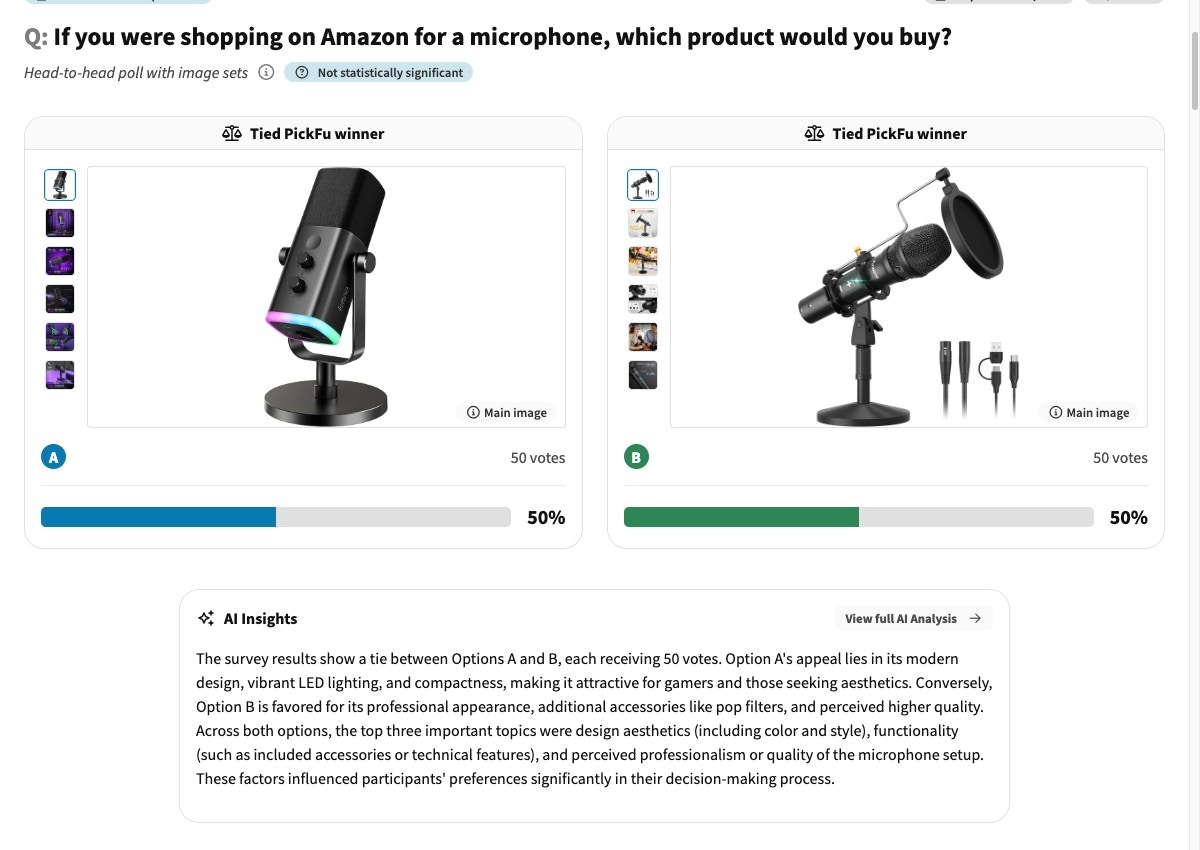
### 2. Baseline your image stack against competitors
| Setting | Value |
| ----------- | --------------------------------------------------------------------------------- |
| Poll type | Ranked choice |
| Question | "If you were shopping on Amazon for \[search term], which product would you buy?" |
| Options | Your image stack + 2–3 competitor stacks (import by ASIN) |
| Audience | General |
| Sample size | 50 |
**What you'll get:** a baseline ranking of your listing vs. competitors. Save the competitor set —
you reuse it in step 5.
[Launch the baseline poll →](https://app.pickfu.com/ask/survey?q1-type=ranked\&q1-prompt=If+you+were+shopping+on+Amazon+for+%3Csearch+term%3E%2C+which+product+would+you+buy%3F\&sample_size=50) · [See an example →](https://app.pickfu.com/results/aMXjQVriol)
 ### 3. Generate improvements
Address the top blockers from step 1. Use PickFu's `generate_image` to produce improved listing
images (size reference, benefits callouts, lifestyle context), and rewrite copy to resolve the
objections respondents raised.
```bash CLI theme={null}
pickfu media generate \
--prompt "Amazon infographic image for a stainless steel water bottle: size-reference next to a hand, 24oz callout, dishwasher-safe icon, clean white background" \
--reference-image-url https://your-cdn.com/current-stack-image.jpg
```
```bash API theme={null}
curl -X POST https://api.pickfu.com/v1/media/generate \
-H "Authorization: Bearer $PICKFU_API_KEY" \
-H "Content-Type: application/json" \
-d '{
"prompt": "Amazon infographic image for a stainless steel water bottle: size-reference next to a hand, 24oz callout, dishwasher-safe icon, clean white background",
"imageUrls": ["https://your-cdn.com/current-stack-image.jpg"]
}'
```
```text MCP theme={null}
Tool call: generate_image
Arguments:
prompt: "Amazon infographic image for a stainless steel water bottle: size-reference next to a hand, 24oz callout, dishwasher-safe icon, clean white background"
reference_image_urls: ["https://your-cdn.com/current-stack-image.jpg"]
```
### 4. Test variants
| Setting | Value |
| ----------- | ------------------------------------------------------ |
| Poll type | Head-to-head (2 options) or Ranked (3–8 options) |
| Question | "Which version makes you more likely to buy, and why?" |
| Options | Improved variant(s) + original |
| Audience | General |
| Sample size | 15 |
Test one change at a time. If you swap the hero image *and* rewrite the bullets in the same
variant and it wins, you won't know which change drove the lift.
[See an example image-feedback poll →](https://app.pickfu.com/results/EfIJFRmhI4) · [See an example copy test →](https://app.pickfu.com/results/9eRlPFZ04X)
### 5. Re-validate against the original competitor set
| Setting | Value |
| ----------- | --------------------------------------------------------------------------------- |
| Poll type | Ranked choice |
| Question | "If you were shopping on Amazon for \[search term], which product would you buy?" |
| Options | Improved listing + the same 2–3 competitor stacks from step 2 |
| Audience | General |
| Sample size | 50 (bump to 100–200 for a high-stakes overhaul) |
**Interpret the result:** a higher ranking or score than your step-2 baseline indicates the
improvement will lift conversion. Unchanged means you won the isolated comparison but didn't move
the category — consider price positioning or a stronger hero image.
## Troubleshooting
Vague feedback usually means the listing has no glaring blocker — the gains will come from
sharpening, not fixing. Pull the most specific 10–15 comments and look for faint signals
(one person confused about size, another about materials). Those micro-objections compound.
You improved relative to your old listing but not relative to the category. The remaining gap is
usually price, brand trust, or the hero image. Re-run the audit with the improved listing to find
the next blocker.
Images. Shoppers scan the image stack before reading bullets, so image-stack problems cap
conversion before copy even gets read. Fix the stack, then optimize copy.
Listing changes can affect conversion within days, but Amazon's metrics are noisy at low order
volumes. Give it 1–2 weeks of steady traffic before judging the live impact.
## Related
* [Amazon CVR help: getting started & FAQs](https://help.pickfu.com/en/articles/12260427-improving-your-amazon-listing-conversion-cvr-with-pickfu-getting-started-faqs) — how to start it in the app + common questions
* [Amazon main image playbook](/docs/playbooks/amazon-main-image) — for click-through rather than conversion
* [Best practices for survey design](/docs/guides/best-practices)
* [MCP server reference](/docs/integrations/mcp-server)
* [PickFu CLI](/docs/integrations/cli)
### 3. Generate improvements
Address the top blockers from step 1. Use PickFu's `generate_image` to produce improved listing
images (size reference, benefits callouts, lifestyle context), and rewrite copy to resolve the
objections respondents raised.
```bash CLI theme={null}
pickfu media generate \
--prompt "Amazon infographic image for a stainless steel water bottle: size-reference next to a hand, 24oz callout, dishwasher-safe icon, clean white background" \
--reference-image-url https://your-cdn.com/current-stack-image.jpg
```
```bash API theme={null}
curl -X POST https://api.pickfu.com/v1/media/generate \
-H "Authorization: Bearer $PICKFU_API_KEY" \
-H "Content-Type: application/json" \
-d '{
"prompt": "Amazon infographic image for a stainless steel water bottle: size-reference next to a hand, 24oz callout, dishwasher-safe icon, clean white background",
"imageUrls": ["https://your-cdn.com/current-stack-image.jpg"]
}'
```
```text MCP theme={null}
Tool call: generate_image
Arguments:
prompt: "Amazon infographic image for a stainless steel water bottle: size-reference next to a hand, 24oz callout, dishwasher-safe icon, clean white background"
reference_image_urls: ["https://your-cdn.com/current-stack-image.jpg"]
```
### 4. Test variants
| Setting | Value |
| ----------- | ------------------------------------------------------ |
| Poll type | Head-to-head (2 options) or Ranked (3–8 options) |
| Question | "Which version makes you more likely to buy, and why?" |
| Options | Improved variant(s) + original |
| Audience | General |
| Sample size | 15 |
Test one change at a time. If you swap the hero image *and* rewrite the bullets in the same
variant and it wins, you won't know which change drove the lift.
[See an example image-feedback poll →](https://app.pickfu.com/results/EfIJFRmhI4) · [See an example copy test →](https://app.pickfu.com/results/9eRlPFZ04X)
### 5. Re-validate against the original competitor set
| Setting | Value |
| ----------- | --------------------------------------------------------------------------------- |
| Poll type | Ranked choice |
| Question | "If you were shopping on Amazon for \[search term], which product would you buy?" |
| Options | Improved listing + the same 2–3 competitor stacks from step 2 |
| Audience | General |
| Sample size | 50 (bump to 100–200 for a high-stakes overhaul) |
**Interpret the result:** a higher ranking or score than your step-2 baseline indicates the
improvement will lift conversion. Unchanged means you won the isolated comparison but didn't move
the category — consider price positioning or a stronger hero image.
## Troubleshooting
Vague feedback usually means the listing has no glaring blocker — the gains will come from
sharpening, not fixing. Pull the most specific 10–15 comments and look for faint signals
(one person confused about size, another about materials). Those micro-objections compound.
You improved relative to your old listing but not relative to the category. The remaining gap is
usually price, brand trust, or the hero image. Re-run the audit with the improved listing to find
the next blocker.
Images. Shoppers scan the image stack before reading bullets, so image-stack problems cap
conversion before copy even gets read. Fix the stack, then optimize copy.
Listing changes can affect conversion within days, but Amazon's metrics are noisy at low order
volumes. Give it 1–2 weeks of steady traffic before judging the live impact.
## Related
* [Amazon CVR help: getting started & FAQs](https://help.pickfu.com/en/articles/12260427-improving-your-amazon-listing-conversion-cvr-with-pickfu-getting-started-faqs) — how to start it in the app + common questions
* [Amazon main image playbook](/docs/playbooks/amazon-main-image) — for click-through rather than conversion
* [Best practices for survey design](/docs/guides/best-practices)
* [MCP server reference](/docs/integrations/mcp-server)
* [PickFu CLI](/docs/integrations/cli)