> ## Documentation Index
> Fetch the complete documentation index at: https://www.pickfu.com/docs/llms.txt
> Use this file to discover all available pages before exploring further.
# Amazon main image optimization
> Run head-to-head PickFu polls to iteratively test and improve your Amazon main product image, lifting search result click-through rates over time.
The Amazon main image is the single largest lever on a product's search-result CTR. This playbook
defines a repeatable optimization loop that benchmarks your current image against the live
competitor set, generates and tests variations, and re-validates the winner against the same
competitor set to confirm the improvement is real.
The loop is designed to be run autonomously by an AI agent (Claude, ChatGPT, Cursor, or any client
with PickFu MCP / CLI / API access) with minimal human intervention.
## When to use this playbook
| Use it when | Skip it when |
| ------------------------------------------------------------------------------------- | --------------------------------------------------------------------------------------------------------------------------------------------------- |
| You want to lift CTR on an existing Amazon listing | You haven't launched yet — start with concept validation instead |
| You have access to your current main image and 2–3 competitor main images | Your listing's primary problem is conversion (CVR), not clicks. Use the [listing conversion playbook](/docs/playbooks/amazon-listing-conversion) instead |
| You can iterate the image (you own the design or have a designer / AI tool available) | You can't change the image, only the copy |
## The optimization loop
Test your current main image vs. 2–3 competitor main images. Save this competitor set — every
later step uses it.
Read the AI summary and individual respondent feedback. Identify the specific reasons
competitors won (clarity, angle, color, lifestyle vs. white-background, text overlays, etc.).
Generate 2–3 new variations using PickFu's [generate\_image](/docs/api-reference/media/generate-media)
tool (via MCP, CLI, or API), or upload variations created elsewhere.
Run cheap (15-respondent) head-to-head polls comparing each variation vs. the original until
one variation wins with a score of 70 or higher.
Run a final 50-respondent poll with the winning variation plus the SAME competitor images from
step 1. A ranking improvement vs. the baseline indicates real CTR lift on Amazon.
**Sample size and cost.** This playbook defaults to small, cheap polls — **50 respondents** for the
baseline and final validation, **15 respondents** per iteration — because the loop triangulates
across many polls, so any single poll being slightly noisy gets corrected by the next one. This
keeps the total cost of an AI-run loop low. Scale up only when the stakes justify it: bump the
**final validation to 100–200** before an expensive listing change you can't easily reverse.
Iterations should stay cheap (15) — they're meant to be fast and disposable. See
[sample size guidance](/docs/guides/best-practices#consider-sample-size).
## Run this playbook with an AI agent
Paste this prompt into Claude, ChatGPT, Cursor, or any AI agent connected to the
[PickFu MCP server](/docs/integrations/mcp-server), [CLI](/docs/integrations/cli),
or [REST API](/docs/api-reference/introduction). The agent will run the entire loop on your behalf —
creating polls, reading responses, and iterating until a winning variation emerges.
```text wrap theme={null}
You are running the PickFu "Amazon main image optimization" playbook end-to-end.
Goal: improve the click-through rate (CTR) of an Amazon product's main image by
iteratively testing variations against the live competitor set and re-validating
the winner.
Before starting, ask the user for:
- The Amazon product or category (e.g. "stainless steel water bottle")
- Their current main image (URL or upload)
- 2-3 competitor main images (the canonical competitor set — these stay fixed
across steps 1 and 5)
- Target audience (default: General; refine only if the user requests it)
Run this loop:
1. BASELINE (50 respondents).
Create a ranked-choice survey with the user's current main image + the
competitor images. Question: "When shopping on Amazon, which product would
you buy?" Audience: General, 50 respondents.
Publish, wait for responses, then read the AI summary and individual
written feedback.
2. ANALYZE.
From the responses and AI summary, produce a numbered list of testable
image changes. Each item must be a specific, visual change (e.g. "increase
product-to-frame ratio", "add a hero ingredient inset in the lower-right",
"switch from white background to lifestyle context"). Avoid vague items
like "improve clarity".
3. CREATE VARIATIONS.
Generate 2-3 new image variations using generate_image, each combining
1-2 changes from the analysis. Brief the model with: the original image,
the product category, the specific change you're testing, and the
constraint that the product must remain unambiguous at thumbnail size.
4. ITERATE (15 respondents per poll).
For each variation, run a head_to_head survey (exactly 2 options) with
the variation + the original main image. Same question as step 1.
Audience: General, 15 respondents. Repeat with new variations until ONE
variation wins the head-to-head with a score of 70 or higher.
Stop condition: if 5+ iterations fail to produce a 70+ winner, halt
and report back. Feedback may indicate brand or category constraints
that no main-image change will overcome.
5. RE-VALIDATE (50 respondents).
Create a ranked-choice survey with the winning variation + the SAME
competitor images from step 1. Same question. Audience: General,
50 respondents. For a high-stakes listing change you can't easily
reverse, bump this to 100-200.
Compare to the step-1 baseline:
- If the winning variation ranks higher than the original did → the
improvement is real, ship it.
- If the ranking is unchanged → the iteration won head-to-head but
didn't beat the category; consider larger structural changes
(angle, lifestyle context, format).
Final report to the user must include:
- Baseline ranking and score
- Final ranking and score
- The 3-5 specific changes that drove the improvement
- The winning image URL
- Expected CTR delta direction (PickFu poll lift is directional, not a
guaranteed CTR number; Amazon CTR changes typically surface in
performance metrics 2-4 weeks after image update)
Tools to use:
- save_survey + publish_survey — create and launch each poll
- get_survey_responses — read responses
- generate_image — create AI variations (step 3)
- upload_media — for variations created outside PickFu
```
Want to run this manually? The same loop is available as a one-click template in the PickFu app
([Start the CTR playbook](https://app.pickfu.com/playbooks/improve_ctr)). The app version walks
through the steps with pre-filled poll URLs.
## Step-by-step (human operator view)
### 1. Baseline against competitors
Test how your current main image performs against your top competitors. Save these competitor
images — you'll reuse the exact same set in step 5.
| Setting | Value |
| ----------- | ------------------------------------------------------- |
| Poll type | Ranked choice |
| Question | "When shopping on Amazon, which product would you buy?" |
| Options | Your current main image + 2–3 competitor main images |
| Audience | General |
| Sample size | 50 |
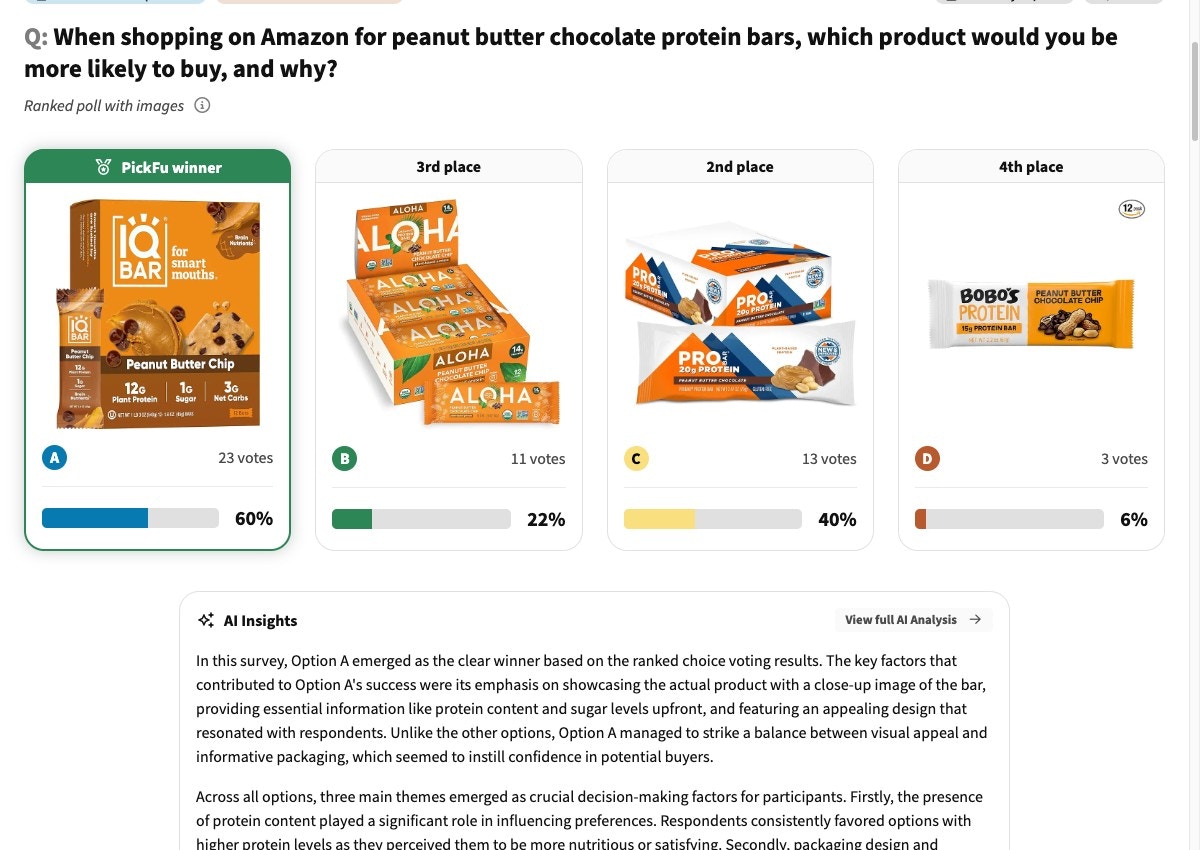
**What you'll get:** a ranking of your image vs. competitors, plus written feedback explaining the
strengths and weaknesses respondents called out. This baseline is the number every subsequent
iteration is judged against.
 [Launch the baseline poll →](https://app.pickfu.com/ask/survey?q1-type=ranked\&q1-prompt=When+shopping+on+Amazon%2C+which+product+would+you+buy%3F\&sample_size=50) · [See an example →](https://app.pickfu.com/results/DLPqtUSoHc)
### 2. Analyze the data
Read the AI summary and respondent feedback. Extract specific, testable changes — not "make it
better." Useful patterns to look for:
* **Clarity:** is the product instantly recognizable at thumbnail size?
* **Angle and crop:** is the product centered and filling the frame?
* **Background:** white vs. lifestyle context — what's the category convention?
* **Text overlays:** badges, sizing callouts, hero ingredients — do competitors use them?
* **Color contrast:** does the image pop on a white SERP background?
The output of this step is a prioritized list of 3–5 changes you'll test in step 3.
### 3. Create AI variations
Use the analysis from step 2 to brief an image-generation tool. PickFu's `generate_image` produces
on-brand variations in seconds and uploads them to the PickFu CDN with a permanent URL — ready to
drop into the next poll.
```bash CLI theme={null}
pickfu media generate \
--prompt "Stainless steel water bottle, white background, centered product fills 80% of frame, hero ingredient (insulated double-wall) inset bottom-right, premium feel" \
--reference-image-url https://your-cdn.com/current-main-image.jpg
```
```bash API theme={null}
curl -X POST https://api.pickfu.com/v1/media/generate \
-H "Authorization: Bearer $PICKFU_API_KEY" \
-H "Content-Type: application/json" \
-d '{
"prompt": "Stainless steel water bottle, white background, centered product fills 80% of frame, hero ingredient (insulated double-wall) inset bottom-right, premium feel",
"imageUrls": ["https://your-cdn.com/current-main-image.jpg"]
}'
```
```text MCP theme={null}
Tool call: generate_image
Arguments:
prompt: "Stainless steel water bottle, white background, centered product fills 80% of frame, hero ingredient inset bottom-right, premium feel"
reference_image_urls: ["https://your-cdn.com/current-main-image.jpg"]
```
Aim for 2–3 variations per iteration. Each variation should test 1–2 specific changes from your
step-2 analysis — not a sweeping redesign. Smaller deltas make it easier to learn what's
actually moving the needle.
### 4. Iterate variations against each other
Run a fast, cheap poll (15 respondents) comparing each new variation against the original. Repeat
until one variation wins the head-to-head with a score of 70+.
| Setting | Value |
| ----------- | ------------------------------------------------------- |
| Poll type | Head-to-head (exactly 2 options) |
| Question | "When shopping on Amazon, which product would you buy?" |
| Options | Variation + original main image |
| Audience | General |
| Sample size | 15 |
Test one major change per iteration. If you batch unrelated changes into one variation and it
wins, you won't know which change drove the win.
[See an example iteration →](https://app.pickfu.com/results/ZFhgNmZFTC)
### 5. Re-validate against the original competitor set
Once you have a 70+ winner from step 4, run a final 50-respondent poll using the winning variation
plus the **same** competitor images from step 1.
| Setting | Value |
| ----------- | -------------------------------------------------------------- |
| Poll type | Ranked choice |
| Question | "When shopping on Amazon, which product would you buy?" |
| Options | Winning variation + the same 2–3 competitor images from step 1 |
| Audience | General |
| Sample size | 50 (bump to 100–200 for a high-stakes, hard-to-reverse change) |
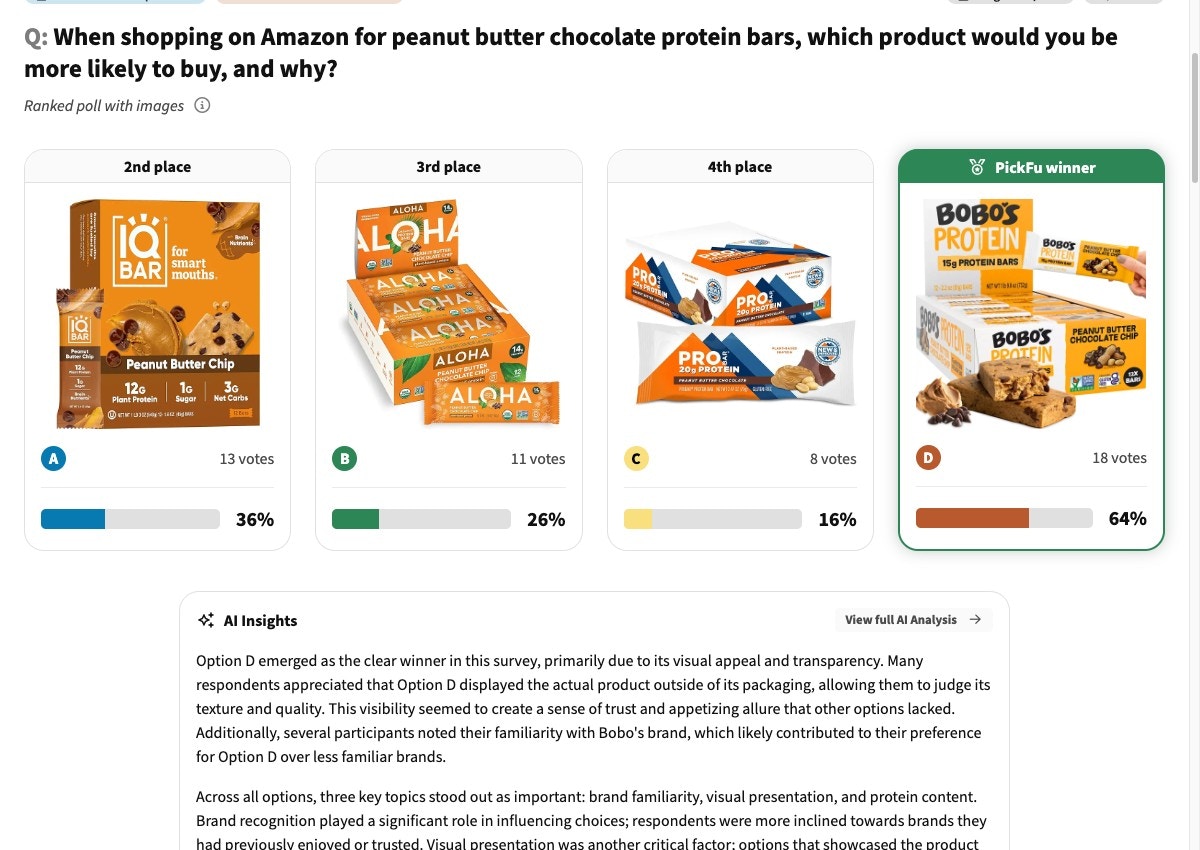
**Interpret the result:**
* **Winning variation ranks higher than the original did in step 1** → the improvement is real.
Ship the new image.
* **Ranking is unchanged or improved by one position only** → the iteration won the head-to-head
but didn't beat the category. Consider larger structural changes (angle, lifestyle context,
packaging format) before shipping.
* **Winning variation ranks worse than the original** → rare, but it happens when the iteration
pool was too small or the variations overfit to a particular preference. Re-baseline with a
different competitor set or a tighter audience.
[Launch the baseline poll →](https://app.pickfu.com/ask/survey?q1-type=ranked\&q1-prompt=When+shopping+on+Amazon%2C+which+product+would+you+buy%3F\&sample_size=50) · [See an example →](https://app.pickfu.com/results/DLPqtUSoHc)
### 2. Analyze the data
Read the AI summary and respondent feedback. Extract specific, testable changes — not "make it
better." Useful patterns to look for:
* **Clarity:** is the product instantly recognizable at thumbnail size?
* **Angle and crop:** is the product centered and filling the frame?
* **Background:** white vs. lifestyle context — what's the category convention?
* **Text overlays:** badges, sizing callouts, hero ingredients — do competitors use them?
* **Color contrast:** does the image pop on a white SERP background?
The output of this step is a prioritized list of 3–5 changes you'll test in step 3.
### 3. Create AI variations
Use the analysis from step 2 to brief an image-generation tool. PickFu's `generate_image` produces
on-brand variations in seconds and uploads them to the PickFu CDN with a permanent URL — ready to
drop into the next poll.
```bash CLI theme={null}
pickfu media generate \
--prompt "Stainless steel water bottle, white background, centered product fills 80% of frame, hero ingredient (insulated double-wall) inset bottom-right, premium feel" \
--reference-image-url https://your-cdn.com/current-main-image.jpg
```
```bash API theme={null}
curl -X POST https://api.pickfu.com/v1/media/generate \
-H "Authorization: Bearer $PICKFU_API_KEY" \
-H "Content-Type: application/json" \
-d '{
"prompt": "Stainless steel water bottle, white background, centered product fills 80% of frame, hero ingredient (insulated double-wall) inset bottom-right, premium feel",
"imageUrls": ["https://your-cdn.com/current-main-image.jpg"]
}'
```
```text MCP theme={null}
Tool call: generate_image
Arguments:
prompt: "Stainless steel water bottle, white background, centered product fills 80% of frame, hero ingredient inset bottom-right, premium feel"
reference_image_urls: ["https://your-cdn.com/current-main-image.jpg"]
```
Aim for 2–3 variations per iteration. Each variation should test 1–2 specific changes from your
step-2 analysis — not a sweeping redesign. Smaller deltas make it easier to learn what's
actually moving the needle.
### 4. Iterate variations against each other
Run a fast, cheap poll (15 respondents) comparing each new variation against the original. Repeat
until one variation wins the head-to-head with a score of 70+.
| Setting | Value |
| ----------- | ------------------------------------------------------- |
| Poll type | Head-to-head (exactly 2 options) |
| Question | "When shopping on Amazon, which product would you buy?" |
| Options | Variation + original main image |
| Audience | General |
| Sample size | 15 |
Test one major change per iteration. If you batch unrelated changes into one variation and it
wins, you won't know which change drove the win.
[See an example iteration →](https://app.pickfu.com/results/ZFhgNmZFTC)
### 5. Re-validate against the original competitor set
Once you have a 70+ winner from step 4, run a final 50-respondent poll using the winning variation
plus the **same** competitor images from step 1.
| Setting | Value |
| ----------- | -------------------------------------------------------------- |
| Poll type | Ranked choice |
| Question | "When shopping on Amazon, which product would you buy?" |
| Options | Winning variation + the same 2–3 competitor images from step 1 |
| Audience | General |
| Sample size | 50 (bump to 100–200 for a high-stakes, hard-to-reverse change) |
**Interpret the result:**
* **Winning variation ranks higher than the original did in step 1** → the improvement is real.
Ship the new image.
* **Ranking is unchanged or improved by one position only** → the iteration won the head-to-head
but didn't beat the category. Consider larger structural changes (angle, lifestyle context,
packaging format) before shipping.
* **Winning variation ranks worse than the original** → rare, but it happens when the iteration
pool was too small or the variations overfit to a particular preference. Re-baseline with a
different competitor set or a tighter audience.
 [Launch the validation poll →](https://app.pickfu.com/ask/survey?q1-type=ranked\&q1-prompt=When+shopping+on+Amazon%2C+which+product+would+you+buy%3F\&sample_size=50) · [See an example →](https://app.pickfu.com/results/GWn3BHbuCJ)
## Optional preamble: quick test before the loop
If you don't yet know what drives clicks in your category, run these two short polls before
starting the loop. They take less than a day and surface category-specific signals that make your
step-2 analysis sharper.
| Setting | Value |
| ----------- | ------------------------------------------------------------------------------ |
| Poll type | Open-ended |
| Question | "When shopping for \[product type], what buying factors are important to you?" |
| Audience | General |
| Sample size | 50 |
**What you'll get:** a ranked list of 3–5 key drivers (price, brand, features, visual appeal,
credibility) that influence purchase decisions in your category. Use these to weight your
step-2 analysis.
[Launch the buyer-psychology poll →](https://app.pickfu.com/ask/survey?q1-type=open_ended\&q1-prompt=When+shopping+for+%3Cproduct+type%3E%2C+what+buying+factors+are+important+to+you%3F\&sample_size=50) · [See an example →](https://app.pickfu.com/results/nmPy8kWazb)
| Setting | Value |
| ----------- | --------------------------------------------------------------------------------------- |
| Poll type | Click test |
| Question | "If you were shopping on Amazon for \[product type], which listing would you click on?" |
| Audience | General |
| Sample size | 50 |
| Setup | Upload a screenshot of the live Amazon search results page (8–12 listings visible) |
**What you'll get:** click data showing which listings attract attention in your category,
plus written feedback on the visual elements that drove the click. Use this to identify
competitors worth including in your step-1 baseline.
[Launch the SERP click-test →](https://app.pickfu.com/ask/survey?q1-type=click_test\&q1-prompt=If+you+were+shopping+on+Amazon+for+%3Cproduct+type%3E%2C+which+listing+would+you+click+on%3F\&sample_size=50) · [See an example →](https://app.pickfu.com/results/oMg2MZ3GLx)
## Troubleshooting
Look for relative improvement between step 1 (baseline) and step 5 (re-validation), not
absolute scores. If your optimized image moves up in ranking — e.g. from 3rd place to 1st — and
the score increases meaningfully, the change is likely to translate to higher CTR on Amazon.
Focus on the specific feedback explaining why competitors won. Common categories:
image clarity, product angle, background choice, missing key features that buyers expect to
see. Note that with very strong competitor brands you may never "win" outright — the goal is
relative improvement against your own baseline, not category dominance.
Most polls complete within 15–60 minutes. You can run new iterations as soon as responses
arrive — rapid cycles are a feature of this loop, not a bug.
Test the most impactful changes from your step-2 analysis first. If respondents flagged the
product angle as the problem, fix that before tweaking text overlays or color tweaks. One
major change per iteration.
Amazon's performance metrics typically reflect main-image changes 2–4 weeks after the update
goes live. PickFu polls give you a directional signal much faster, but Amazon's own ranking
and impression dynamics take time to settle.
## Related
* [Amazon CTR help: getting started & FAQs](https://help.pickfu.com/en/articles/12260691-improving-your-amazon-main-image-ctr-with-pickfu-getting-started-faqs) — how to start it in the app + common questions
* [Amazon listing conversion playbook](/docs/playbooks/amazon-listing-conversion) — for conversion
problems rather than CTR
* [Best practices for survey design](/docs/guides/best-practices)
* [MCP server reference](/docs/integrations/mcp-server)
* [PickFu CLI](/docs/integrations/cli)
[Launch the validation poll →](https://app.pickfu.com/ask/survey?q1-type=ranked\&q1-prompt=When+shopping+on+Amazon%2C+which+product+would+you+buy%3F\&sample_size=50) · [See an example →](https://app.pickfu.com/results/GWn3BHbuCJ)
## Optional preamble: quick test before the loop
If you don't yet know what drives clicks in your category, run these two short polls before
starting the loop. They take less than a day and surface category-specific signals that make your
step-2 analysis sharper.
| Setting | Value |
| ----------- | ------------------------------------------------------------------------------ |
| Poll type | Open-ended |
| Question | "When shopping for \[product type], what buying factors are important to you?" |
| Audience | General |
| Sample size | 50 |
**What you'll get:** a ranked list of 3–5 key drivers (price, brand, features, visual appeal,
credibility) that influence purchase decisions in your category. Use these to weight your
step-2 analysis.
[Launch the buyer-psychology poll →](https://app.pickfu.com/ask/survey?q1-type=open_ended\&q1-prompt=When+shopping+for+%3Cproduct+type%3E%2C+what+buying+factors+are+important+to+you%3F\&sample_size=50) · [See an example →](https://app.pickfu.com/results/nmPy8kWazb)
| Setting | Value |
| ----------- | --------------------------------------------------------------------------------------- |
| Poll type | Click test |
| Question | "If you were shopping on Amazon for \[product type], which listing would you click on?" |
| Audience | General |
| Sample size | 50 |
| Setup | Upload a screenshot of the live Amazon search results page (8–12 listings visible) |
**What you'll get:** click data showing which listings attract attention in your category,
plus written feedback on the visual elements that drove the click. Use this to identify
competitors worth including in your step-1 baseline.
[Launch the SERP click-test →](https://app.pickfu.com/ask/survey?q1-type=click_test\&q1-prompt=If+you+were+shopping+on+Amazon+for+%3Cproduct+type%3E%2C+which+listing+would+you+click+on%3F\&sample_size=50) · [See an example →](https://app.pickfu.com/results/oMg2MZ3GLx)
## Troubleshooting
Look for relative improvement between step 1 (baseline) and step 5 (re-validation), not
absolute scores. If your optimized image moves up in ranking — e.g. from 3rd place to 1st — and
the score increases meaningfully, the change is likely to translate to higher CTR on Amazon.
Focus on the specific feedback explaining why competitors won. Common categories:
image clarity, product angle, background choice, missing key features that buyers expect to
see. Note that with very strong competitor brands you may never "win" outright — the goal is
relative improvement against your own baseline, not category dominance.
Most polls complete within 15–60 minutes. You can run new iterations as soon as responses
arrive — rapid cycles are a feature of this loop, not a bug.
Test the most impactful changes from your step-2 analysis first. If respondents flagged the
product angle as the problem, fix that before tweaking text overlays or color tweaks. One
major change per iteration.
Amazon's performance metrics typically reflect main-image changes 2–4 weeks after the update
goes live. PickFu polls give you a directional signal much faster, but Amazon's own ranking
and impression dynamics take time to settle.
## Related
* [Amazon CTR help: getting started & FAQs](https://help.pickfu.com/en/articles/12260691-improving-your-amazon-main-image-ctr-with-pickfu-getting-started-faqs) — how to start it in the app + common questions
* [Amazon listing conversion playbook](/docs/playbooks/amazon-listing-conversion) — for conversion
problems rather than CTR
* [Best practices for survey design](/docs/guides/best-practices)
* [MCP server reference](/docs/integrations/mcp-server)
* [PickFu CLI](/docs/integrations/cli)