> ## Documentation Index
> Fetch the complete documentation index at: https://www.pickfu.com/docs/llms.txt
> Use this file to discover all available pages before exploring further.
# App store listing optimization (ASO)
> Test your app icon, trailer, screenshots, and store description with real mobile players, then validate the full App Store listing before you launch.
Your app store listing is a conversion funnel: the icon wins the tap, the screenshots and trailer
build interest, the description closes it. This playbook tests each element with real mobile players
and then validates the complete listing before you spend on user acquisition.
Unlike the e-commerce loops, this is a **sequential element test** — you optimize each listing
component in order, then run one combined validation. The loop is designed to be run by an AI agent
(Claude, ChatGPT, Cursor, or any client with PickFu MCP / CLI / API access) or step-by-step by a
human.
## When to use this playbook
| Use it when | Skip it when |
| ------------------------------------------------------------------ | --------------------------------------------------------------------------------------------------------------- |
| You're preparing a mobile game / app store listing | You haven't validated the concept yet — use [game concept validation](/docs/playbooks/game-concept-validation) first |
| You have multiple icon, screenshot, or description options to test | You have nothing to compare (generate options first) |
| You want player-representative feedback before launch | You need post-launch retention data (that's analytics, not pre-test) |
**Audience targeting.** Because this tests a mobile game, the polls target mobile gamers
(`mobileyes`) in the core 25–44 age range and report results by age and gender. Adjust the
targeting to your game's actual demographic — a kids' puzzle game and a hardcore strategy game
have very different players. Use [list\_available\_targeting](/docs/integrations/mcp-server) to see options.
## The sequence
The icon wins or loses the tap in the store grid. Rank 3–4 icon variations.
Open-ended feedback on whether the trailer makes players want to download.
Rank 4–8 screenshots by download intent to find your strongest ordering.
Compare description versions to find the most compelling copy.
A multi-question survey on the assembled listing confirms it converts before launch.
**Sample size and cost.** Defaults to **50–100 respondents** per element test (ranked tests use
100 for a clearer winner; open-ended uses 50). For a tighter budget, 50 across the board is fine
for directional results. The final validation uses 100. See
[sample size guidance](/docs/guides/best-practices#consider-sample-size).
## Run this playbook with an AI agent
Paste this prompt into Claude, ChatGPT, Cursor, or any AI agent connected to the
[PickFu MCP server](/docs/integrations/mcp-server), [CLI](/docs/integrations/cli),
or [REST API](/docs/api-reference/introduction). The agent will run the entire loop on your behalf —
creating polls, reading responses, and iterating until a winning variation emerges.
```text wrap theme={null}
You are running the PickFu "App store listing optimization (ASO)" playbook
end-to-end. Goal: optimize each element of a mobile game's app store listing and
validate the full listing before launch.
Before starting, ask the user for:
- The game and its genre (e.g. "match-3 puzzle", "4X strategy")
- Icon variations (3-4 images)
- Gameplay trailer (video URL or upload)
- Screenshots (4-8 images)
- Description versions (2-3 text variants)
- A screenshot of the full assembled listing (for step 5)
- Target audience (default: mobile gamers 25-44; refine to the game's
actual demographic if the user knows it)
Substitute [GENRE] with the user's genre in every question. Run in sequence:
1. ICON (100 respondents, ranked, 3-4 options).
If the user doesn't already have icon variations, GENERATE them: use
generate_image to create 3-4 distinct icon concepts (vary the hero element
— character face, key object, color treatment). Character-focused icons
tend to outperform logos in gaming, so include at least one character
concept. Then run a ranked poll: "Which game icon makes you MOST want to
download and play a mobile [GENRE] game? Explain what catches your eye."
Targeting: mobile gamers, 25-44. Report by age + gender.
If no icon reaches 35%+ first place, take the strongest elements from the
top two, generate a new concept combining them, and re-run replacing the
weakest — an iterate-to-winner sub-loop, same shape as the Amazon main
image playbook. The winner is your launch icon.
2. TRAILER (50 respondents, open_ended).
Upload the trailer. Question: "Watch this gameplay trailer for a mobile
[GENRE] game. Would you download it? What excites you or puts you off?"
Use the feedback to recut if needed.
3. SCREENSHOTS (100 respondents, ranked, 4-8 options).
Question: "Which image would make you MOST likely to download and play a
mobile [GENRE] game? Tell us what about the image makes you want to play."
The ranking gives you the strongest screenshot order.
4. DESCRIPTION (100 respondents, ranked, 3 options).
Provide 3 description versions as text options (use ranked, which needs 3+
options; if you only have 2 versions, use head_to_head instead). Question:
"Which app description would make you MOST likely to download this mobile
[GENRE] game? What about the description appeals to you?"
5. VALIDATE FULL LISTING (100 respondents, multi-question).
Upload a screenshot of the assembled listing as the context image for Q1.
Q1 (star_rating): "Based on this app store listing, how likely are you (1-5)
to download this game?"
Q2 (open_ended): "What's the most appealing thing about this game based on
the listing?"
Q3 (open_ended): "Is there anything confusing or that would stop you from
downloading?"
Q4 (multi_select): "What type of game does this look like?" with options
Strategy / Action / Puzzle / Casino / Sports / RPG / Simulation / Other.
Success target: full listing averages 3.5+ stars on Q1, and Q4 shows players
correctly identifying the genre.
Final report must include:
- The winning icon, screenshot order, and description
- The full-listing star average and the top appeal + top blocker from Q2/Q3
- Whether players correctly identified the genre (Q4)
- Any element scoring poorly enough to redo before launch
Tools to use:
- save_survey + publish_survey — create and launch each poll
- get_survey_responses — read responses
- generate_image — create/iterate icon concepts (step 1)
- list_available_targeting — confirm targeting codes
- upload_media — screenshots, trailer, finished assets
```
Want to run this manually? The same sequence is available as a one-click template in the PickFu
app ([Start the ASO playbook](https://app.pickfu.com/playbooks/optimize-app-store-listing)) with
pre-filled poll URLs.
## Step-by-step (human operator view)
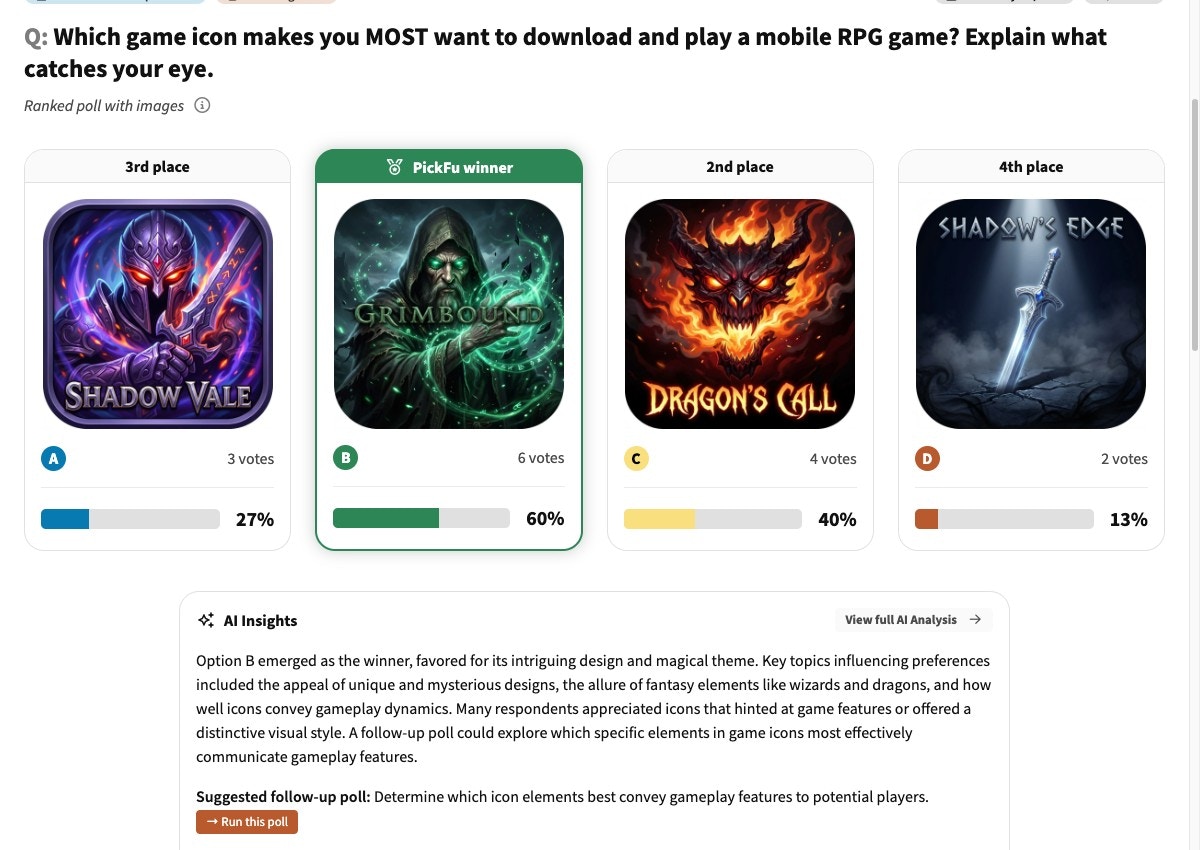
### 1. Compare icon designs
| Setting | Value |
| ----------- | ----------------------------------------------------------------------------------------------------------------- |
| Poll type | Ranked choice |
| Question | "Which game icon makes you MOST want to download and play a mobile \[GENRE] game? Explain what catches your eye." |
| Options | 3–4 icon variations |
| Audience | Mobile gamers, 25–44 (report by age + gender) |
| Sample size | 100 |
**No icon variations yet?** Generate them with [generate\_image](/docs/api-reference/media/generate-media).
Create 3–4 concepts varying the hero element (character, key object, color), include at least one
character-focused concept (they tend to win in gaming), then iterate to a winner the same way the
[Amazon main image playbook](/docs/playbooks/amazon-main-image) does — combine the strongest elements of
the top two and re-run until one icon clears 35%+ first-place votes.
[See an example icon poll →](https://app.pickfu.com/results/6hB9CXT7oi)
 ### 2. Test your gameplay trailer
| Setting | Value |
| ----------- | ------------------------------------------------------------------------------------------------------------------ |
| Poll type | Open-ended |
| Question | "Watch this gameplay trailer for a mobile \[GENRE] game. Would you download it? What excites you or puts you off?" |
| Options | Your gameplay trailer / video preview |
| Audience | Mobile gamers, 25–44 |
| Sample size | 50 |
[See an example trailer poll →](https://app.pickfu.com/results/kjxZqzFPuQ)
### 3. Rank your screenshots
| Setting | Value |
| ----------- | ------------------------------------------------------------------------------------------------------------------------------------------ |
| Poll type | Ranked choice |
| Question | "Which image would make you MOST likely to download and play a mobile \[GENRE] game? Tell us what about the image makes you want to play." |
| Options | 4–8 screenshot options |
| Audience | Mobile gamers, 25–44 |
| Sample size | 100 |
[See an example screenshot poll →](https://app.pickfu.com/results/HYntPUFcdD)
### 4. Test your app description
| Setting | Value |
| ----------- | ------------------------------------------------------------------------------------------------------------------------------------ |
| Poll type | Ranked (3+ versions) or Head-to-head (exactly 2 versions) |
| Question | "Which app description would make you MOST likely to download this mobile \[GENRE] game? What about the description appeals to you?" |
| Options | Your description versions, as text options |
| Audience | Mobile gamers, 25–44 |
| Sample size | 50–100 |
Ranked polls require 3–8 options. If you're comparing only **two** description versions, use a
**head-to-head** poll instead — a 2-option ranked poll will be rejected.
[See an example description poll →](https://app.pickfu.com/results/6owu682mlQ)
### 5. Validate the full listing
| Setting | Value |
| ----------- | ------------------------------------------------------------------------------------------------------------------------- |
| Poll type | Multi-question survey |
| Q1 | Star rating: "Based on this app store listing, how likely are you (1–5) to download this game?" |
| Q2 | Open-ended: "What's the most appealing thing about this game based on the listing?" |
| Q3 | Open-ended: "Is there anything confusing or that would stop you from downloading?" |
| Q4 | Multi-select: "What type of game does this look like?" (Strategy, Action, Puzzle, Casino, Sports, RPG, Simulation, Other) |
| Context | Upload a screenshot of the full app store listing as the Q1 context image |
| Audience | Mobile gamers, 25–44 |
| Sample size | 100 |
**Success criteria:** a clear winning icon (35%+ first-place votes), screenshots ranked by download
intent, a validated description, and a full listing averaging **3.5+ stars** on Q1 — with Q4
confirming players correctly read the genre.
[See an example full-listing validation →](https://app.pickfu.com/results/I6TyrP3l4Z)
## Recommended targeting by genre
These are the demographics most likely to play each genre. You know your audience best — adjust as
needed, and use [list\_available\_targeting](/docs/integrations/mcp-server) for the exact trait codes.
| Genre | Targeting | Why |
| --------------- | ----------------------------------- | ----------------------- |
| Strategy | mobile gamers, 25–34, 35–44, male | Strategy core demo |
| Casino / Slots | mobile gamers, 35–44, 45–54, 55–64 | Casino skews older |
| Sports | mobile gamers, 18–24, 25–34, male | Sports skews young male |
| Casual / Puzzle | mobile gamers, 25–34, 35–44, female | Casual skews female |
| RPG / Fantasy | mobile gamers, 18–24, 25–34 | RPG skews younger |
## Pro tips
* **Character-focused icons beat logos.** Across hundreds of gaming icon tests, icons with a
character face or figure out-perform abstract logos and text-only icons. Always include a
character concept.
* **Test icons at display size.** Upload icons at roughly 60×60px — the size they appear on the
store shelf. Performance at small size is what matters, not full-resolution polish.
* **Lead with your strongest screenshot.** Position 1 gets 3–5× more views than position 4+, so your
\#1-ranked screenshot should occupy the first slot.
* **Vibrant colors win on the shelf.** Saturated treatments consistently out-perform muted or dark
ones in icon testing.
* **Re-test after major updates.** Re-run the screenshot and full-listing steps after any major
update or seasonal re-skin so the listing reflects the current game.
## Troubleshooting
Ranked polls need 3–8 options. If you only have two description versions, switch the poll type
to **head-to-head** (exactly 2 options). Add a third version to keep it ranked.
If the multi-select genre answers scatter or point to the wrong category, your icon + screenshots
are sending mixed signals. Revisit steps 1 and 3 — the winning assets should make the genre
unmistakable at a glance.
Target the demographic that matches your game. A hardcore strategy game tested on casual players
gives misleading results. Use [list\_available\_targeting](/docs/integrations/mcp-server) to find the
right mobile-gamer and age filters, and report by age + gender to spot segment differences.
## Related
* [ASO advanced tests & FAQs (help center)](https://help.pickfu.com/en/articles/13838002-app-store-optimization-aso-for-mobile-games-getting-started-advanced-tests-faqs) — video preview, Custom Product Page, featured-graphic tests, and common questions
* [Game concept validation](/docs/playbooks/game-concept-validation) — validate the concept before building the listing
* [Best practices for survey design](/docs/guides/best-practices)
* [MCP server reference](/docs/integrations/mcp-server)
* [PickFu CLI](/docs/integrations/cli)
### 2. Test your gameplay trailer
| Setting | Value |
| ----------- | ------------------------------------------------------------------------------------------------------------------ |
| Poll type | Open-ended |
| Question | "Watch this gameplay trailer for a mobile \[GENRE] game. Would you download it? What excites you or puts you off?" |
| Options | Your gameplay trailer / video preview |
| Audience | Mobile gamers, 25–44 |
| Sample size | 50 |
[See an example trailer poll →](https://app.pickfu.com/results/kjxZqzFPuQ)
### 3. Rank your screenshots
| Setting | Value |
| ----------- | ------------------------------------------------------------------------------------------------------------------------------------------ |
| Poll type | Ranked choice |
| Question | "Which image would make you MOST likely to download and play a mobile \[GENRE] game? Tell us what about the image makes you want to play." |
| Options | 4–8 screenshot options |
| Audience | Mobile gamers, 25–44 |
| Sample size | 100 |
[See an example screenshot poll →](https://app.pickfu.com/results/HYntPUFcdD)
### 4. Test your app description
| Setting | Value |
| ----------- | ------------------------------------------------------------------------------------------------------------------------------------ |
| Poll type | Ranked (3+ versions) or Head-to-head (exactly 2 versions) |
| Question | "Which app description would make you MOST likely to download this mobile \[GENRE] game? What about the description appeals to you?" |
| Options | Your description versions, as text options |
| Audience | Mobile gamers, 25–44 |
| Sample size | 50–100 |
Ranked polls require 3–8 options. If you're comparing only **two** description versions, use a
**head-to-head** poll instead — a 2-option ranked poll will be rejected.
[See an example description poll →](https://app.pickfu.com/results/6owu682mlQ)
### 5. Validate the full listing
| Setting | Value |
| ----------- | ------------------------------------------------------------------------------------------------------------------------- |
| Poll type | Multi-question survey |
| Q1 | Star rating: "Based on this app store listing, how likely are you (1–5) to download this game?" |
| Q2 | Open-ended: "What's the most appealing thing about this game based on the listing?" |
| Q3 | Open-ended: "Is there anything confusing or that would stop you from downloading?" |
| Q4 | Multi-select: "What type of game does this look like?" (Strategy, Action, Puzzle, Casino, Sports, RPG, Simulation, Other) |
| Context | Upload a screenshot of the full app store listing as the Q1 context image |
| Audience | Mobile gamers, 25–44 |
| Sample size | 100 |
**Success criteria:** a clear winning icon (35%+ first-place votes), screenshots ranked by download
intent, a validated description, and a full listing averaging **3.5+ stars** on Q1 — with Q4
confirming players correctly read the genre.
[See an example full-listing validation →](https://app.pickfu.com/results/I6TyrP3l4Z)
## Recommended targeting by genre
These are the demographics most likely to play each genre. You know your audience best — adjust as
needed, and use [list\_available\_targeting](/docs/integrations/mcp-server) for the exact trait codes.
| Genre | Targeting | Why |
| --------------- | ----------------------------------- | ----------------------- |
| Strategy | mobile gamers, 25–34, 35–44, male | Strategy core demo |
| Casino / Slots | mobile gamers, 35–44, 45–54, 55–64 | Casino skews older |
| Sports | mobile gamers, 18–24, 25–34, male | Sports skews young male |
| Casual / Puzzle | mobile gamers, 25–34, 35–44, female | Casual skews female |
| RPG / Fantasy | mobile gamers, 18–24, 25–34 | RPG skews younger |
## Pro tips
* **Character-focused icons beat logos.** Across hundreds of gaming icon tests, icons with a
character face or figure out-perform abstract logos and text-only icons. Always include a
character concept.
* **Test icons at display size.** Upload icons at roughly 60×60px — the size they appear on the
store shelf. Performance at small size is what matters, not full-resolution polish.
* **Lead with your strongest screenshot.** Position 1 gets 3–5× more views than position 4+, so your
\#1-ranked screenshot should occupy the first slot.
* **Vibrant colors win on the shelf.** Saturated treatments consistently out-perform muted or dark
ones in icon testing.
* **Re-test after major updates.** Re-run the screenshot and full-listing steps after any major
update or seasonal re-skin so the listing reflects the current game.
## Troubleshooting
Ranked polls need 3–8 options. If you only have two description versions, switch the poll type
to **head-to-head** (exactly 2 options). Add a third version to keep it ranked.
If the multi-select genre answers scatter or point to the wrong category, your icon + screenshots
are sending mixed signals. Revisit steps 1 and 3 — the winning assets should make the genre
unmistakable at a glance.
Target the demographic that matches your game. A hardcore strategy game tested on casual players
gives misleading results. Use [list\_available\_targeting](/docs/integrations/mcp-server) to find the
right mobile-gamer and age filters, and report by age + gender to spot segment differences.
## Related
* [ASO advanced tests & FAQs (help center)](https://help.pickfu.com/en/articles/13838002-app-store-optimization-aso-for-mobile-games-getting-started-advanced-tests-faqs) — video preview, Custom Product Page, featured-graphic tests, and common questions
* [Game concept validation](/docs/playbooks/game-concept-validation) — validate the concept before building the listing
* [Best practices for survey design](/docs/guides/best-practices)
* [MCP server reference](/docs/integrations/mcp-server)
* [PickFu CLI](/docs/integrations/cli)