> ## Documentation Index
> Fetch the complete documentation index at: https://www.pickfu.com/docs/llms.txt
> Use this file to discover all available pages before exploring further.
# Packaging design optimization
> Test packaging first impressions, see what catches the eye, benchmark against competitor products, and iterate your design until it stands out on the shelf.
Packaging has seconds to communicate what a product is and why it's worth buying — on a crowded
shelf or a search-results grid. This playbook measures first impressions, identifies which design
elements actually land, benchmarks against competitors, and iterates the design to a validated
winner.
The loop is designed to be run autonomously by an AI agent (Claude, ChatGPT, Cursor, or any client
with PickFu MCP / CLI / API access) with minimal human intervention.
## When to use this playbook
| Use it when | Skip it when |
| ----------------------------------------------------- | -------------------------------------------------- |
| You're designing or refreshing product packaging | The packaging is locked and can't change |
| You can produce 2+ design variations | You only have one design and no ability to iterate |
| You have 2–3 competitor packages to benchmark against | You need pricing or concept feedback, not design |
## The optimization loop
A 5-second test reveals what the packaging communicates at a glance — what the product is and
which features stand out before deliberate study.
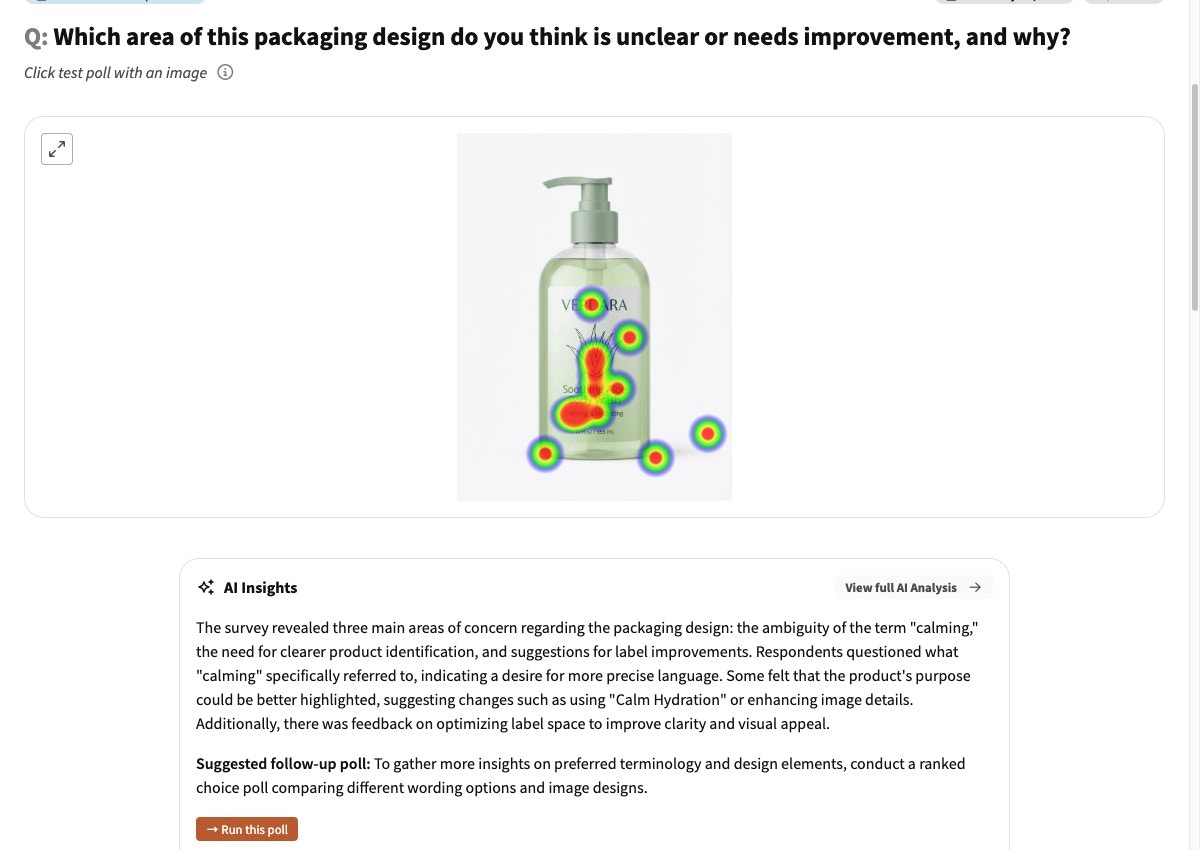
A click test (heatmap) shows which areas of the design draw attention, and the written feedback
explains why.
Test your current design vs. 2–3 competitor packages. Save this competitor set — you reuse it in
the final validation.
Generate or upload improved variations and run head-to-head polls until a design wins with a
score of 70 or higher.
Run a final poll with the winning design plus the SAME competitor packages from step 3 to
confirm the improvement holds against the category.
**Sample size and cost.** Defaults to small, cheap polls — **50 respondents** for the impression,
click, benchmark, and validation tests, **15 respondents** per iteration. The loop triangulates
across polls, so a single noisy result self-corrects. Scale the **final validation to 100–200**
before committing to an expensive print run. See
[sample size guidance](/docs/guides/best-practices#consider-sample-size).
## Run this playbook with an AI agent
Paste this prompt into Claude, ChatGPT, Cursor, or any AI agent connected to the
[PickFu MCP server](/docs/integrations/mcp-server), [CLI](/docs/integrations/cli),
or [REST API](/docs/api-reference/introduction). The agent will run the entire loop on your behalf —
creating polls, reading responses, and iterating until a winning variation emerges.
```text wrap theme={null}
You are running the PickFu "Packaging design optimization" playbook end-to-end.
Goal: refine a product's packaging design so it communicates clearly, draws the
eye, and out-converts competitors on the shelf.
Before starting, ask the user for:
- The product and what it is (e.g. "organic dog treats, 12oz bag")
- Their current packaging design image
- 2-3 competitor packaging images (the canonical competitor set — fixed across
steps 3 and 5)
- Target audience (default: General; refine only if the user requests it)
Run this loop:
1. FIRST IMPRESSIONS (50 respondents, five_second_test).
Show the packaging for 5 seconds. Question: "Based on what you just saw, what
do you think this product is? Which features or benefits stood out to you?"
Read responses to learn what the design communicates (and what it misses).
2. WHAT CATCHES THE EYE (50 respondents, click_test).
Question: "Which areas of this product packaging stand out to you most, and
why?" The heatmap + comments show which elements draw attention.
3. BENCHMARK (50 respondents, ranked).
Compare the current design vs. competitor packages. Question: "Based on the
packaging, which product would you buy? Why?" Record the baseline ranking.
4. ITERATE (15 respondents per poll, head_to_head).
Using insights from steps 1-2, generate or commission 2-3 design variations
that fix what didn't land and amplify what did. Test each variation vs. the
original with head_to_head (exactly 2 options). Question: "Which packaging
design do you prefer and why?" Repeat until a variation wins with a 70+ score.
Stop condition: if 5+ iterations don't yield a 70+ winner, halt and report —
the issue may be brand recognition or product category, not the design.
5. RE-VALIDATE (50 respondents, ranked).
Compare the winning design against the SAME competitor packages from step 3.
Same question as step 3. A higher ranking/score than the baseline confirms
the design improvement holds against the category.
Final report must include:
- What the design communicated in 5 seconds (step 1) vs. intended message
- The high- and low-attention areas from the heatmap (step 2)
- Baseline ranking/score vs final ranking/score
- The specific design changes that drove the improvement
- The winning design URL
Tools to use:
- save_survey + publish_survey — create and launch each poll
- get_survey_responses — read responses
- extract_images — view/describe the heatmap and designs
- generate_image — create design variations (step 4)
- upload_media — for designs created outside PickFu
```
Want to run this manually? The same flow is available as a one-click template in the PickFu app
([Start the packaging playbook](https://app.pickfu.com/playbooks/refine-packaging-design)) with
pre-filled poll URLs.
## Step-by-step (human operator view)
### 1. Test first impressions
| Setting | Value |
| ----------- | ------------------------------------------------------------------------------------------------------------- |
| Poll type | 5-second test |
| Question | "Based on what you just saw, what do you think this product is? Which features or benefits stood out to you?" |
| Options | Your packaging design image |
| Audience | General |
| Sample size | 50 |
**What you'll get:** whether the packaging communicates the product and its key benefit in the
first few seconds — the single most important test of shelf legibility.
[Launch the 5-second test →](https://app.pickfu.com/ask/survey?q1-type=five_second_test\&q1-prompt=Based+on+what+you+just+saw%2C+what+do+you+think+this+product+is%3F+Which+features+or+benefits+stood+out+to+you%3F\&sample_size=50) · [See an example →](https://app.pickfu.com/results/CcBJMJztOm)
### 2. See what catches the eye
| Setting | Value |
| ----------- | ----------------------------------------------------------------------- |
| Poll type | Click test |
| Question | "Which areas of this product packaging stand out to you most, and why?" |
| Options | Your packaging design image |
| Audience | General |
| Sample size | 50 |
**What you'll get:** a heatmap of attention plus written reasons. Use it to confirm your hero
element (logo, product window, key claim) is actually where eyes go.
[Launch the click test →](https://app.pickfu.com/ask/survey?q1-type=click_test\&q1-prompt=Which+areas+of+this+product+packaging+stand+out+to+you+most%2C+and+why%3F\&sample_size=50) · [See an example →](https://app.pickfu.com/results/a5HmbHiTZb)
 ### 3. Benchmark against competitors
| Setting | Value |
| ----------- | ----------------------------------------------------------- |
| Poll type | Ranked choice |
| Question | "Based on the packaging, which product would you buy? Why?" |
| Options | Your packaging + 2–3 competitor images |
| Audience | General |
| Sample size | 50 |
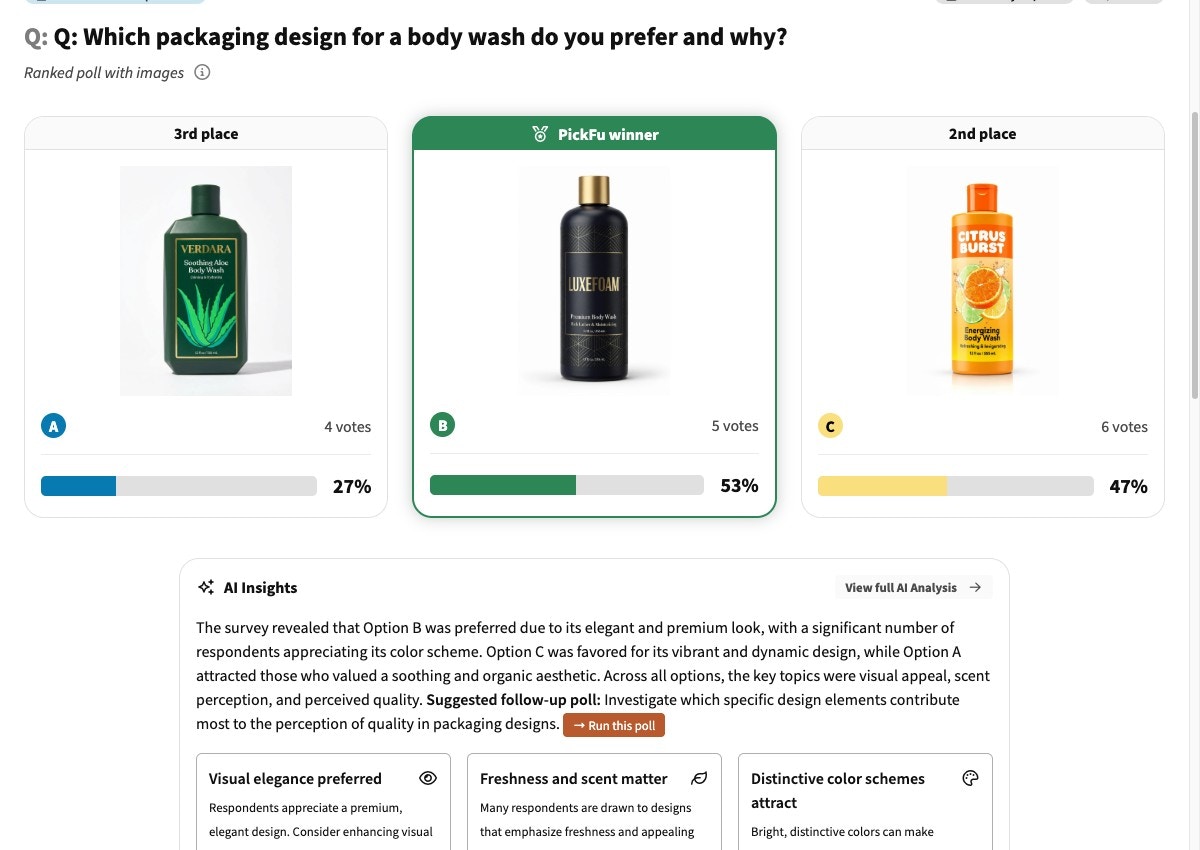
**What you'll get:** a baseline ranking against the competitive set. Save these competitor images —
you reuse them in step 5.
[Launch the benchmark poll →](https://app.pickfu.com/ask/survey?q1-type=ranked\&q1-prompt=Based+on+the+packaging%2C+which+product+would+you+buy%3F+Why%3F\&sample_size=50) · [See an example →](https://app.pickfu.com/results/LmdjZOF4Z4)
### 3. Benchmark against competitors
| Setting | Value |
| ----------- | ----------------------------------------------------------- |
| Poll type | Ranked choice |
| Question | "Based on the packaging, which product would you buy? Why?" |
| Options | Your packaging + 2–3 competitor images |
| Audience | General |
| Sample size | 50 |
**What you'll get:** a baseline ranking against the competitive set. Save these competitor images —
you reuse them in step 5.
[Launch the benchmark poll →](https://app.pickfu.com/ask/survey?q1-type=ranked\&q1-prompt=Based+on+the+packaging%2C+which+product+would+you+buy%3F+Why%3F\&sample_size=50) · [See an example →](https://app.pickfu.com/results/LmdjZOF4Z4)
 ### 4. Iterate your design
| Setting | Value |
| ----------- | ----------------------------------------------- |
| Poll type | Head-to-head (exactly 2 options) |
| Question | "Which packaging design do you prefer and why?" |
| Options | Variation + original design |
| Audience | General |
| Sample size | 15 |
Test one major change per iteration. If you change the color scheme *and* the logo placement in
the same variation, a win won't tell you which one worked.
[See an example iteration →](https://app.pickfu.com/results/6PCC7ZX0Vl)
### 5. Re-validate against the original competitor set
| Setting | Value |
| ----------- | ----------------------------------------------------------- |
| Poll type | Ranked choice |
| Question | "Based on the packaging, which product would you buy? Why?" |
| Options | Winning design + the same 2–3 competitor images from step 3 |
| Audience | General |
| Sample size | 50 (bump to 100–200 before an expensive print run) |
**Interpret the result:** a higher ranking/score than your step-3 baseline confirms the new design
out-performs against the real competitive set, not just against your old design.
[See an example validation →](https://app.pickfu.com/results/lWptYu0tpu)
## Troubleshooting
This is the most valuable failure to catch early. Before iterating on aesthetics, fix
legibility: larger product name, a clearer product window or photo, or an explicit category
descriptor. A beautiful package that doesn't communicate the product loses on the shelf.
If eyes land on a decorative element instead of your key claim or brand, increase the visual
weight of what matters (size, contrast, position) and de-emphasize the distraction. Re-run the
click test to confirm the shift.
You improved on your old design but didn't beat the category. Look at what the winning competitor
does that you don't — often a clearer benefit claim or stronger color contrast — and address that
specifically.
## Related
* [More ways to test your packaging (advanced tests & FAQs)](https://help.pickfu.com/en/articles/13834564-testing-your-packaging-design-with-pickfu-getting-started-advanced-tests-faqs) — label design, premium perception, gift appeal, sustainability trade-offs, and more
* [Amazon main image playbook](/docs/playbooks/amazon-main-image) — for digital-shelf thumbnails
* [Best practices for survey design](/docs/guides/best-practices)
* [MCP server reference](/docs/integrations/mcp-server)
* [PickFu CLI](/docs/integrations/cli)
### 4. Iterate your design
| Setting | Value |
| ----------- | ----------------------------------------------- |
| Poll type | Head-to-head (exactly 2 options) |
| Question | "Which packaging design do you prefer and why?" |
| Options | Variation + original design |
| Audience | General |
| Sample size | 15 |
Test one major change per iteration. If you change the color scheme *and* the logo placement in
the same variation, a win won't tell you which one worked.
[See an example iteration →](https://app.pickfu.com/results/6PCC7ZX0Vl)
### 5. Re-validate against the original competitor set
| Setting | Value |
| ----------- | ----------------------------------------------------------- |
| Poll type | Ranked choice |
| Question | "Based on the packaging, which product would you buy? Why?" |
| Options | Winning design + the same 2–3 competitor images from step 3 |
| Audience | General |
| Sample size | 50 (bump to 100–200 before an expensive print run) |
**Interpret the result:** a higher ranking/score than your step-3 baseline confirms the new design
out-performs against the real competitive set, not just against your old design.
[See an example validation →](https://app.pickfu.com/results/lWptYu0tpu)
## Troubleshooting
This is the most valuable failure to catch early. Before iterating on aesthetics, fix
legibility: larger product name, a clearer product window or photo, or an explicit category
descriptor. A beautiful package that doesn't communicate the product loses on the shelf.
If eyes land on a decorative element instead of your key claim or brand, increase the visual
weight of what matters (size, contrast, position) and de-emphasize the distraction. Re-run the
click test to confirm the shift.
You improved on your old design but didn't beat the category. Look at what the winning competitor
does that you don't — often a clearer benefit claim or stronger color contrast — and address that
specifically.
## Related
* [More ways to test your packaging (advanced tests & FAQs)](https://help.pickfu.com/en/articles/13834564-testing-your-packaging-design-with-pickfu-getting-started-advanced-tests-faqs) — label design, premium perception, gift appeal, sustainability trade-offs, and more
* [Amazon main image playbook](/docs/playbooks/amazon-main-image) — for digital-shelf thumbnails
* [Best practices for survey design](/docs/guides/best-practices)
* [MCP server reference](/docs/integrations/mcp-server)
* [PickFu CLI](/docs/integrations/cli)