> ## Documentation Index
> Fetch the complete documentation index at: https://www.pickfu.com/docs/llms.txt
> Use this file to discover all available pages before exploring further.
# Amazon SERP test
> Test how your Amazon product card stacks up in real search results, then optimize titles, images, and price to win clicks and conversions.
Maximize conversions by improving your search position and understanding consumer trends.
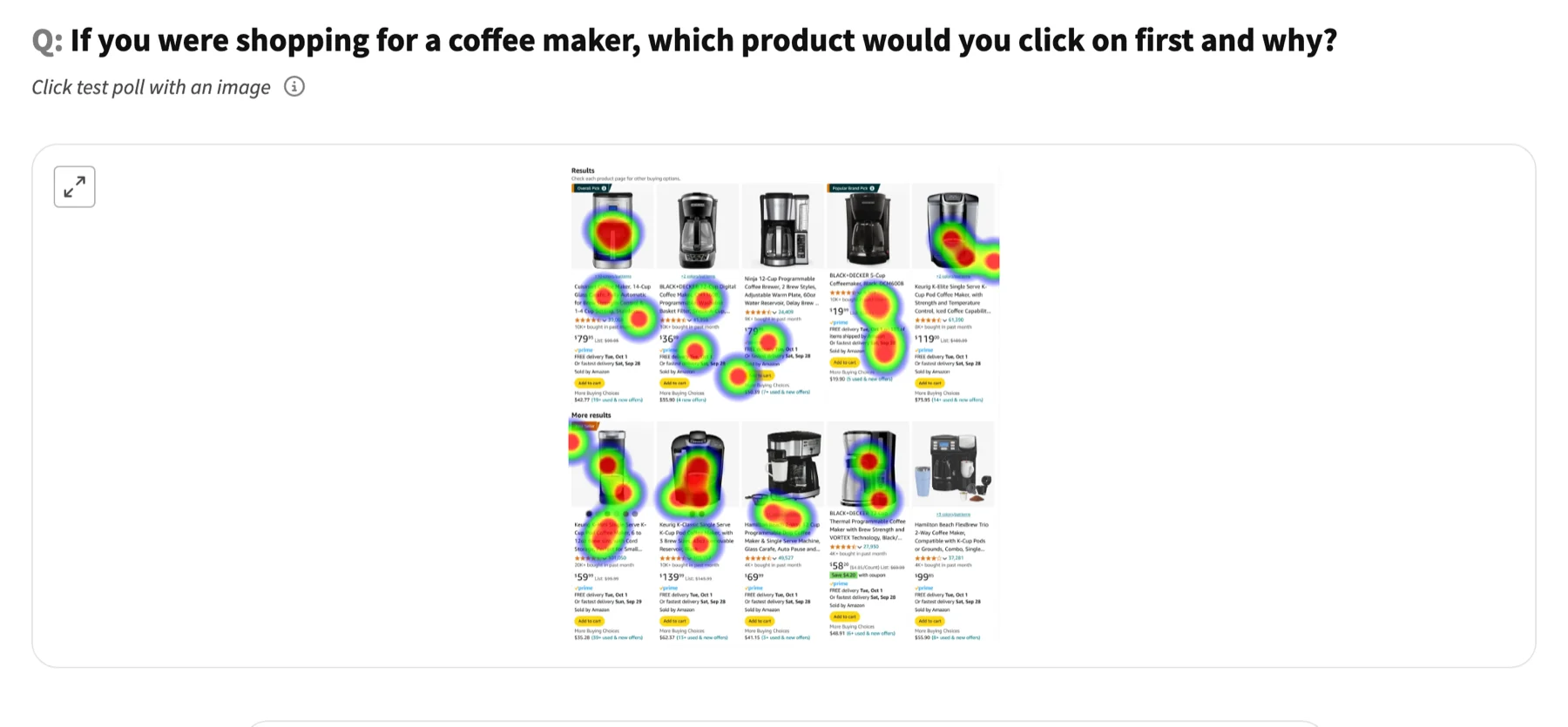 [See the full interactive result →](https://www.pickfu.com/results/PXGmPv5Y5L)
## When to use
Built for Amazon sellers. Reach for it when your options are ready and you want a fast, real-audience read before you commit.
## The test at a glance
| Setting | Value |
| --------- | -------------------------------------------------------------------------------------------------------- |
| Poll type | Click test |
| Question | "If you were shopping for a \[product type], which product would you click on first and why?" |
| Options | 1 screenshot |
| Audience | 30 Amazon Prime subscribers |
| Reporting | Gender identity, Age range, Recently purchased categories, Hobbies and interests, Household income range |
## Run it
[Use this template →](https://app.pickfu.com/ask/template/amazon-serp-test?regular=true)
```text theme={null}
Create a PickFu click test poll titled "Amazon SERP test".
Question: "If you were shopping for a [product type], which product would you click on first and why?"
Setup: Click Test. Respondents will look at your search results screenshot, click on the product they are most interested in, and leave a comment explaining their choice.
Audience: 30 respondents, targeting Amazon Prime member - Yes, Custom trait; report by Gender identity, Age range, Recently purchased categories.
Publish it, then summarize the result when responses arrive.
Tools: save_survey, publish_survey, get_survey_responses.
```
```bash theme={null}
# Create + publish with the PickFu CLI — see /integrations/cli
pickfu survey create --type click_test --question "If you were shopping for a [product type], which product would you click on first and why?" --sample-size 30
```
```bash theme={null}
# POST /v1/surveys — see /api-reference/surveys
curl -X POST https://api.pickfu.com/v1/surveys \
-H "Authorization: Bearer $PICKFU_API_KEY" -H "Content-Type: application/json" \
-d '{"questions":[{"type":"click_test","prompt":"If you were shopping for a [product type], which product would you click on first and why?"}],"sampleSize":30}'
```
```
https://app.pickfu.com/ask/survey?q1-type=click_test&q1-prompt=If+you+were+shopping+for+a+%5Bproduct+type%5D%2C+which+product+would+you+click+on+first+and+why%3F&sample_size=30
```
## Customize
* **Audience** — swap or add [targeting traits](/docs/guides/url-parameters#targeting-and-settings) (e.g. `amznpr` for Amazon Prime shoppers).
* **Sample size** — `15` for a fast read, `30` (default), `100`+ for higher confidence.
* **Country** — add `country=US` (or CA, GB, DE, …) to target a locale.
* **Fill-ins** — replace the `[bracketed]` placeholders in the question with your own values per run.
[See the full interactive result →](https://www.pickfu.com/results/PXGmPv5Y5L)
## When to use
Built for Amazon sellers. Reach for it when your options are ready and you want a fast, real-audience read before you commit.
## The test at a glance
| Setting | Value |
| --------- | -------------------------------------------------------------------------------------------------------- |
| Poll type | Click test |
| Question | "If you were shopping for a \[product type], which product would you click on first and why?" |
| Options | 1 screenshot |
| Audience | 30 Amazon Prime subscribers |
| Reporting | Gender identity, Age range, Recently purchased categories, Hobbies and interests, Household income range |
## Run it
[Use this template →](https://app.pickfu.com/ask/template/amazon-serp-test?regular=true)
```text theme={null}
Create a PickFu click test poll titled "Amazon SERP test".
Question: "If you were shopping for a [product type], which product would you click on first and why?"
Setup: Click Test. Respondents will look at your search results screenshot, click on the product they are most interested in, and leave a comment explaining their choice.
Audience: 30 respondents, targeting Amazon Prime member - Yes, Custom trait; report by Gender identity, Age range, Recently purchased categories.
Publish it, then summarize the result when responses arrive.
Tools: save_survey, publish_survey, get_survey_responses.
```
```bash theme={null}
# Create + publish with the PickFu CLI — see /integrations/cli
pickfu survey create --type click_test --question "If you were shopping for a [product type], which product would you click on first and why?" --sample-size 30
```
```bash theme={null}
# POST /v1/surveys — see /api-reference/surveys
curl -X POST https://api.pickfu.com/v1/surveys \
-H "Authorization: Bearer $PICKFU_API_KEY" -H "Content-Type: application/json" \
-d '{"questions":[{"type":"click_test","prompt":"If you were shopping for a [product type], which product would you click on first and why?"}],"sampleSize":30}'
```
```
https://app.pickfu.com/ask/survey?q1-type=click_test&q1-prompt=If+you+were+shopping+for+a+%5Bproduct+type%5D%2C+which+product+would+you+click+on+first+and+why%3F&sample_size=30
```
## Customize
* **Audience** — swap or add [targeting traits](/docs/guides/url-parameters#targeting-and-settings) (e.g. `amznpr` for Amazon Prime shoppers).
* **Sample size** — `15` for a fast read, `30` (default), `100`+ for higher confidence.
* **Country** — add `country=US` (or CA, GB, DE, …) to target a locale.
* **Fill-ins** — replace the `[bracketed]` placeholders in the question with your own values per run.