> ## Documentation Index
> Fetch the complete documentation index at: https://www.pickfu.com/docs/llms.txt
> Use this file to discover all available pages before exploring further.
# Rapid App Store icon test
> Use PickFu Rapid to test App Store icon variants for your mobile game and pick the design that drives the most taps from real iOS players.
Pick the best App Store icon for your game with rapid feedback.
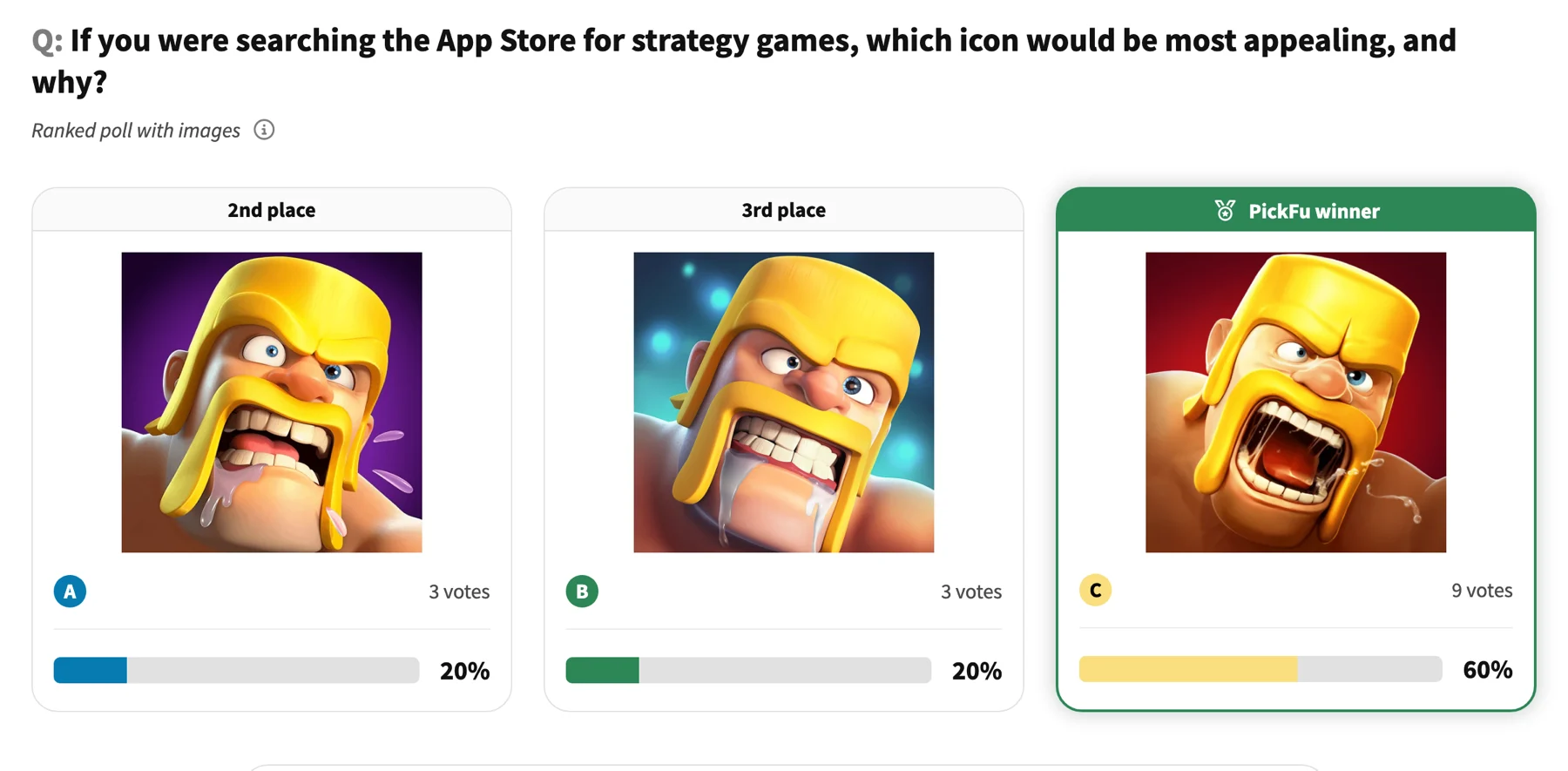 [See the full interactive result →](https://www.pickfu.com/results/FwBHomHfa5)
## When to use
Built for game developers. Reach for it when your options are ready and you want a fast, real-audience read before you commit.
## The test at a glance
| Setting | Value |
| --------- | -------------------------------------------------------------------------------------------------------------------------------------------------------------------------------------------- |
| Poll type | Ranked |
| Question | "If you were searching the App Store for \[game genre] games, which icon would be most appealing, and why?" |
| Options | 2-4 image |
| Audience | 15 mobile gamers |
| Reporting | Gender identity, Age range, Mobile gaming frequency, Favorite mobile game genres, App store spending habits, Mobile device, Tablet device, Gaming consoles played, Hours spent mobile gaming |
## Run it
[Use this template →](https://app.pickfu.com/ask/template/rapid-app-store-icon-test?regular=true)
```text theme={null}
Create a PickFu ranked poll titled "Rapid App Store icon test".
Question: "If you were searching the App Store for [game genre] games, which icon would be most appealing, and why?"
Setup: Ranked poll. Respondents will see all icons in a random order, rank them in order of preference, and tell you why they made that choice.
Audience: 15 respondents, targeting Mobile gamers - Yes, Custom trait; report by Gender identity, Age range, Mobile gaming frequency.
Publish it, then summarize the result when responses arrive.
Tools: save_survey, publish_survey, get_survey_responses.
```
```bash theme={null}
# Create + publish with the PickFu CLI — see /integrations/cli
pickfu survey create --type ranked --question "If you were searching the App Store for [game genre] games, which icon would be most appealing, and why?" --sample-size 15
```
```bash theme={null}
# POST /v1/surveys — see /api-reference/surveys
curl -X POST https://api.pickfu.com/v1/surveys \
-H "Authorization: Bearer $PICKFU_API_KEY" -H "Content-Type: application/json" \
-d '{"questions":[{"type":"ranked","prompt":"If you were searching the App Store for [game genre] games, which icon would be most appealing, and why?"}],"sampleSize":15}'
```
```
https://app.pickfu.com/ask/survey?q1-type=ranked&q1-prompt=If+you+were+searching+the+App+Store+for+%5Bgame+genre%5D+games%2C+which+icon+would+be+most+appealing%2C+and+why%3F&sample_size=15
```
## Customize
* **Audience** — swap or add [targeting traits](/docs/guides/url-parameters#targeting-and-settings) (e.g. `amznpr` for Amazon Prime shoppers).
* **Sample size** — `15` for a fast read, `15` (default), `100`+ for higher confidence.
* **Country** — add `country=US` (or CA, GB, DE, …) to target a locale.
* **Fill-ins** — replace the `[bracketed]` placeholders in the question with your own values per run.
[See the full interactive result →](https://www.pickfu.com/results/FwBHomHfa5)
## When to use
Built for game developers. Reach for it when your options are ready and you want a fast, real-audience read before you commit.
## The test at a glance
| Setting | Value |
| --------- | -------------------------------------------------------------------------------------------------------------------------------------------------------------------------------------------- |
| Poll type | Ranked |
| Question | "If you were searching the App Store for \[game genre] games, which icon would be most appealing, and why?" |
| Options | 2-4 image |
| Audience | 15 mobile gamers |
| Reporting | Gender identity, Age range, Mobile gaming frequency, Favorite mobile game genres, App store spending habits, Mobile device, Tablet device, Gaming consoles played, Hours spent mobile gaming |
## Run it
[Use this template →](https://app.pickfu.com/ask/template/rapid-app-store-icon-test?regular=true)
```text theme={null}
Create a PickFu ranked poll titled "Rapid App Store icon test".
Question: "If you were searching the App Store for [game genre] games, which icon would be most appealing, and why?"
Setup: Ranked poll. Respondents will see all icons in a random order, rank them in order of preference, and tell you why they made that choice.
Audience: 15 respondents, targeting Mobile gamers - Yes, Custom trait; report by Gender identity, Age range, Mobile gaming frequency.
Publish it, then summarize the result when responses arrive.
Tools: save_survey, publish_survey, get_survey_responses.
```
```bash theme={null}
# Create + publish with the PickFu CLI — see /integrations/cli
pickfu survey create --type ranked --question "If you were searching the App Store for [game genre] games, which icon would be most appealing, and why?" --sample-size 15
```
```bash theme={null}
# POST /v1/surveys — see /api-reference/surveys
curl -X POST https://api.pickfu.com/v1/surveys \
-H "Authorization: Bearer $PICKFU_API_KEY" -H "Content-Type: application/json" \
-d '{"questions":[{"type":"ranked","prompt":"If you were searching the App Store for [game genre] games, which icon would be most appealing, and why?"}],"sampleSize":15}'
```
```
https://app.pickfu.com/ask/survey?q1-type=ranked&q1-prompt=If+you+were+searching+the+App+Store+for+%5Bgame+genre%5D+games%2C+which+icon+would+be+most+appealing%2C+and+why%3F&sample_size=15
```
## Customize
* **Audience** — swap or add [targeting traits](/docs/guides/url-parameters#targeting-and-settings) (e.g. `amznpr` for Amazon Prime shoppers).
* **Sample size** — `15` for a fast read, `15` (default), `100`+ for higher confidence.
* **Country** — add `country=US` (or CA, GB, DE, …) to target a locale.
* **Fill-ins** — replace the `[bracketed]` placeholders in the question with your own values per run.