Documentation Index

Fetch the complete documentation index at: https://www.pickfu.com/docs/llms.txt

Use this file to discover all available pages before exploring further.

Click-through gets shoppers onto your listing; conversion gets them to buy. This playbook diagnoses the specific reasons shoppers hesitate, then tests improved image stacks and copy against the live competitor set until the listing converts. Where the Amazon main image playbook optimizes the thumbnail that wins the click, this one optimizes the detail page that wins the purchase. The loop is designed to be run autonomously by an AI agent (Claude, ChatGPT, Cursor, or any client with PickFu MCP / CLI / API access) with minimal human intervention.

When to use this playbook

Use it whenSkip it when
Shoppers reach your listing but don’t buyYour problem is getting clicks, not conversions. Use the main image playbook
You can change your image stack, copy, or A+ contentYou can’t change the listing
You have 2–3 competitor listings to benchmark againstYou’re pre-launch — validate the concept first

The optimization loop

1

Audit conversion blockers

Show shoppers your live listing and ask what stops them from buying. This surfaces the specific objections to fix.
2

Baseline your image stack against competitors

Test your current image stack vs. 2–3 competitor stacks. Save this competitor set — you reuse it in the final validation.
3

Generate improvements

Use the audit feedback to rewrite copy and generate improved images (generate_image via MCP, CLI, or API).
4

Test variants

Run head-to-head or ranked polls comparing improved copy / images against the original until a variant wins with a score of 70 or higher.
5

Re-validate against the original competitor set

Run a final poll with the improved listing plus the SAME competitor stacks from step 2. A ranking improvement vs. the baseline indicates higher CVR.
Sample size and cost. This playbook defaults to small, cheap polls — 50 respondents for the audit, baseline, and final validation, 15 respondents per iteration. The loop triangulates across many polls, so a single noisy poll gets corrected by the next. Scale up only when stakes justify it: bump the final validation to 100–200 before a costly listing overhaul. Open-ended audits (steps 1, 3) benefit from a few more responses if you want richer themes — 50–100 is a good range. See sample size guidance.

Run this playbook with an AI agent

Copy prompt for AI

Paste this prompt into Claude, ChatGPT, Cursor, or any AI agent connected to the PickFu MCP server, CLI, or REST API. The agent will run the entire loop on your behalf — creating polls, reading responses, and iterating until a winning variation emerges.
You are running the PickFu "Amazon listing conversion (CVR)" playbook end-to-end.
Goal: increase the conversion rate of an Amazon product detail page by diagnosing
purchase blockers, generating improvements, and validating them against the live
competitor set.

Before starting, ask the user for:
- The product and target search term (e.g. "stainless steel water bottle")
- Their current listing (ASIN to import, or image stack + description)
- 2-3 competitor listings/ASINs (the canonical competitor set — fixed across
  steps 2 and 5)
- Target audience (default: General; refine only if the user requests it)

Run this loop:

1. AUDIT (50 respondents, open_ended).
   Show the user's listing. Question: "Review the listing. What prevents you
   from purchasing, and what would change your mind?" Audience: General.
   Read the AI summary + written feedback. Produce a numbered list of concrete
   conversion blockers (e.g. "no size reference", "benefits not visible in
   first 2 images", "missing social proof", "unclear what's in the box").

2. BASELINE (50 respondents, ranked).
   Compare the user's image stack against the competitor stacks. Question:
   "If you were shopping on Amazon for <search term>, which product would you
   buy?" Audience: General. Record the baseline ranking and score.

3. GENERATE IMPROVEMENTS.
   Address the top blockers from step 1. For images, use generate_image to
   produce improved infographic/lifestyle images (e.g. add a size-reference
   image, a benefits callout, a what's-in-the-box image). For copy, rewrite
   the title/bullets/description to resolve the objections. Make 2-3 variants.

4. ITERATE (15 respondents per poll).
   Test each improvement against the original:
   - For 2-way image or copy comparisons, use head_to_head (exactly 2 options).
   - For 3+ variants, use ranked (3-8 options).
   Repeat until a variant wins with a score of 70 or higher.

   Stop condition: if 5+ iterations fail to produce a 70+ winner, halt and
   report. The blocker may be price, brand, or product — not the listing.

5. RE-VALIDATE (50 respondents, ranked).
   Compare the improved listing against the SAME competitor stacks from step 2.
   Same question. Compare ranking + score to the step-2 baseline.
   - Higher than baseline -> the improvement is real, ship it.
   - Unchanged -> the variant won head-to-head but didn't beat the category;
     consider larger changes (price positioning, hero image, A+ content).

Final report must include:
- Top 3-5 conversion blockers found in the audit
- Baseline ranking/score vs final ranking/score
- The specific image/copy changes that drove the improvement
- The winning asset URLs / final copy
- Note: Amazon CVR changes surface in performance metrics over days-to-weeks
  after the listing update.

Tools to use:
- save_survey + publish_survey  — create and launch each poll
- get_survey_responses          — read responses
- generate_image                — create improved images (step 3)
- upload_media                  — for assets created outside PickFu
Want to run this manually? The same flow is available as a one-click template in the PickFu app (Start the CVR playbook) with pre-filled poll URLs.

Step-by-step (human operator view)

1. Audit conversion blockers

Show shoppers your live listing and ask what stops them from buying.
SettingValue
Poll typeOpen-ended
Question”Review the listing. What prevents you from purchasing, and what would change your mind?”
AudienceGeneral
Sample size50
What you’ll get: a prioritized list of objections — missing information, unclear benefits, weak social proof, confusing images. These become your improvement targets. Launch the conversion-blockers audit → · See an example →

2. Baseline your image stack against competitors

SettingValue
Poll typeRanked choice
Question”If you were shopping on Amazon for [search term], which product would you buy?”
OptionsYour image stack + 2–3 competitor stacks (import by ASIN)
AudienceGeneral
Sample size50
What you’ll get: a baseline ranking of your listing vs. competitors. Save the competitor set — you reuse it in step 5. Launch the baseline poll → · See an example →
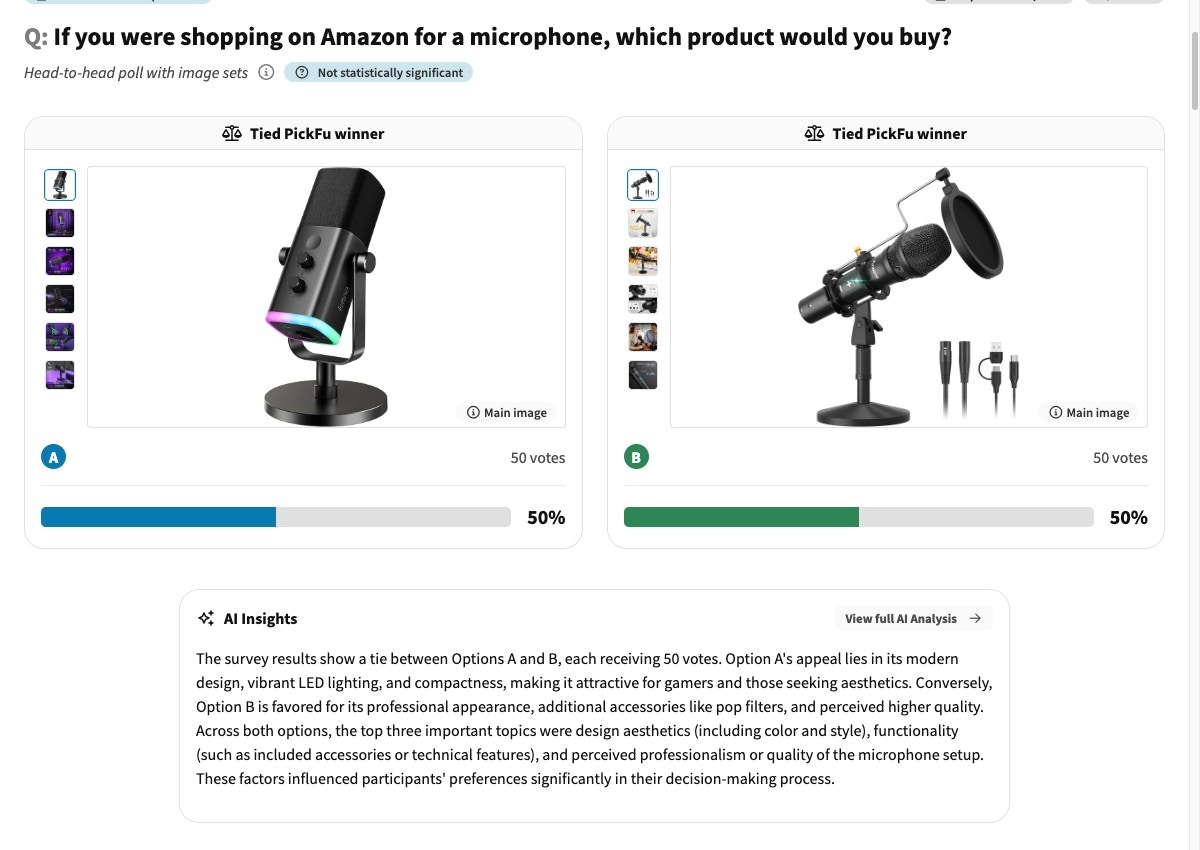
PickFu results comparing two Amazon product image stacks with vote share and AI insights

3. Generate improvements

Address the top blockers from step 1. Use PickFu’s generate_image to produce improved listing images (size reference, benefits callouts, lifestyle context), and rewrite copy to resolve the objections respondents raised.
pickfu media generate \
  --prompt "Amazon infographic image for a stainless steel water bottle: size-reference next to a hand, 24oz callout, dishwasher-safe icon, clean white background" \
  --reference-image-url https://your-cdn.com/current-stack-image.jpg

4. Test variants

SettingValue
Poll typeHead-to-head (2 options) or Ranked (3–8 options)
Question”Which version makes you more likely to buy, and why?”
OptionsImproved variant(s) + original
AudienceGeneral
Sample size15
Test one change at a time. If you swap the hero image and rewrite the bullets in the same variant and it wins, you won’t know which change drove the lift.
See an example image-feedback poll → · See an example copy test →

5. Re-validate against the original competitor set

SettingValue
Poll typeRanked choice
Question”If you were shopping on Amazon for [search term], which product would you buy?”
OptionsImproved listing + the same 2–3 competitor stacks from step 2
AudienceGeneral
Sample size50 (bump to 100–200 for a high-stakes overhaul)
Interpret the result: a higher ranking or score than your step-2 baseline indicates the improvement will lift conversion. Unchanged means you won the isolated comparison but didn’t move the category — consider price positioning or a stronger hero image.

Troubleshooting

Vague feedback usually means the listing has no glaring blocker — the gains will come from sharpening, not fixing. Pull the most specific 10–15 comments and look for faint signals (one person confused about size, another about materials). Those micro-objections compound.
You improved relative to your old listing but not relative to the category. The remaining gap is usually price, brand trust, or the hero image. Re-run the audit with the improved listing to find the next blocker.
Images. Shoppers scan the image stack before reading bullets, so image-stack problems cap conversion before copy even gets read. Fix the stack, then optimize copy.
Listing changes can affect conversion within days, but Amazon’s metrics are noisy at low order volumes. Give it 1–2 weeks of steady traffic before judging the live impact.