
What is MCP?
Model Context Protocol (MCP) is an open standard that lets AI assistants interact with external tools and services. With the PickFu MCP server, you can ask your AI assistant to create surveys, analyze results, and get consumer insights without leaving your conversation.Preview before you create a poll
You don’t build any survey logic yourself. The MCP server exposes PickFu’s poll formats, audience targeting, and pricing to your AI assistant, so creating a poll is a conversation — not something you configure or maintain. When you ask your assistant to create a poll, it can walk you through the same choices you’d make in the dashboard before anything is published:- Poll format — the assistant can list the available question types and recommend one for your goal.
- Audience targeting — it can surface the demographic targeting options (via
list_available_targeting) so you choose who sees the poll. - Estimated price — it can report the cost for your question types, sample size, and targeting so you can confirm before spending.
The preview experience depends on your AI client. MCP clients that implement MCP Apps (such as Claude and ChatGPT) render the poll format, targeting, and price as inline, interactive cards; other clients present the same information as text in the conversation. Either way, you review the poll before it’s published.
Connect to the MCP server
Claude (claude.ai, desktop, and mobile)
Claude connects to remote MCP servers through its Connectors feature — no config files needed. This works the same way across claude.ai, the Claude Desktop app, and Claude mobile.1
Open Customize
In Claude, click your profile icon (bottom-left), then Customize.
2
Go to Connectors
Select Connectors.
3
Add PickFu
Click +, then Add custom connector. Enter:
- Name:
PickFu - URL:
https://mcp.pickfu.com/mcp
4
Authorize
The first time Claude uses a PickFu tool, you’ll be prompted to sign in to your PickFu account via OAuth.
Claude Code
Run this command in your terminal:/mcp inside Claude Code to verify the connection and complete OAuth sign-in.
See Claude Code MCP documentation for more options.
Cursor
1
Open MCP settings
Open Cursor Settings and select MCP in the sidebar.
2
Add the server
Click Add new MCP server and enter:
- Name:
PickFu - Type:
Streamable HTTP - URL:
https://mcp.pickfu.com/mcp
.cursor/mcp.json in your project (or ~/.cursor/mcp.json for all projects):3
Authorize
Cursor prompts you to sign in to your PickFu account via OAuth when you first use a tool.
ChatGPT
PickFu is a published app in the ChatGPT app directory — install it and sign in. No Developer Mode or connector setup needed.1
Find PickFu
In ChatGPT, open Plugins (sidebar link or Settings → Plugins) and search for
PickFu.2
Install and connect
Click + to install, sign in to your PickFu account via OAuth, and click Allow to connect your account with ChatGPT.
3
Use it in a chat
Mention
@PickFu in a conversation or pick it from the + menu, then ask naturally — e.g. “Create a PickFu poll comparing these two headlines.” Poll previews and results render as interactive cards inline.Building or testing your own integration? You can still add
https://mcp.pickfu.com/mcp as a custom connector in Developer Mode (Settings → Apps & Connectors → Advanced settings), but the published app is the recommended path for everyday use.Grok
Two ways in: add PickFu’s ready-made Grok Bot template, or add PickFu as a custom connector yourself. Grok Bot template PickFu publishes a shareable consumer-insights bot template. Open x.ai/bot/9EFVmFgQhjYKjMHAhpCWn and add it to your xAI account, then add PickFu as an MCP server under Settings → Plugins (plugins are account-wide, not per-bot):- URL:
https://mcp.pickfu.com/mcp - Transport: Streamable HTTP
https://mcp.pickfu.com/mcp, and complete the OAuth flow. Grok discovers the tools automatically. Once connected, @PickFu in a Grok chat to use it directly.
See xAI’s connectors docs for details.
Notion
Notion Custom Agents support custom MCP connections on Business and Enterprise plans. A workspace admin must enable them first.1
Enable custom MCP servers (admin)
Go to Settings → Notion AI → AI connectors and enable Custom MCP servers.
2
Add to your Custom Agent
Open your Custom Agent’s Settings → Tools & Access → Add connection → Custom MCP server. Enter:
- Display name:
PickFu - URL:
https://mcp.pickfu.com/mcp
3
Authorize
Follow the OAuth prompt to sign in to your PickFu account. Each MCP connection is per-agent — repeat for additional agents.
Accio Work
PickFu is an official plugin in the Accio Work plugin market — Alibaba’s AI agent for e-commerce sellers. There’s no MCP URL to paste: install the plugin and connect your account.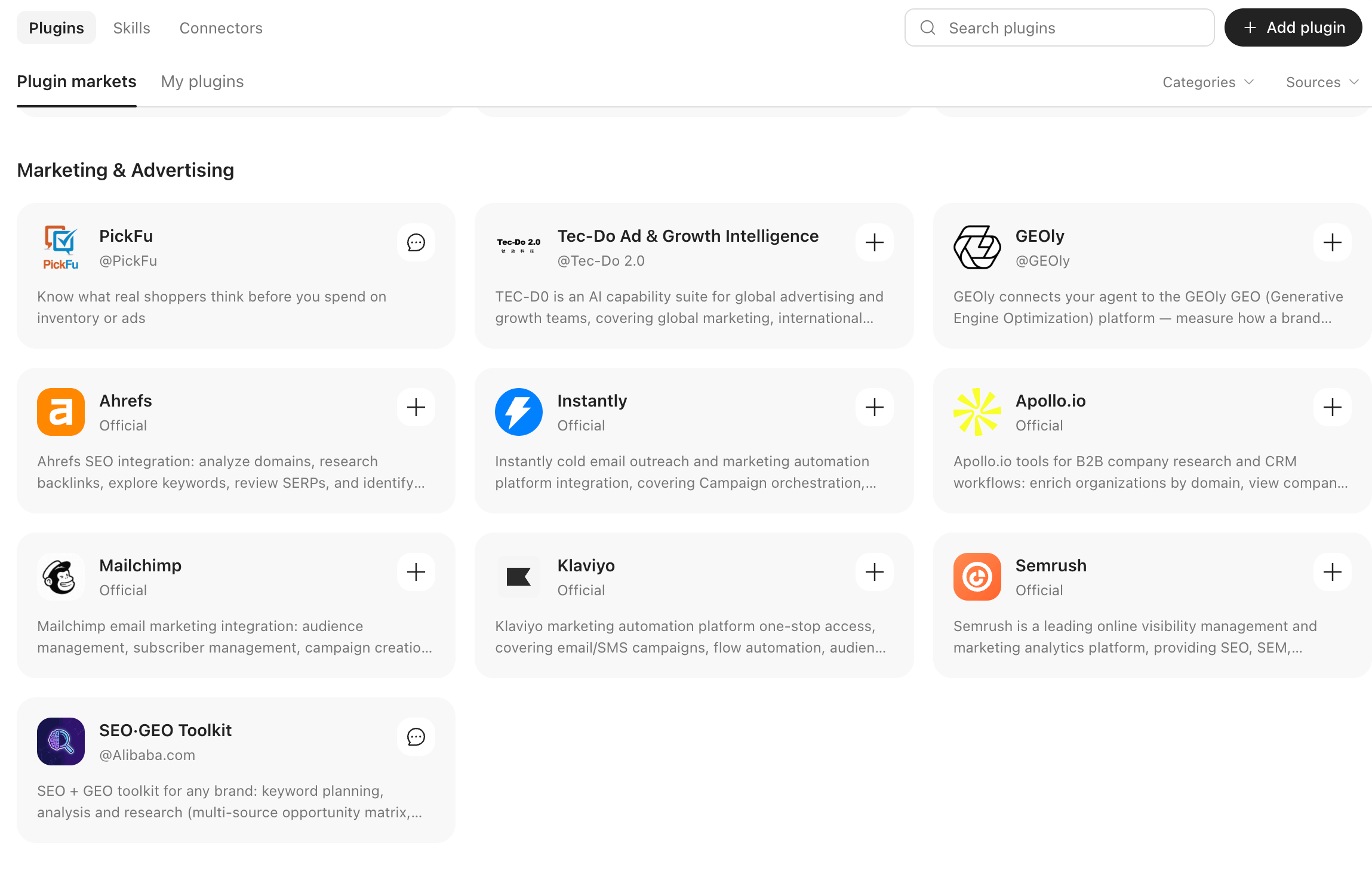
1
Find PickFu in the plugin market
In Accio Work, open Plugins → Plugin markets and search for
PickFu (it’s listed under Marketing & Advertising).2
Add the plugin
Click + to add PickFu to your workspace.
3
Connect your account
Open the plugin’s App Authorization section and connect PickFu. You’ll be sent to PickFu to sign in and approve access — the same OAuth flow every other MCP client uses.
OpenClaw
See the OpenClaw page for MCP configuration, CLI-based skills, and the Claw Hub market research workflow.Other MCP clients
Any MCP-compatible client that supports Streamable HTTP transport can connect:Gemini: Gemini does not currently support custom connectors on the web, but you can add MCP servers through the Gemini CLI. See Gemini’s MCP server instructions for setup.
Available tools
Survey management
Projects
Survey URL builder
Media
Inline previews in supporting clients: In MCP clients that implement MCP Apps (such as Claude and ChatGPT),
generate_image renders as an inline card showing the image, prompt, and model — alongside the existing inline previews for survey-builder and results-dashboard tools. CLI and REST API callers continue to receive the CDN URL in the image_url field and can use it directly.Images in web-based clients: Web chat clients like Claude, ChatGPT, and Notion can’t pass attached file data to MCP tools directly. Instead, the assistant starts an upload session — you upload the images in your browser, and the assistant picks up the CDN URLs automatically. Terminal-based tools like Claude Code and OpenClaw can read local files directly and pass them as base64
data.Uploading local files
When you attach or reference a local image in a web chat client, the assistant callsupload_media with no arguments. PickFu mints a short-lived upload session and returns:
upload_url— a browser link (app.pickfu.com/upload/<token>) where you upload your filestoken— an opaque session token (prefixedpfuh_) the assistant uses to check the sessionexpires_at— when the session expires (about 15 minutes after minting)
check_upload with the session token and receives the hosted media-cdn.pickfu.com URLs in the order you selected the files, ready to pass as mediaUrl in save_survey or build_poll_url. The done screen also shows copy-link buttons, so you can copy the URLs and paste them into the chat yourself.
You can also start an upload session directly at app.pickfu.com/upload without going through the assistant, then paste the resulting URLs into any chat.
Session limits
- Up to 10 images per session, 20 MB each
- Accepted formats: JPEG, PNG, GIF, WebP, BMP, TIFF, and HEIC/HEIF (the iPhone default)
- Up to 5 active sessions at a time per account
- Rolling upload quota of 1 GB per 24 hours per account
url or base64 data to upload_media instead.
Remote image hosts allowlist. When
extract_images fetches an image or you pass a reference_image_urls URL to generate_image, the URL host must be on PickFu’s allowlist. Currently allowed:pickfu.com(and subdomains, includingmedia-cdn.pickfu.com)cloudinary.coms3.amazonaws.comand regionals3.<region>.amazonaws.com- CloudFront distributions (
d*.cloudfront.net) - Amazon product image CDNs:
m.media-amazon.com,ssl-images-amazon.com,images-amazon.com - Alibaba / Aliyun image CDNs:
alicdn.comandaliyuncs.com(including subdomains)
upload_media and use the returned media-cdn.pickfu.com URL. The same allowlist applies to the mediaUrl you pass to save_survey / build_poll_url — if a save_survey call fails with a 400 on an image URL, re-host via upload_media and try again.Previewing images before launch
Before you hand over a survey link or callpublish_survey on an image survey, show the user the actual images. Wrong, cropped, or accidentally duplicated assets are far easier to catch while the survey is still a draft than after it goes live.
You have two ways to render the images inline:
- Pass
previewImages: truetosave_surveyorbuild_poll_url. The tool response includes labeled base64 previews of every image option attached to the survey, alongside the survey JSON or generated URL. - Call
extract_imageson the option image URLs. Use this to preview images for a survey you already created without re-saving it, or for any image URL you want to eyeball.
previewImages labels each image
Every previewable image is labeled by its position in the survey — for example, Q1 option 1, Q2 option 3 image 2 for an entry in an imageSet, Q1 option 2 mockup for a mockup listing image, or Q1 context for a question’s context image. Only HTTPS media URLs, imageSet entries, mockup images, and question context images are collected. Text options and Amazon asin options have no previewable image and are skipped.
Limits and duplicate callouts
The response is capped at 12 inline images to keep the payload manageable. If the survey references more than 12 previewable images:
- Any reference past the cap that points at an image already previewed earlier is called out by label — for example,
Q13 option 1: same image as Q1 option 1 (preview omitted, image limit reached). Duplicate callouts are themselves bounded (up to 6) so a survey that reuses the same asset hundreds of times doesn’t flood the response. - Remaining non-duplicate images past the cap are rolled up into a single count note.
same image as … before publishing.
Discovery and organization
Templates
Templates are PickFu product combos: ready-made single-question surveys from the template gallery, each with a fixed price per respondent. They’re different from playbooks, which are multi-step research plans. Both template tools are read-only; to create a draft from a template, pass atemplate block to save_survey. Saved team templates stay in the PickFu app and aren’t available through MCP.
Creating a draft from a template
Callget_template first, then pass a template block to save_survey in place of questions:
idis the template’scmb_<slug>id fromlist_templates.blanksfills each{{name}}in the template’s question. Every blank is required; a missing one is rejected with its name and placeholder.promptreplaces the question on templates without blanks. It can’t be combined withblanks, and it’s rejected on templates that have them.optionsfollow the template’s option slots and kinds (text, image, video, or product). The question type comes from the template: two options run head-to-head, three or more are ranked.contextadds an optional image, video, or text shown with the question.sampleSize,country,name, andtargetingdefault to the template’s values when omitted.reportingcan’t be set: a template’s reporting traits are fixed.
questions or surveyId, and the mini-poll doesn’t take it. To edit a template draft, call save_survey with its surveyId as usual; every edit must stay within the template’s limits.
Templates have fixed limits on sample size, country, option count and kind, and audience. A draft outside them is rejected before anything is saved. The error lists every violation with its allowed values, for example Allowed: ["15","30"]. Received: "75". For a poll outside a template’s limits, build it with questions at standard pricing.
The draft is priced at the template’s pricePerResponse times the sample size. The cost save_survey returns is a quote; publishing charges the current price. Survey responses from get_survey and list_surveys include a template field (id, name, and on get_survey its constraints), or null for surveys not made from a template.
You can also open a template’s url, which loads it in the PickFu survey builder.
Help
Mini-poll tool
mini_poll runs the account’s plan-included daily mini-poll. It’s plan-gated: the tool only appears in ListTools for accounts on a plan with mini-poll capability, and teammates on the same plan share one mini-poll allowance per day. Use it when the user wants a quick, no-cost pulse check that doesn’t consume the survey balance.
Mini-polls have a fixed shape:
- Exactly one question per mini-poll (any type except
screen_recording). - Five respondents. Sample size is not configurable.
- No audience targeting and no caller-selected reporting demographics.
- Publishing consumes today’s allowance; there is no charge against the account balance.
publish_survey refuses mini-poll drafts — always use mini_poll with action: "publish" instead.
Actions
The tool takes a single action field: create, update, or publish.
Workflow
Always create first, then reuse the returned
id as surveyId for later update or publish calls in the same flow:
- Call
mini_pollwithaction: "create"and the question. - Read
idfrom the response. - Optionally call
action: "update"withsurveyId: <id>to refine the draft. - Confirm launch with the user in plain language, then call
action: "publish"withsurveyId: <id>. The assistant must not publish without explicit user confirmation.
id. After the user confirms, publish it:
nextAvailableAt— ISO timestamp for when the account can run its next mini-poll.claimedBy— if a teammate already used today’s allowance, the login or user id that claimed it.
Synthetic Audiences tools (beta)
The synthetic tools run research against synthetic panelists instead of the human panel. They’re feature-gated: the tools only appear inListTools for accounts with Synthetic Audiences turned on. Synthetic Audiences is rolling out to select accounts. To request access, join the waitlist.
Workflow
- Call
get_synthetic_feedbackwith the brief. - Show the plan to the user, including the suggested synthetic audience and the question or options. The assistant must not submit without explicit user approval.
- Call
submit_synthetic_feedbackwith the sameguid. - Call
get_synthetic_feedback_resultsonce with the sameguid. Results typically take a few minutes.
Supported question types
Every response includes a written explanation by default. When a respondent picks an
option, ranks, rates, or clicks, they’re also required to explain why in their own words
— that’s already part of every question type except
screen_recording (which returns a
transcription instead). Do not add a separate open_ended question to capture “why” —
it wastes a question slot (multi-question surveys are priced per question) and produces
redundant data. Phrase your real question, and PickFu collects the explanation
automatically. The text comes back on each response as the explanation field. See
surveys overview for more.Likert questions
Use alikert question when you want respondents to rate several statements on the same agreement, frequency, or satisfaction scale. Learn more in What is a Likert Scale question?
- Statements — Pass 2–8 text statements as
options[].value. Each statement must be non-blank text and can’t be anhttp://orhttps://URL.save_surveyandmini_pollreject Likert options that usemediaUrl,asin,imageSet, ormockup. - Scale — Set
likertScaleto one of these presets:
If you omit
likertScale when creating a question, PickFu uses agreement5. If you omit it when updating an existing Likert question, the question keeps its current scale. Setting likertScale on any other question type fails validation.
build_poll_url doesn’t support Likert questions. Use save_survey or mini_poll instead.
Example: Likert question
Usage examples
Once connected, just ask your AI assistant naturally: Create a head-to-head question“Create a PickFu survey comparing these two logo designs to see which one people prefer”Get survey results
“Show me the results from my latest PickFu survey”Target a specific audience
“Create a survey asking Amazon Prime members aged 25–34 which product image they prefer”Generate images for a survey
“Generate two product mockup images and create a head-to-head question comparing them”
Supported countries
These are the markets you can target with thecountry field. PickFu auto-translates your survey into each market’s language and returns results in both languages — see International surveys and translation.
Sample sizes
Available respondent counts: 15, 30, 50, 75, 100, 200, 300, 500Screen recording questions use a different set: 5, 10, 15, 20, 25, 30, 50, 75. Passing any other value (for example
sampleSize: 100) to save_survey or build_poll_url on a screen_recording question fails validation.Option formats
Surveys support various content types for options:- Text — Plain text via
value - Media URL — Images or videos via
mediaUrl. PickFu classifies the URL by content: image URLs become image options, YouTube, Vimeo, and Wistia links become embedded video options (returned astype: "video"onget_survey), and any other URL becomes a generic link option. Because video and generic-URL options are different content types, a single question cannot mix them —save_surveyrejects the request withOPTION_CONTENT_TYPE_MISMATCH(HTTP 400). - ASIN — Amazon product by
asinfor comparison - Image set — Multiple images grouped together via
imageSet(see below) - Mockup — Product listing mockups via
mockup(SERP or listing style)
One content type per option. Each option must set exactly ONE of
value, mediaUrl, asin, imageSet, or mockup. Setting more than one — for example, adding a text value label to a mediaUrl image option — is rejected client-side by save_survey and build_poll_url with a message that names the conflict and the fix.Image options are auto-labeled. Do NOT put a caption in value alongside an image — respondents see image options as A, B, C… automatically. Use value only for text-only options.All options in the same question must share the same content type (all text, or all images, etc.). This cross-option rule is enforced by the API.Likert statements are text only. For likert questions, save_survey and mini_poll accept only value. See Likert questions.Image set options
PassimageSet on an option in save_survey to group multiple images into one comparable unit. Each entry can be one of:
- An HTTPS image URL — included as-is.
- A product reference —
{ "source": "amazon", "id": "B08288SG9K" }. PickFu expands the reference to that product’s full Amazon image gallery (every listing image) and rehosts each image. Onlysource: "amazon"resolves today; other sources return a 422. - A bare Amazon ASIN —
"B08288SG9K"as a shorthand. The MCP server normalizes it to{ source: "amazon", id: "B08288SG9K" }before forwarding. The underlying API expects the{ source, id }object, so this shorthand is MCP-only.
- Use either image URLs or exactly one product reference per option — don’t mix them in the same
imageSet. To compare two products’ galleries, give each its own option. imageSetrequires at least one entry.- This shape is specific to
save_survey.build_poll_urlonly accepts plain image URLs.
imageSetDirection on the option to control the layout:
a-plus is also what makes get_survey → save_survey round-trips work for A+ image sets — re-saving an existing A+ survey preserves its direction.
Example: comparing two Amazon listings’ full galleries
Authentication
The MCP server supports two authentication methods. Most clients support both.OAuth (automatic)
OAuth works out of the box with all clients listed above. When you first use a PickFu tool, your AI client prompts you to sign in to your PickFu account. No configuration needed.API keys
For automation, CI/CD pipelines, and long-running agents, authenticate with an API key instead of OAuth.1
Create an API key
Go to Settings > API Keys in your PickFu account and create a new key.
2
Add the key to your MCP client config
Pass the API key as a Bearer token in the
Authorization header:Need help?
MCP documentation
Learn more about the Model Context Protocol.
Help center article
Quick setup overview for non-developers.
Contact support
Get help with MCP server setup.