
When should I use a Likert Scale question?
Likert Scale questions work best when you want to measure how strongly people feel about several related statements. They’re ideal for:- Brand perception – how strongly do people agree that your brand is trustworthy, affordable, or innovative?
- Product claims – which benefits or claims do shoppers believe?
- Shopping habits – how often do people buy online, read reviews, or use coupons?
- Customer satisfaction – how satisfied are people with price, quality, shipping, or support?
Choosing a scale
When you build a Likert Scale question, you choose one of four rating scales. Every statement in the question uses the same scale.
Use an agreement scale for opinions and claims, frequency for behaviors, and satisfaction for experiences with a product or service.
How to create a Likert Scale question
- Start a new survey – click the New survey button from your dashboard
- Choose Likert Scale – select it from the question type menu
- Write your prompt – the default prompt is “Respond to each of the following statements.” You can edit it to add more direction.
- Choose a scale type – pick 5-point agreement, 7-point agreement, frequency, or satisfaction
- Add your statements – enter 2 to 8 text statements. Click Add statement to add more.
- Target your audience – choose demographics that match your target market
- Preview and launch – review your survey, then launch to start collecting feedback
save_survey and mini_poll tools.
Tip: Write each statement as a single, clear idea. For example, write “This product looks durable” instead of “This product looks durable and affordable.” Combining two ideas makes the rating hard to interpret.
How to read your Likert Scale results
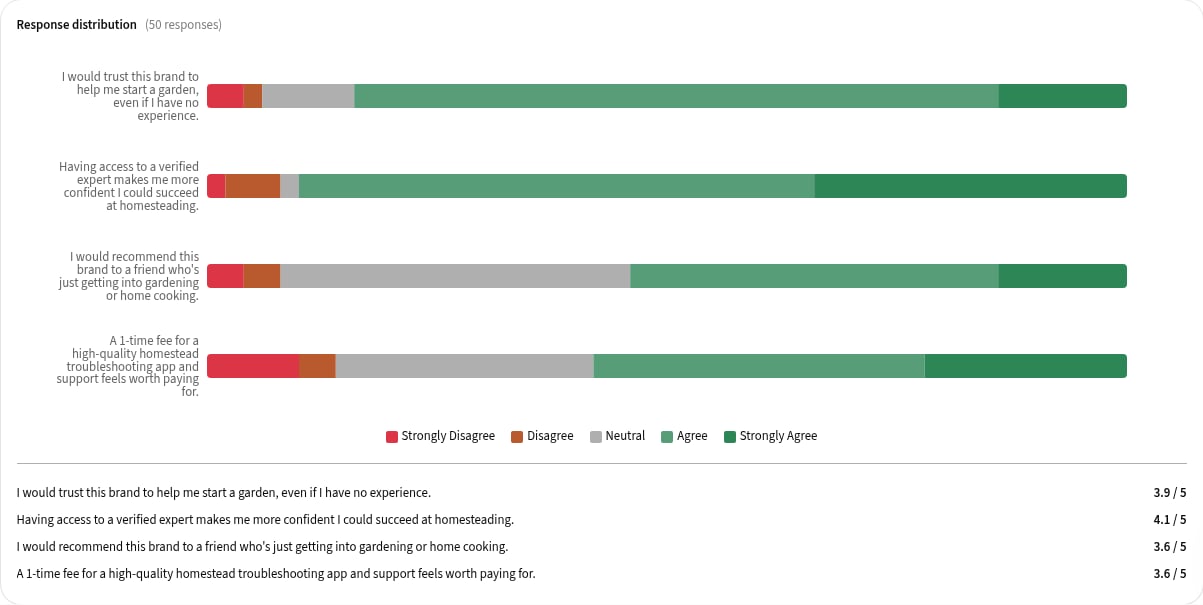
Once responses arrive, you’ll see:- Mean – the average rating for each statement, so you can quickly compare statements
- Response distribution – a chart showing how many respondents chose each point on the scale for each statement
- Written feedback – comments from each respondent explaining their ratings
Frequently asked questions
How many statements can I include?
You can include 2 to 8 statements in a single Likert Scale question.Can I use images or videos as statements?
No. Likert Scale statements are text only. To show respondents an image or video, add it as context to the question.Does the number of statements affect the price?
Yes. Your survey’s price summary shows a separate Likert line item based on how many statements you add.Can I use a Likert Scale question to branch my survey?
Not currently. Likert Scale questions can’t be used as the source question for branch logic. You can still add a Likert Scale question to a survey that uses branch logic, and you can set it to show only to respondents who gave a specific answer to an earlier question.Related Articles