
When should I use a Van Westendorp price test?
Use a Van Westendorp price test when you need a data-backed price, not just a gut check. It works well for:- Launching a new product – find a starting price before you list it
- Repricing an existing product – check whether your current price sits inside the range shoppers accept
- Premium or budget positioning – see where quality concerns start at the low end and where buyers walk away at the high end
- Services and subscriptions – price a course, app, membership, or service package
The four questions respondents answer
Every respondent sees your product or service description and answers these four questions:- Too cheap – “At what price would this seem so cheap that you’d doubt the quality?”
- Bargain – “At what price would this be a bargain – a great buy for the money?”
- Expensive – “At what price would this start to feel expensive, but still worth considering?”
- Too expensive – “At what price would this be too expensive to consider buying?”
How to create a Van Westendorp price test
- Start a new survey – click the New survey button from your dashboard
- Choose Van Westendorp Price Sensitivity Meter – select it from the question type menu
- Describe your product or service – enter a short description of what you’re pricing
- Add context – add text, images, or other media so respondents understand exactly what they’d be buying
- Target your audience – choose demographics that match your likely buyers
- Preview and launch – review your survey, then launch to start collecting responses
How to read your Van Westendorp results
When responses arrive, your results page shows:- PickFu recommends – a summary of the recommended Optimal Price Point, the acceptable price range, the indifference price, and the peak acceptance (the share of respondents who find a price acceptable)
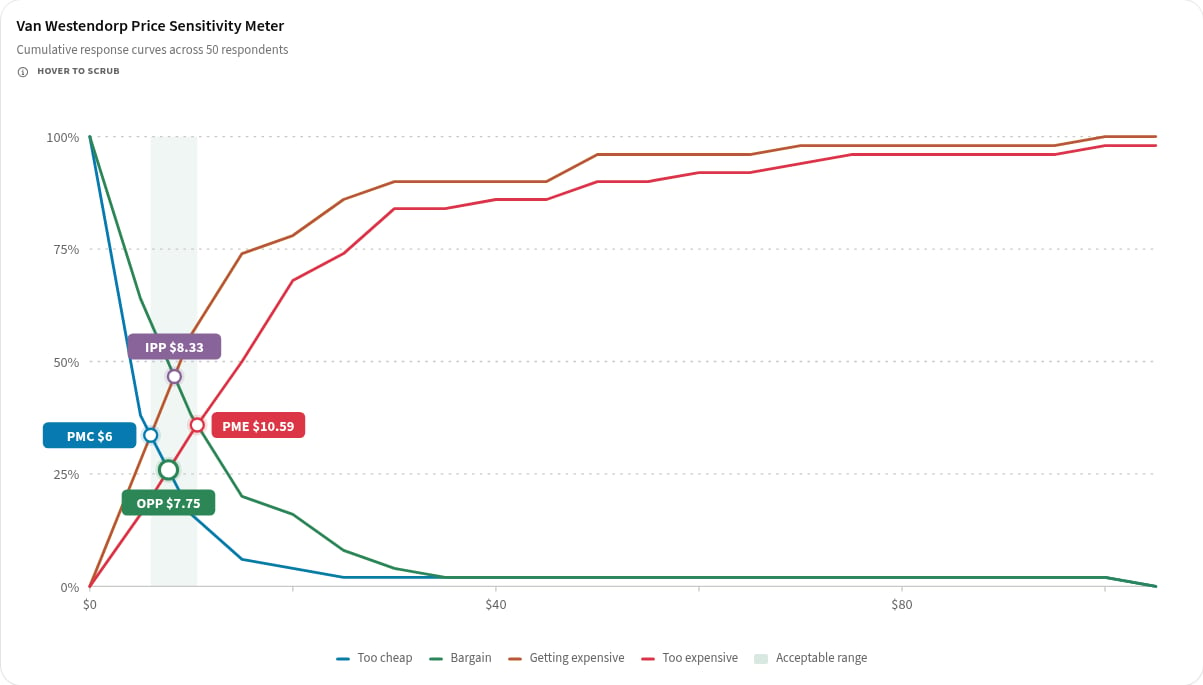
- Price sensitivity chart – four cumulative curves (Too cheap, Bargain, Getting expensive, Too expensive) plotted across every price respondents entered
- Price points – the four key prices where the curves cross
- Confidence – a High, Medium, or Low rating based on how many people responded and how spread out their answers are
- Distribution – a tab showing how respondents’ answers are spread out for each of the four questions
- Written feedback – comments from respondents explaining their answers

The acceptable price range runs from the Point of Marginal Cheapness to the Point of Marginal Expensiveness. Pricing anywhere in that range is defensible. The Optimal Price Point is a strong default.
Frequently asked questions
Can I change the four price questions?
No. The four questions are standardized so PickFu can calculate the price points reliably. You control the product description and context that respondents see.What currency will respondents use?
Respondents answer in the currency of your survey’s target country.How many respondents should I use?
More respondents produce smoother curves and a higher confidence rating. If your confidence rating comes back Low, consider adding more respondents.Can I test more than one price at once?
A Van Westendorp price test doesn’t compare specific prices. Instead, respondents tell you their own price thresholds. To compare specific prices you’ve already chosen, use a Single Select or Head-to-Head question.Related Articles