Run head-to-head PickFu surveys to iteratively test and improve your Amazon main product image, lifting search result click-through rates over time.
The Amazon main image is the single largest lever on a product’s search-result CTR. This playbook
defines a repeatable optimization loop that benchmarks your current image against the live
competitor set, generates and tests variations, and re-validates the winner against the same
competitor set to confirm the improvement is real.The loop is designed to be run autonomously by an AI agent (Claude, ChatGPT, Cursor, or any client
with PickFu MCP / CLI / API access) with minimal human intervention.
Test your current main image vs. 2–3 competitor main images. Save this competitor set — every
later step uses it.
2
Analyze the data
Read the AI summary and individual respondent feedback. Identify the specific reasons
competitors won (clarity, angle, color, lifestyle vs. white-background, text overlays, etc.).
3
Create AI variations
Generate 2–3 new variations using PickFu’s generate_image
tool (via MCP, CLI, or API), or upload variations created elsewhere.
4
Iterate variations against each other
Run cheap (15-respondent) head-to-head questions comparing each variation vs. the original until
one variation wins with a score of 70 or higher.
5
Re-validate against the original competitor set
Run a final 50-respondent survey with the winning variation plus the SAME competitor images from
step 1. A ranking improvement vs. the baseline indicates real CTR lift on Amazon.
Sample size and cost. This playbook defaults to small, cheap surveys — 50 respondents for the
baseline and final validation, 15 respondents per iteration — because the loop triangulates
across many surveys, so any single survey being slightly noisy gets corrected by the next one. This
keeps the total cost of an AI-run loop low. Scale up only when the stakes justify it: bump the
final validation to 100–200 before an expensive listing change you can’t easily reverse.
Iterations should stay cheap (15) — they’re meant to be fast and disposable. See
sample size guidance.
Paste this prompt into Claude, ChatGPT, Cursor, or any AI agent connected to the
PickFu MCP server, CLI,
or REST API. The agent will run the entire loop on your behalf —
creating polls, reading responses, and iterating until a winning variation emerges.
You are running the PickFu "Amazon main image optimization" playbook end-to-end.Goal: improve the click-through rate (CTR) of an Amazon product's main image byiteratively testing variations against the live competitor set and re-validatingthe winner.Before starting, ask the user for:- The Amazon product or category (e.g. "stainless steel water bottle")- Their current main image (URL or upload)- 2-3 competitor main images (the canonical competitor set — these stay fixed across steps 1 and 5)- Target audience (default: General; refine only if the user requests it)Run this loop:1. BASELINE (50 respondents). Create a ranked-choice survey with the user's current main image + the competitor images. Question: "When shopping on Amazon, which product would you buy?" Audience: General, 50 respondents. Publish, wait for responses, then read the AI summary and individual written feedback.2. ANALYZE. From the responses and AI summary, produce a numbered list of testable image changes. Each item must be a specific, visual change (e.g. "increase product-to-frame ratio", "add a hero ingredient inset in the lower-right", "switch from white background to lifestyle context"). Avoid vague items like "improve clarity".3. CREATE VARIATIONS. Generate 2-3 new image variations using generate_image, each combining 1-2 changes from the analysis. Brief the model with: the original image, the product category, the specific change you're testing, and the constraint that the product must remain unambiguous at thumbnail size.4. ITERATE (15 respondents per survey). For each variation, run a head_to_head survey (exactly 2 options) with the variation + the original main image. Same question as step 1. Audience: General, 15 respondents. Repeat with new variations until ONE variation wins the head-to-head with a score of 70 or higher. Stop condition: if 5+ iterations fail to produce a 70+ winner, halt and report back. Feedback may indicate brand or category constraints that no main-image change will overcome.5. RE-VALIDATE (50 respondents). Create a ranked-choice survey with the winning variation + the SAME competitor images from step 1. Same question. Audience: General, 50 respondents. For a high-stakes listing change you can't easily reverse, bump this to 100-200. Compare to the step-1 baseline: - If the winning variation ranks higher than the original did → the improvement is real, ship it. - If the ranking is unchanged → the iteration won head-to-head but didn't beat the category; consider larger structural changes (angle, lifestyle context, format).Final report to the user must include:- Baseline ranking and score- Final ranking and score- The 3-5 specific changes that drove the improvement- The winning image URL- Expected CTR delta direction (PickFu survey lift is directional, not a guaranteed CTR number; Amazon CTR changes typically surface in performance metrics 2-4 weeks after image update)Tools to use:- save_survey + publish_survey — create and launch each survey- get_survey_responses — read responses- generate_image — create AI variations (step 3)- upload_media — for variations created outside PickFu
Want to run this manually? The same loop is available as a one-click template in the PickFu app
(Start the CTR playbook). The app version walks
through the steps with pre-filled survey URLs.
Test how your current main image performs against your top competitors. Save these competitor
images — you’ll reuse the exact same set in step 5.
Setting
Value
Question type
Ranked choice
Question
”When shopping on Amazon, which product would you buy?”
Options
Your current main image + 2–3 competitor main images
Audience
General
Sample size
50
What you’ll get: a ranking of your image vs. competitors, plus written feedback explaining the
strengths and weaknesses respondents called out. This baseline is the number every subsequent
iteration is judged against.
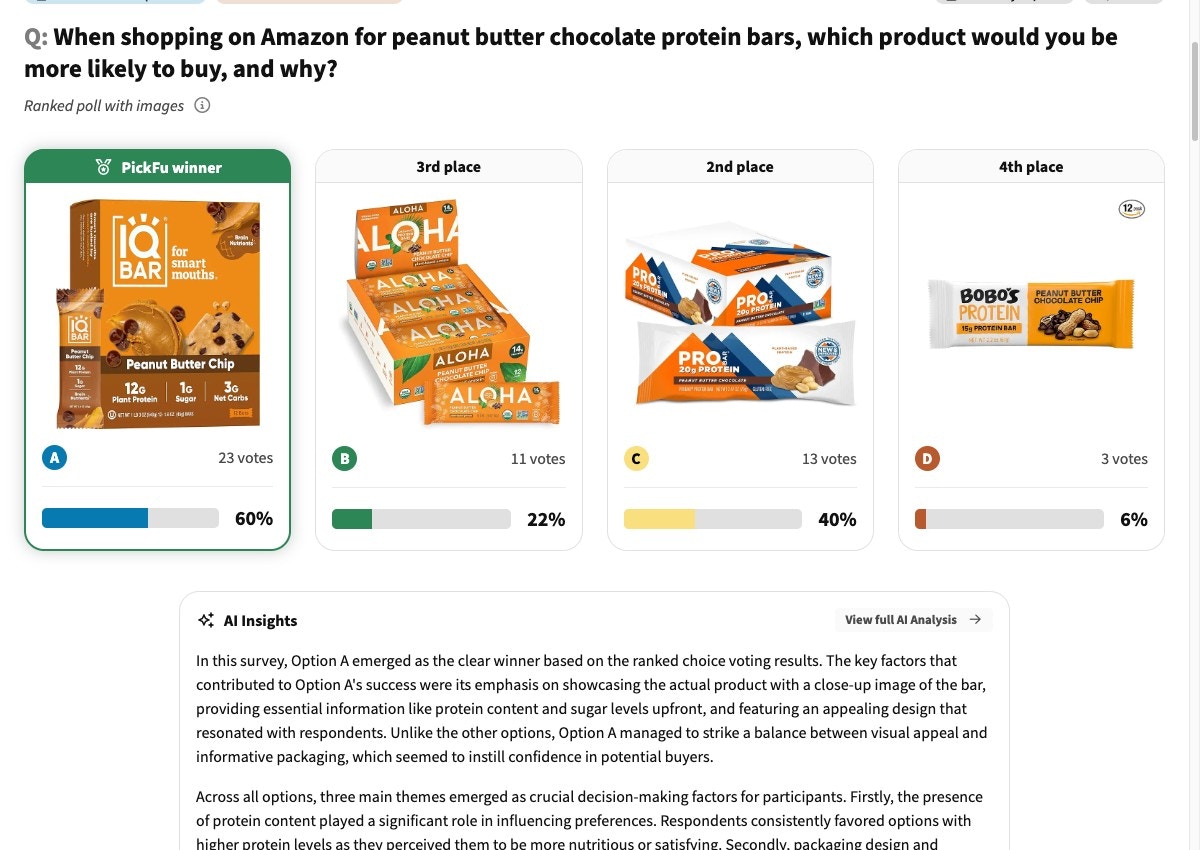
A baseline ranked test: your main image scored against competitor main images, with vote counts and per-option written feedback below.
Use the analysis from step 2 to brief an image-generation tool. PickFu’s generate_image produces
on-brand variations in seconds and uploads them to the PickFu CDN with a permanent URL — ready to
drop into the next survey.
pickfu media generate \
  --prompt "Stainless steel water bottle, white background, centered product fills 80% of frame, hero ingredient (insulated double-wall) inset bottom-right, premium feel" \
  --reference-image-url https://your-cdn.com/current-main-image.jpg
curl -X POST https://api.pickfu.com/v1/media/generate \
  -H "Authorization: Bearer $PICKFU_API_KEY" \
  -H "Content-Type: application/json" \
  -d '{
    "prompt": "Stainless steel water bottle, white background, centered product fills 80% of frame, hero ingredient (insulated double-wall) inset bottom-right, premium feel",
    "imageUrls": ["https://your-cdn.com/current-main-image.jpg"]
  }'
Tool call: generate_imageArguments: prompt: "Stainless steel water bottle, white background, centered product fills 80% of frame, hero ingredient inset bottom-right, premium feel" reference_image_urls: ["https://your-cdn.com/current-main-image.jpg"]
Aim for 2–3 variations per iteration. Each variation should test 1–2 specific changes from your
step-2 analysis — not a sweeping redesign. Smaller deltas make it easier to learn what’s
actually moving the needle.
Run a fast, cheap survey (15 respondents) comparing each new variation against the original. Repeat
until one variation wins the head-to-head with a score of 70+.
Setting
Value
Question type
Head-to-head (exactly 2 options)
Question
”When shopping on Amazon, which product would you buy?”
Options
Variation + original main image
Audience
General
Sample size
15
Test one major change per iteration. If you batch unrelated changes into one variation and it
wins, you won’t know which change drove the win.
5. Re-validate against the original competitor set
Once you have a 70+ winner from step 4, run a final 50-respondent survey using the winning variation
plus the same competitor images from step 1.
Setting
Value
Question type
Ranked choice
Question
”When shopping on Amazon, which product would you buy?”
Options
Winning variation + the same 2–3 competitor images from step 1
Audience
General
Sample size
50 (bump to 100–200 for a high-stakes, hard-to-reverse change)
Interpret the result:
Winning variation ranks higher than the original did in step 1 → the improvement is real.
Ship the new image.
Ranking is unchanged or improved by one position only → the iteration won the head-to-head
but didn’t beat the category. Consider larger structural changes (angle, lifestyle context,
packaging format) before shipping.
Winning variation ranks worse than the original → rare, but it happens when the iteration
pool was too small or the variations overfit to a particular preference. Re-baseline with a
different competitor set or a tighter audience.
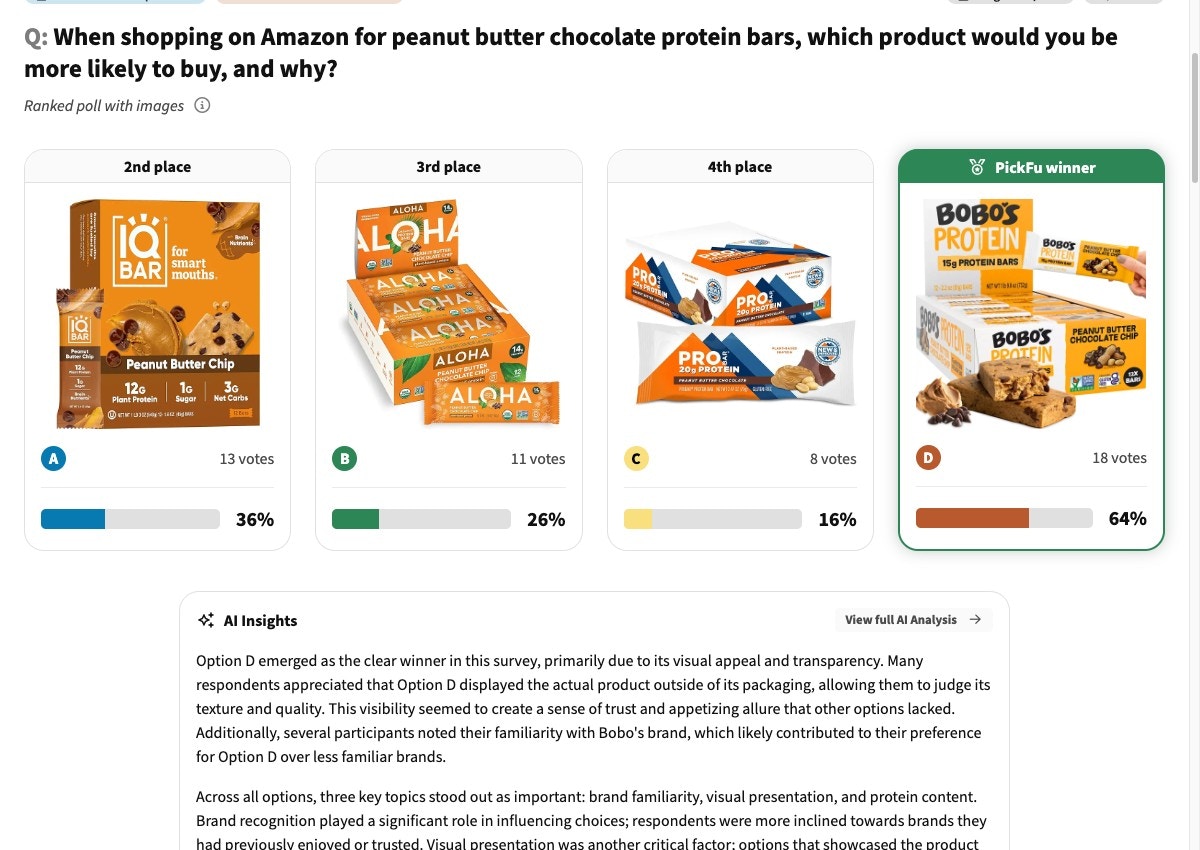
A validation ranked test: the optimized image re-run against the same competitor set from step 1. Compare its rank and score to the baseline to confirm the lift is real.
If you don’t yet know what drives clicks in your category, run these two short surveys before
starting the loop. They take less than a day and surface category-specific signals that make your
step-2 analysis sharper.
”When shopping for [product type], what buying factors are important to you?”
Audience
General
Sample size
50
What you’ll get: a ranked list of 3–5 key drivers (price, brand, features, visual appeal,
credibility) that influence purchase decisions in your category. Use these to weight your
step-2 analysis.Launch the buyer-psychology survey → · See an example →
SERP click-test (click test)
Setting
Value
Question type
Click test
Question
”If you were shopping on Amazon for [product type], which listing would you click on?”
Audience
General
Sample size
50
Setup
Upload a screenshot of the live Amazon search results page (8–12 listings visible)
What you’ll get: click data showing which listings attract attention in your category,
plus written feedback on the visual elements that drove the click. Use this to identify
competitors worth including in your step-1 baseline.Launch the SERP click-test → · See an example →
How do I know if my image improvement is significant?
Look for relative improvement between step 1 (baseline) and step 5 (re-validation), not
absolute scores. If your optimized image moves up in ranking — e.g. from 3rd place to 1st — and
the score increases meaningfully, the change is likely to translate to higher CTR on Amazon.
My variation keeps losing to competitors. What now?
Focus on the specific feedback explaining why competitors won. Common categories:
image clarity, product angle, background choice, missing key features that buyers expect to
see. Note that with very strong competitor brands you may never “win” outright — the goal is
relative improvement against your own baseline, not category dominance.
How long should I wait between iterations?
Most surveys complete within 15–60 minutes. You can run new iterations as soon as responses
arrive — rapid cycles are a feature of this loop, not a bug.
Should I test angles or styling changes first?
Test the most impactful changes from your step-2 analysis first. If respondents flagged the
product angle as the problem, fix that before tweaking text overlays or color tweaks. One
major change per iteration.
When will Amazon CTR actually move?
Amazon’s performance metrics typically reflect main-image changes 2–4 weeks after the update
goes live. PickFu surveys give you a directional signal much faster, but Amazon’s own ranking
and impression dynamics take time to settle.