
When to use this playbook
Audience targeting. Because this tests a mobile game, the surveys target mobile gamers
(
mobileyes) in the core 25–44 age range and report results by age and gender. Adjust the
targeting to your game’s actual demographic — a kids’ puzzle game and a hardcore strategy game
have very different players. Use list_available_targeting to see options.The sequence
1
Compare icon designs
The icon wins or loses the tap in the store grid. Rank 3–4 icon variations.
2
Test your gameplay trailer
Open-ended feedback on whether the trailer makes players want to download.
3
Rank your screenshots
Rank 4–8 screenshots by download intent to find your strongest ordering.
4
Test your app description
Compare description versions to find the most compelling copy.
5
Validate the full listing
A multi-question survey on the assembled listing confirms it converts before launch.
Sample size and cost. Defaults to 50–100 respondents per element test (ranked tests use
100 for a clearer winner; open-ended uses 50). For a tighter budget, 50 across the board is fine
for directional results. The final validation uses 100. See
sample size guidance.
Run this playbook with an AI agent
Copy prompt for AI
Paste this prompt into Claude, ChatGPT, Cursor, or any AI agent connected to the
PickFu MCP server, CLI,
or REST API. The agent will run the entire loop on your behalf —
creating polls, reading responses, and iterating until a winning variation emerges.
Step-by-step (human operator view)
1. Compare icon designs
See an example icon survey →
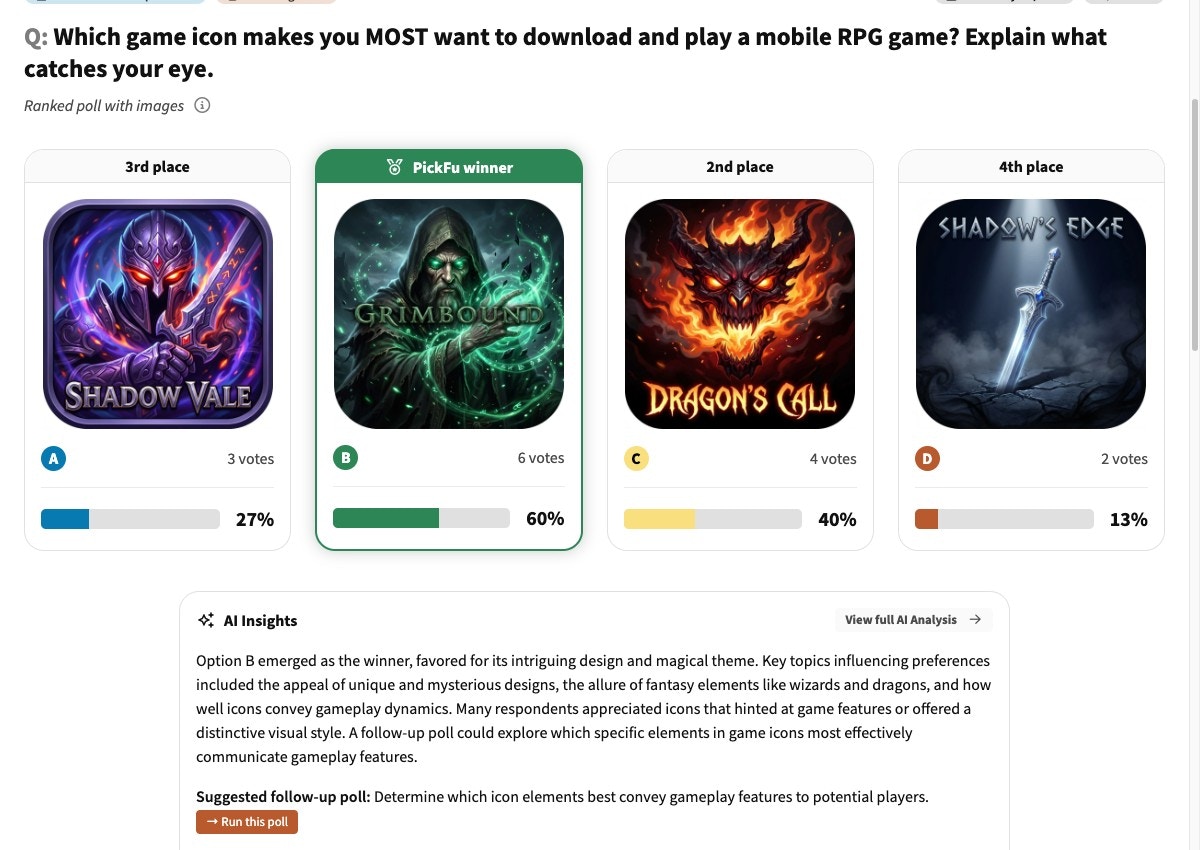
An icon test: candidate icons ranked by download intent, with vote share, the PickFu winner, and an AI summary of what's catching players' eyes.
2. Test your gameplay trailer
See an example trailer survey →
3. Rank your screenshots
See an example screenshot survey →
4. Test your app description
See an example description survey →
5. Validate the full listing
Success criteria: a clear winning icon (35%+ first-place votes), screenshots ranked by download
intent, a validated description, and a full listing averaging 3.5+ stars on Q1 — with Q4
confirming players correctly read the genre.
See an example full-listing validation →
Recommended targeting by genre
These are the demographics most likely to play each genre. You know your audience best — adjust as needed, and use list_available_targeting for the exact trait codes.Pro tips
- Character-focused icons beat logos. Across hundreds of gaming icon tests, icons with a character face or figure out-perform abstract logos and text-only icons. Always include a character concept.
- Test icons at display size. Upload icons at roughly 60×60px — the size they appear on the store shelf. Performance at small size is what matters, not full-resolution polish.
- Lead with your strongest screenshot. Position 1 gets 3–5× more views than position 4+, so your #1-ranked screenshot should occupy the first slot.
- Vibrant colors win on the shelf. Saturated treatments consistently out-perform muted or dark ones in icon testing.
- Re-test after major updates. Re-run the screenshot and full-listing steps after any major update or seasonal re-skin so the listing reflects the current game.
Troubleshooting
My ranked description survey won't launch.
My ranked description survey won't launch.
Ranked questions need 3–8 options. If you only have two description versions, switch the question type
to head-to-head (exactly 2 options). Add a third version to keep it ranked.
Players misidentify the genre in Q4 of the full-listing validation.
Players misidentify the genre in Q4 of the full-listing validation.
If the multi-select genre answers scatter or point to the wrong category, your icon + screenshots
are sending mixed signals. Revisit steps 1 and 3 — the winning assets should make the genre
unmistakable at a glance.
Should I target broadly or narrowly?
Should I target broadly or narrowly?
Target the demographic that matches your game. A hardcore strategy game tested on casual players
gives misleading results. Use list_available_targeting to find the
right mobile-gamer and age filters, and report by age + gender to spot segment differences.
Related
- ASO advanced tests & FAQs (help center) — video preview, Custom Product Page, featured-graphic tests, and common questions
- Game concept validation — validate the concept before building the listing
- Best practices for survey design
- MCP server reference
- PickFu CLI