
Пока эта статья доступна только на английском.
2021-06-07
Best UserTesting alternatives for UX research and usability testing
Choosing the right UserTesting alternative depends entirely on your specific research goals, such as whether you need task-based usability testing, moderated qualitative interviews, or information architecture research. While tools like Maze, Lookback, and Optimal Workshop help evaluate how users interact with prototypes and digital experiences, platforms like PickFu focus on rapid consumer preference and concept validation. Ultimately, aligning your testing method with the specific uncertainty you need to resolve ensures you gather actionable evidence before making major product or design investments.

UserTesting is a broad UX research platform for watching people interact with websites, apps, prototypes, and other digital experiences. It isn't the right tool for every research question.
The best UserTesting alternative depends on what you're trying to learn. Maze is strong for prototype and website testing. Lyssna handles focused methods like first-click tests, five-second tests, and preference tests. Lookback is built around moderated and unmoderated qualitative research. Dscout suits research that has to follow people over days or weeks. Contentsquare, which now includes the products people used to associate with Hotjar, analyzes behavior from traffic you already have.
PickFu sits in a different part of the process. It's a consumer insights platform: you upload your options, pick the audience you want to hear from, and get written feedback from real people who match it. Most surveys run 50 to 75 respondents and come back in hours. That makes it the right tool when the question is which concept, product image, package, logo, message, or early design direction people prefer and why — not whether they can finish a complex task.
So the useful question isn't "which platform is the closest UserTesting clone?" It's what uncertainty are you trying to remove before you decide?

📊 Survey example: Landing page hero clarity test — Tendrl A vs B
We showed 15 US respondents two versions of the same landing page hero and asked which one made it clearer what the product does. Version B won 12–3. Respondents kept coming back to specificity. One put it plainly: "A makes me a promise, B shows me tools I can actually use and how they work." A holdout went the other way, saying there was "too much going on in B," which is the tension worth designing around. No tasks, no recordings, no recruiting. Just the question of whether the page explains itself.
Best UserTesting alternatives at a glance
Why look for a UserTesting alternative?
Cost is one reason teams look elsewhere. Method fit is usually the bigger one.
UserTesting currently offers unmoderated testing, moderated Live Conversation, participant recruitment, path flows, click maps, transcripts, sentiment analysis, and enterprise research features. Its plans use either test-based consumption or team-based unlimited structures, and pricing comes by quote rather than a public subscription price.
That breadth pays off when a company runs many kinds of research. It's overkill when the immediate problem is narrow.
A product designer may only need to know whether people understand a new navigation structure. A marketer might want to compare three landing-page concepts. A research team may need experienced finance directors for user interviews. Another team already has thousands of users and just wants to know where those users get stuck.
Those are four different methods.
You may need a narrower research method
Say a SaaS company is redesigning its account navigation. The immediate question is whether people can find "Billing settings." A tree test can evaluate the hierarchy before anyone builds a full prototype or schedules interviews.
If the question is instead what people understand when they first see a new homepage, a five-second test gets there faster. If it's which visual direction feels more trustworthy, a preference test is enough.
The method should follow the uncertainty, not the other way around.
📊 Survey example for retreatsandvenues.com: Homepage info sufficiency for a retreat booking decision

We ran a 5-Second Test with 30 US small business owners: after five seconds on a homepage hero, was there enough information to decide whether to explore further? Most said no. The written answers explained why: missing price, location, and audience cues, plus a brand name people couldn't find. "I couldn't find the name of the company," one wrote. Another: "Too much text for time to engage with it." That's a five-second problem, and you don't need a moderated session to catch it.
You may need deeper qualitative research
Unmoderated testing works when participants can follow a defined task on their own. What it can't do is chase an unexpected comment.
If someone testing a returns flow says "I don't trust this," a moderator can ask what caused the reaction right then. Lookback, Userlytics, PlaybookUX, and Dscout all support live moderated research for questions where the follow-up is the point.
You may already have traffic
Recruiting people into a study isn't always necessary.
If a product already gets meaningful traffic, behavioral analytics show where people click, scroll, hesitate, or drop out. Hotjar became the popular name here through heatmaps and session recordings. It has since merged into Contentsquare, and it's no longer possible to create a new Hotjar account. New users sign up on Contentsquare, where the same heatmaps, session replay, and surveys now sit alongside funnels, error monitoring, and other experience analytics.
Behavioral analytics and recruited usability testing answer different questions. One shows what's happening across everyone. The other helps explain why.
Sometimes the question isn't usability
This is the distinction marketers, ecommerce teams, founders, and product teams run into most.
A company has three possible packaging designs. Nothing needs to be clicked. There's no workflow to complete. The team wants to know which package communicates the product most clearly, and why. That's package design testing, which is consumer research rather than usability testing.
The same goes for product images, logos, names, messaging, app store screenshots, ad concepts, mockup testing, and early wireframes. It's also where people land when they go looking for focus group alternatives: the question is what a group of real buyers thinks, without the room, the moderator, or the three-week timeline.
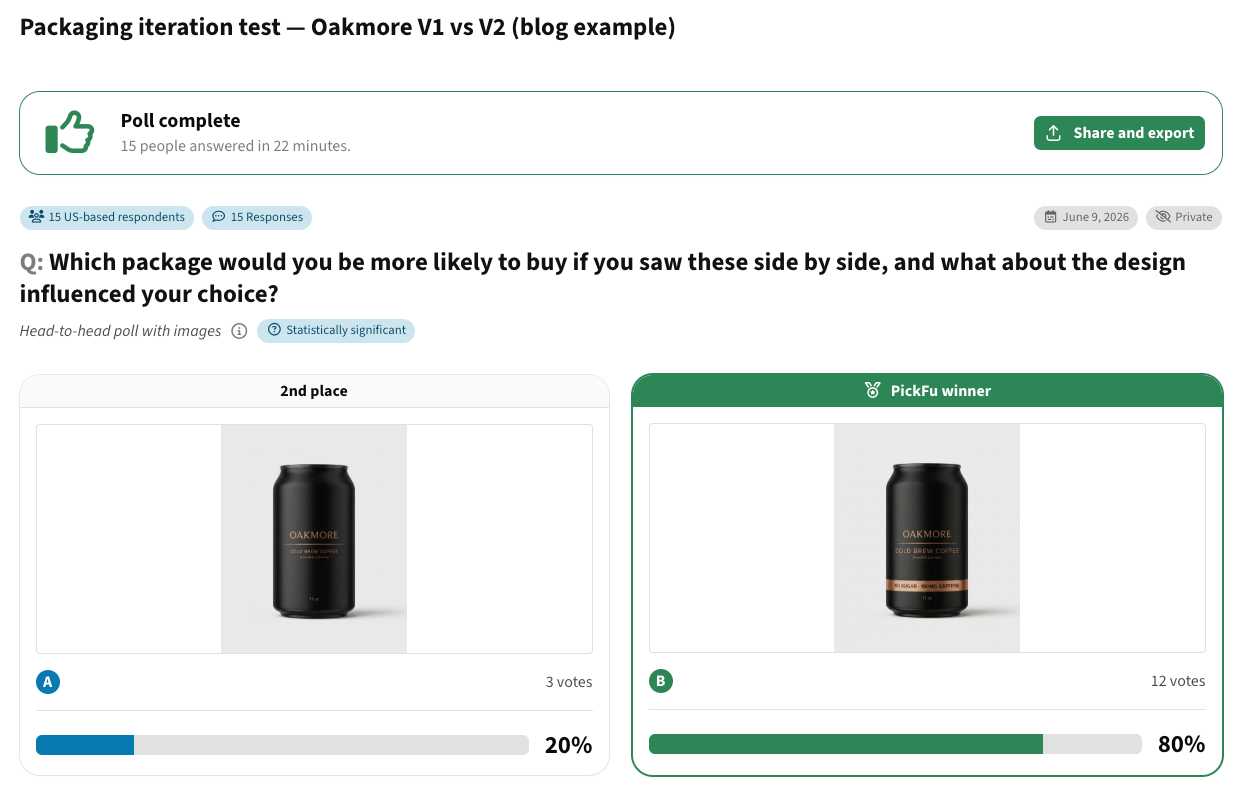
📊 Survey example: Packaging iteration test — Oakmore V1 vs V2
Two versions of a cold brew can, 15 US respondents, one question: which would you be more likely to buy, and what about the design made you choose it? V2 won 12–3 on the strength of one element, a copper band carrying "no sugar" and the caffeine count. "The metallic highlights look more premium, and B has helpful information about what's actually in the drink," one respondent wrote. The three holdouts are worth reading too. "I like the simple or basic premium look of this product," said one. "It tells me that it's high quality." So the lesson isn't only to add the information. Add it without losing the finish that a fifth of shoppers responded to.
What is usability testing?
Usability testing asks representative users to complete realistic tasks with a website, app, or prototype while researchers watch what happens.
The value sits in the gap between what people say and what they do. Someone will call an interface simple and then fail to find a feature. Someone else will sail through a task while worrying out loud about pricing or what happens after they click.
Common usability metrics include task completion, time on task, first-click success, errors, navigation paths, and perceived difficulty. Those numbers get a lot more useful with qualitative context attached. That's also the distinction behind user testing versus usability testing.
How we evaluated these UserTesting alternatives
This comparison is organized around the research question each platform answers rather than a feature count. We reviewed each vendor's own product and pricing documentation in September 2026, looking at moderated and unmoderated testing, prototype and website testing, mobile research, participant recruitment, screening and targeting, recording and transcription, first-click and five-second testing, card sorting and tree testing, diary research, behavioral analytics, whether you can bring your own participants, pricing structure, and best-fit workflow.
Pricing and capabilities change constantly, so check current plan details before you buy.
PickFu: best for rapid consumer and concept validation
PickFu sits next to traditional usability platforms rather than replacing one.
It's a consumer insights platform with a built-in audience. You test ideas with real people in your target market and get quantitative results plus written explanations. Nearly every question type asks respondents to say why they chose what they chose, so you learn the reasoning, not just the split. Those survey responses are the part teams tend to quote back in design reviews.
That's most useful right before an expensive creative or product decision. An ecommerce company has three package designs. An app team is picking between two store screenshots. A SaaS company has four homepage concepts and hasn't built any of them. None of those teams needs to watch someone complete a task. They need directional evidence about what deserves the next round of investment.
Teams use PickFu for:
- Package design testing
- Product image and image-stack tests
- Logo and design testing
- Brand name tests and product naming
- Headlines, slogans, and positioning
- App store screenshot and icon testing
- Business names and Logos
- Ad creative concepts
- AI creative testing
- Mockup testing and early prototype market validation
PickFu began in 2008, when co-founders Justin Chen and John Li built the first version to settle an argument inside another business they were running. It's been a consumer insights product for a long time since.
One more thing that matters in 2026: PickFu's respondents are real, verified people, with quality checks on both the respondent and the answer. That's a live question for buyers now that some research products generate responses computationally, and it's worth asking any vendor on this list how their participants are verified.
A workflow that tends to work:
Create concepts → validate direction with consumers → build the stronger concept → run usability testing → launch → measure real behavior.
PickFu improves what reaches usability testing. Maze, UserTesting, or Userlytics can then find out whether people can actually use what got built.
Where PickFu is less suitable
PickFu is digital consumer research. It doesn't replace a task-based usability platform when you need to watch someone move through a complex workflow, run technical testing, or hand a participant a physical sample. You also can't ask respondents to download an app, create an account, or make a purchase as part of a survey.
The point isn't to force PickFu into methods it wasn't built for. It's to use it where consumer judgment is the evidence you need.
Maze: best for rapid prototype and website testing
Maze suits teams that want research to stay close to the design process. It supports prototype testing and live website testing. Website tests capture journeys through live URLs, while prototype tests hand participants a task and record how they move through a design. Maze has also expanded into interviews, card sorting, AI-supported analysis, and participant recruitment.
A team redesigning signup can put a Figma prototype in front of participants before engineering commits to the flow. If people keep taking an unexpected route, the design changes while changing it is still cheap.
The caution: interaction metrics don't explain motivation. A failed task tells you something went wrong. Open-ended feedback or an interview tells you why.
Lyssna: best for focused design research
Lyssna was UsabilityHub until October 2023, when it rebranded and expanded past its original five-second testing product. Its suite now covers first-click testing, five-second testing, preference testing, prototype testing, card sorting, tree testing, surveys, think-aloud studies, and user interviews.
First-click tests ask where someone would click first to complete a task — "Where would you go to update your billing address?" When people consistently pick the wrong destination, the problem is usually the label or the hierarchy, not the visual design.
Five-second tests show a design briefly, then ask what someone remembers or understood. Useful for landing pages, ads, hero sections, and packaging, where the first impression is most of the decision.
Preference tests ask participants to choose between design variations against a stated criterion. They narrow creative directions well, but preference and performance aren't the same thing. People can prefer a design and still struggle to use it. That's why preference testing usually belongs before a task-based study, not instead of one.
Lookback: best for moderated qualitative research
Lookback is for researchers who want to see and hear participants while asking follow-up questions. It supports moderated and unmoderated sessions, and researchers can observe live, review recordings, build findings and reels, and invite observers.
Adaptability is the advantage. Someone testing a checkout flow stops before placing the order. An unmoderated study records the pause; a moderator asks what they're looking for. The participant says they aren't sure whether the payment gets taken immediately. The finding just moved from "checkout interaction problem" to "payment communication problem."
Lookback's in-product recruiting is powered by a User Interviews integration, and its public pricing runs on annual plans plus session and recruitment usage. Moderated research costs researcher hours, so it earns its keep when the probing is the point.
Userlytics: best for a broad traditional UserTesting replacement
Userlytics is one of the more direct swaps for teams that want to keep the familiar remote usability testing model. It handles moderated, unmoderated, and quantitative studies across websites, mobile apps, and prototypes. You can recruit from its panel or bring your own participants, and depending on plan you get transcripts, card sorting, tree testing, highlight reels, and analysis tools.
That matters when the research method isn't the problem. If a team is already comfortable writing tasks, recruiting, reviewing recordings, and sharing clips, moving to a platform with the same shape is far less disruptive than switching methodology.
Userbrain: best for straightforward unmoderated testing
Userbrain concentrates on unmoderated testing. Participants complete tasks while their screen and audio record, which gives you think-aloud feedback on websites, apps, and prototypes. It also includes transcripts, AI-supported analysis, automated reports, screening, and its own panel.
The narrow model is the point for smaller teams. A product manager who wants five people to attempt a checkout flow doesn't need a research repository or a governance system. The simpler the workflow, the more often a team actually repeats it. Userbrain also lets you invite your own participants, which helps when you already have customers worth hearing from.
PlaybookUX: best for several research methods in one platform
PlaybookUX covers a wide range of qualitative and quantitative work: moderated interviews, unmoderated testing, surveys, card sorting, tree testing, first-click tests, five-second tests, preference tests, session replays, and participant recruitment. Its panel includes both consumers and professionals.
Breadth cuts down on tool switching. An agency or a mature research team might otherwise pay for one platform to recruit, another to interview, a third for information architecture, and a repository on top. The tradeoff is straightforward: don't buy methodological breadth you'll use one corner of.
UXtweak: best for a broad self-service UX toolkit
UXtweak pulls most common UX research methods into one place: card sorting, tree testing, preference tests, five-second tests, surveys, session recording, interviews, mobile app testing, first-click testing, prototype testing, website testing, and several recruitment options.
That fits teams whose questions change across a development cycle. A redesign might start with card sorting, move to tree testing, continue into prototype testing, and end up in session recording after launch. If all you need is occasional preference feedback, though, that's a lot of research infrastructure to carry.
Optimal Workshop: best for information architecture
Optimal Workshop, which now often shortens its name to Optimal in its own marketing, has been the information architecture name for years, card sorting and tree testing especially. The platform has grown well past that. Current plans include usability testing, prototype testing, live-site testing, interviews, recordings, card sorting, surveys, tree testing, first-click testing, and recruitment.
Card sorting shows how people naturally group information. Tree testing checks whether they can find things in a hierarchy you've already built. Together they answer two separate questions: how do users expect this to be organized, and can they find what they need in the structure we made?
That combination is what makes Optimal Workshop relevant when findability is the actual problem.
Dscout: best for diary and longitudinal research
Some experiences can't be understood in one session.
Dscout specializes in research that captures behavior over time. Diary studies can run multiple activities and collect photos, videos, screen recordings, and written responses as people move through real situations. It also supports interviews and usability studies.
Take a productivity app trying to work out why people stop using reminders. An interview at the end of the month depends on memory. A diary study captures what happened around each reminder while it's still fresh. Different evidence entirely.
Dscout isn't really a replacement for a quick usability session. It's an addition to the method list when context and time are part of the question.
Contentsquare: best when you already have website traffic
Hotjar used to be the obvious name in this category, and in 2026 that recommendation needs updating. Hotjar merged into Contentsquare and new customers sign up there instead. The heatmaps, session replay, and surveys people associate with Hotjar now sit alongside funnels, error monitoring, performance monitoring, and the rest of Contentsquare's experience analytics.
This is a different research model from UserTesting. Rather than recruiting participants and assigning a task, you study what actual visitors are already doing.
A session replay might show people bouncing between pricing and feature pages before abandoning signup. That observation is a research question, not an answer. A usability test or an interview then investigates why the pattern exists. Behavioral analytics tell you where to look; recruited research helps explain what you find.
Useberry: best for lightweight prototype and website research
Useberry runs research across prototypes and live sites with first-click testing, five-second testing, preference testing, questionnaires, recordings, and moderated interviews. You can recruit from its participant pool or bring your own audience.
It suits designers who want to test early without standing up a research process first. That puts it in the same bracket as Maze and Lyssna in one important way: research happens before engineering has sunk time into the experience.
User Interviews: best when recruitment is the real problem
Sometimes the testing platform isn't the bottleneck. Finding the right people is.
User Interviews specializes in participant recruitment, screening, scheduling, and incentives, with a network of millions of consumers and professionals and detailed professional targeting. That matters most for niche B2B work — finding general online shoppers is nothing like finding finance directors at mid-market construction firms who use a specific accounting system.
One update this comparison needs: UserTesting acquired User Interviews in January 2026, and in August 2026 launched Advanced Targeting, which brings the User Interviews network into the UserTesting platform. User Interviews says it remains a standalone, tool-agnostic product, and that customers aren't required to adopt or migrate to UserTesting. Still, if your reason for shortlisting User Interviews was independence from UserTesting, that reason is weaker than it was a year ago.
Other UserTesting alternatives worth considering
Several smaller platforms cover parts of the same ground and are worth a look if nothing above fits: Loop11 for unmoderated usability testing and benchmarking, Trymata for usability testing paired with product analytics, Sprig for in-product surveys and continuous discovery, Userfeel for multilingual tester panels, and TryMyUI for unmoderated testing with its own tester pool. UserZoom turns up on a lot of older lists; it's now part of UserTesting, and UserTesting is guiding UserZoom users toward the broader platform.
Feature comparison of UserTesting alternatives
UserTesting alternatives pricing comparison
Pricing is hard to compare because these platforms charge for different things. A subscription may or may not cover participant recruitment, incentives, seats, study limits, recordings, transcription, or advanced analysis.
These public prices were checked in September 2026.
How to choose the right UserTesting alternative
Start with the decision, not the software. Ask what evidence would actually change your next move.
A research stack can use several of these at once. A product team might compare early concepts in PickFu, evaluate the prototype in Maze, study post-launch behavior in Contentsquare, and book interviews when something unexpected shows up. They aren't competing when they answer different questions.
Common mistakes when choosing a UserTesting alternative
Choosing on price alone. The cheapest subscription isn't the cheapest research process. A tool that saves money and adds manual recruiting, scheduling, or analysis gets expensive fast. Compare the cost of getting a useful answer.
Ignoring participant fit. A well-designed study with the wrong participants produces weak evidence. Recruit people who reasonably resemble whoever will use, influence, or buy the product. In B2B that means job role, company size, industry, and product experience matter more than broad demographics.
Confusing preference with usability. A preference test asks which option someone chooses. A usability test asks whether they can use it. Those findings can point different directions. Use preference research to narrow concepts, then usability testing to check the result works. Running both as sequential split tests is cheaper than betting on one.
Waiting until the product is expensive to change. Research gets harder to act on once a team has already spent on engineering, production, or media. Concept research, mockup testing, first-click tests, tree testing, and prototype testing all create earlier places to learn. That doesn't remove the need for post-launch measurement. It just cuts down how many avoidable problems get that far.
Frequently asked questions about UserTesting alternatives
What are some platforms similar to UserTesting?
Userlytics, Lookback, PlaybookUX, UXtweak, Maze, Userbrain, Useberry, and Optimal Workshop all cover parts of the remote UX research workflow. The closest match depends on whether you need moderated interviews, unmoderated usability testing, participant recruitment, prototype testing, information architecture research, or enterprise research operations.
PickFu and Contentsquare are less direct replacements. PickFu handles consumer concept and preference research; Contentsquare analyzes behavior from live traffic.
What are the most cost-effective alternatives to UserTesting?
For low-commitment testing, PickFu (from $1 per response, $15 per survey), UXtweak's free Starter plan, Useberry's free plan, and Lyssna's free plan all let you run something useful without an annual contract. Userbrain's $49/month Starter and Optimal Workshop's $199/month Starter are the cheapest paid entry points for recorded usability testing and information architecture research respectively. Remember that participant costs often sit outside the subscription.
What is the difference between PickFu and UserTesting?
UserTesting is built around observing how people experience products, websites, prototypes, and customer journeys. PickFu is a consumer insights platform built around asking real people in a target audience what they think of products, ideas, creative, and messaging. They choose or rate an option and explain their answer in writing.
Use PickFu when the uncertainty is about perception, preference, clarity, or concept direction. Use task-based usability research when the uncertainty is whether someone can successfully use the thing.
Is Maze a UserTesting alternative?
Yes, when the main need is rapid product, prototype, or website research. Maze supports prototype testing, live website testing, interviews, and participant access. It isn't a one-for-one replacement for every enterprise research operation UserTesting offers.
What are the best alternatives for moderated user research?
Lookback, Userlytics, PlaybookUX, and Dscout all support live moderated studies, as do several broader platforms. Moderated research earns its cost when you expect to ask follow-up questions, explore motivations, or chase something unexpected mid-session.
Which UserTesting alternative is useful for information architecture?
Optimal Workshop is the specialist for card sorting and tree testing, though UXtweak, PlaybookUX, and UserTesting itself all support information architecture research. Choose based on whether IA is your main research program or one method you reach for occasionally.
What if participant recruitment is the main problem?
Look at the recruitment model before you replace the testing environment. User Interviews specializes in recruiting and screening, especially for professional or niche audiences, and UserTesting now reaches that network through Advanced Targeting. Lookback, Userlytics, Maze, Lyssna, PlaybookUX, and Dscout all offer recruitment too.
Do you need a UX researcher to use these tools?
Not always. Most of these products are built for product managers, designers, marketers, and founders to run focused user testing themselves.
Research expertise matters more as study design gets complicated. Sampling, sensitive topics, statistical interpretation, tricky screeners, high-stakes decisions, and mixed-method work all go better with an experienced researcher involved.
Match the research method to the decision
Not every uncertainty deserves a full recorded usability study.
Prototype testing tells you whether an experience works. Moderated interviews get at the reason behind a behavior. Card sorting and tree testing handle information architecture, diary studies cover experiences that unfold over time, and behavioral analytics take over once real traffic exists.
When the decision is which package, image, logo, message, creative direction, or early product concept lands with the people you want to reach, that's consumer research — and it belongs before the money goes out.
Create your free PickFu account and put your next product or creative decision in front of real people in your target audience.