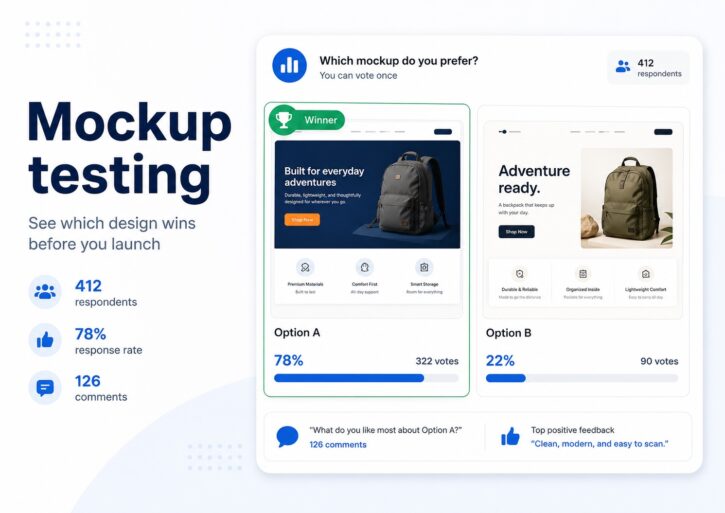
Mockup testing helps you collect feedback on a visual or written concept before it is finalized. A mockup can be a product design, packaging concept, website layout, app screen, logo, ad creative, book cover, Amazon listing image, e-commerce product page, or any early version of an idea that needs audience validation before launch.
The fastest way to do it is to put your options in front of real people who match your buyers. With PickFu, a consumer research platform built for exactly this kind of decision, you upload two or more mockups, choose the audience you want to hear from, and get votes plus written feedback from verified human respondents who match it, typically 50 to 100 people, with answers coming back in hours, not weeks. Instead of choosing a design because your team likes it, you see which mockup your audience finds clearer, more trustworthy, more professional, more appealing, or more likely to make them click, buy, download, or learn more.
Quick summary
Mockup testing is the process of showing people an early visual version of something before you fully build, print, publish, manufacture, or launch it. It gives teams a way to reduce risk before decisions get expensive. A mockup might be a website mockup, mobile app screen, product render, packaging mockup, poster mockup, book mockup, billboard mockup, bottle mockup, logo concept, Amazon image, storefront design, or app store screenshot.
The value is simple. Mockups often look good to the people who made them, but real customers notice problems the internal team misses. They may find the headline unclear, the visual hierarchy confusing, the product image unconvincing, the label hard to read, the logo unprofessional, or the app screen harder to use than expected.
PickFu turns subjective design debates into audience-backed decisions. You compare mockups, target the people most likely to buy or use the product, and read survey responses that explain why one version works better than another. The winning percentage gives you direction. The written feedback is usually where the real insight lives.
Put plainly, mockup testing turns “which version do we like?” into “which version does our audience prefer, and why?”
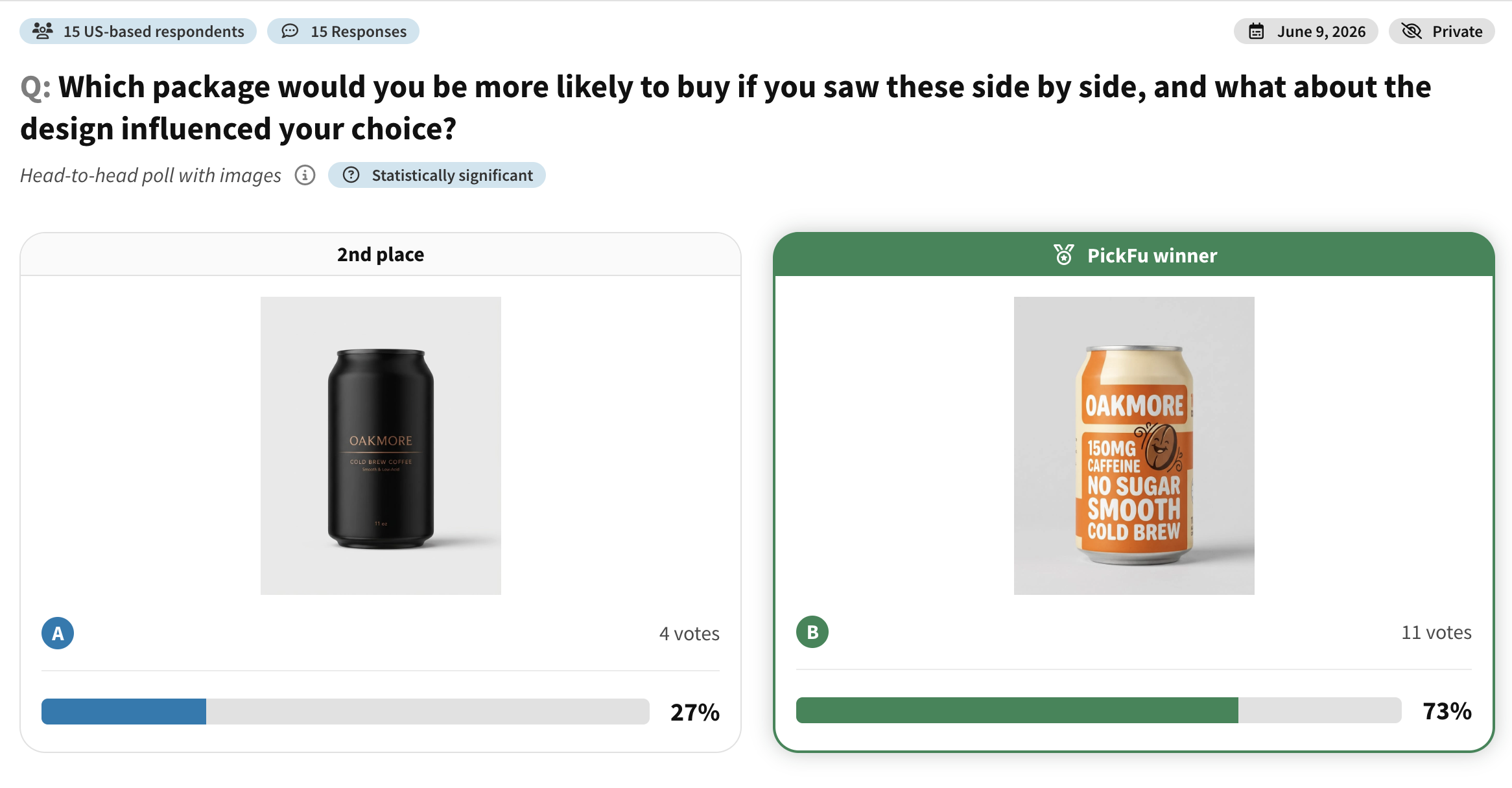
📊 Survey example — packaging mockup test: We compared two cold brew can designs for a sample brand we’ll call Oakmore with 15 U.S. shoppers. See how the two designs stacked up.
What the results showed:
- Design B won decisively, taking 11 of 15 votes (73%).
- Shoppers picked B because it was brighter, more descriptive, and easier to read at a glance: “I like how bright and cheerful B appears, it would make me excited to drink,” and “Option B is more descriptive. Option A gives no information about the product.”
- The four shoppers who chose A liked its premium feel (“it feels silky and luxurious”), a reminder that a losing design can still hold an idea worth keeping.
What is mockup testing?
Mockup testing means collecting feedback on a visual or written concept before it is finalized. The term shows up across design, marketing, e-commerce, software, product development, architecture, and construction, but the underlying idea is the same: build a realistic enough version of the concept so people can react to it before the final version exists.
People search for “mockup testing,” “mock up testing,” and “mock-up testing.” In most marketing and product design contexts, “mockup” is written as one word. “Mock-up” with a hyphen is still accepted, especially in formal or construction-related writing. The spelling matters less than the purpose. You’re using an early representation to learn before you commit.
A mockup sits between an abstract idea and the finished thing. It’s more concrete than a strategy doc, a sketch, or a wireframe, but it may not be as functional as a prototype. A wireframe usually shows structure. A mockup shows how something will look. A prototype shows how something will work. Mockup testing helps you check whether the look, message, layout, or concept makes sense to the people you care about.
Mockup testing can answer questions like:
- Which design is more appealing?
- Which concept is easier to understand?
- Which version feels more trustworthy?
- Which mockup looks more professional?
- Which option is more likely to make someone click, buy, download, or learn more?
- What’s confusing or unconvincing about the design?
That last question is often the most useful. A winning mockup tells you which option people prefer. The comments tell you what to fix before launch.
Why mockup testing matters
Mockups often look good inside a design file, a pitch deck, or an internal meeting. That doesn’t mean they’ll work in the real world. Customers see designs quickly, with less context, less patience, and more competing options than the team reviewing the file.
A founder looks at a website mockup and sees a clear value proposition, because they already know the product. A first-time visitor sees the same page and wonders what the company actually does. A designer picks a beautiful color palette for packaging mockups, and shoppers struggle to read the flavor or understand the benefit. A product team loves a mobile app user interface, and new users don’t know where to tap next.
Mockup testing catches those gaps before they get expensive. Found before production, the fix might be a headline change, a stronger image, a clearer label, a different CTA, or a cleaner visual hierarchy. Found after launch, the same fix can mean wasted ad spend, a lower conversion rate, inventory risk, design rework, or lost customer trust.
| Benefit | Why it matters |
| Reduce risk | Catch problems before launch |
| Compare options | Choose between design directions |
| Improve clarity | Find out whether people understand the concept |
| Increase confidence | Make decisions based on audience feedback |
| Avoid internal bias | Get independent opinions outside your team |
| Save money | Fix issues before production or development |
| Improve conversion potential | Choose the option more likely to drive action |
So mockup testing belongs earlier in the process than many teams think. It shouldn’t only happen after everyone has fallen in love with one direction. It should happen while the decision is still flexible enough to improve. To see how a single test fits into a bigger decision, PickFu’s guide on how testing works walks through the basics.
How to test a mockup with PickFu
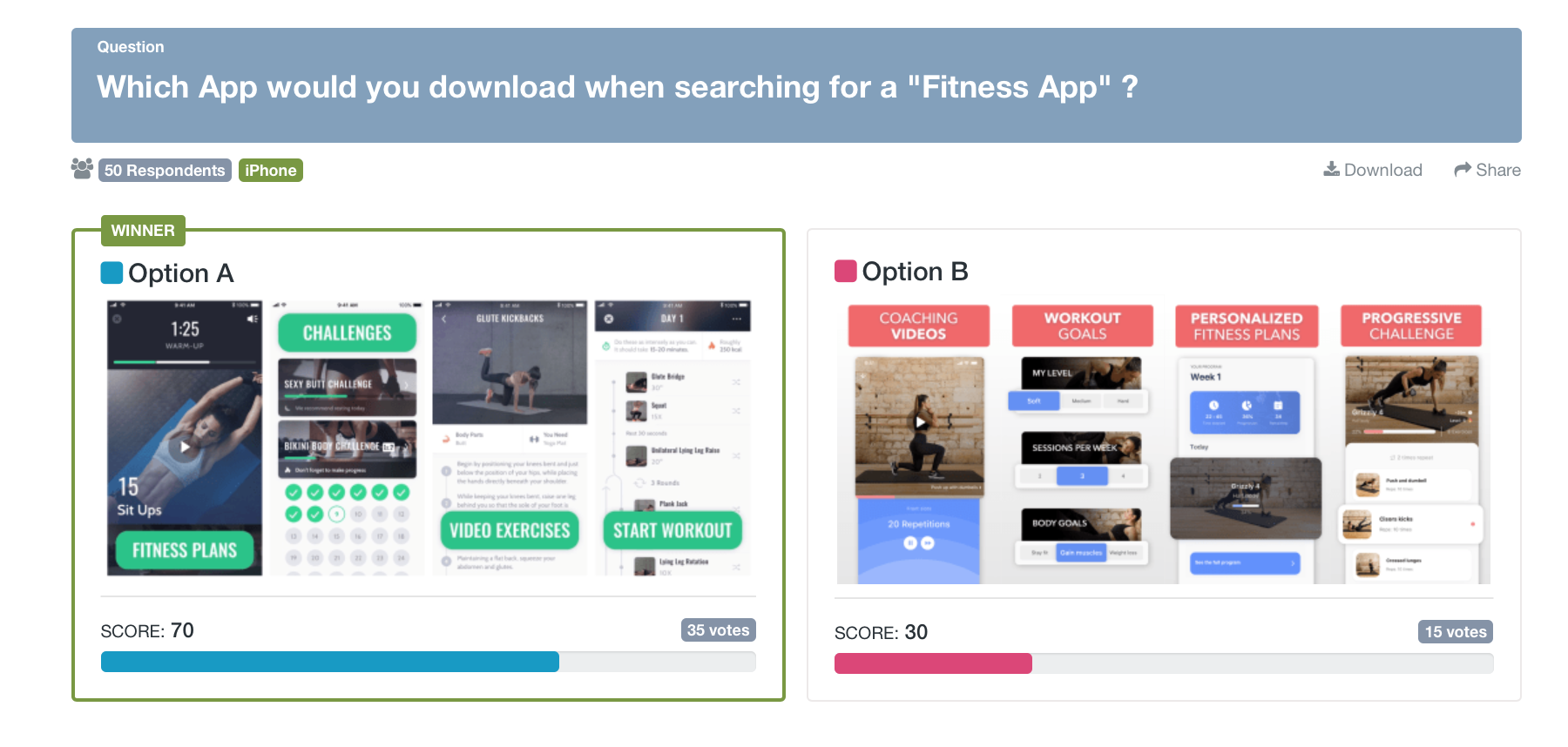
PickFu is useful when you need fast feedback on mockup options and want to understand not just which version wins, but why people prefer it. The workflow is simple enough for founders and marketers and structured enough to support real product and design decisions.
Start by uploading your mockup options. These might be two product mockups, three packaging concepts, a homepage design and a variant, two app onboarding screens, competing Amazon listing images, a poster mockup, a book cover, a logo concept, or ad creative. If you’re testing visual assets, make the mockups realistic enough that respondents can react to them as if they were seeing the final version.
Next, choose your target audience. This is where informal feedback usually breaks down. Asking friends or coworkers is easy, but they may not resemble your actual buyers. PickFu lets you select respondents who match your likely customers, users, readers, shoppers, or buyers.
Then ask a focused question. Instead of “which is better?” ask which mockup is clearer, more trustworthy, more appealing, more professional, more likely to be clicked, or more likely to be purchased. The sharper the question, the more useful the feedback.
Finally, review the votes and the written user feedback. The vote result shows where preference leans. The comments explain what respondents noticed, misunderstood, liked, distrusted, or found confusing. Use the patterns to improve the mockup, then retest if the changes are significant.
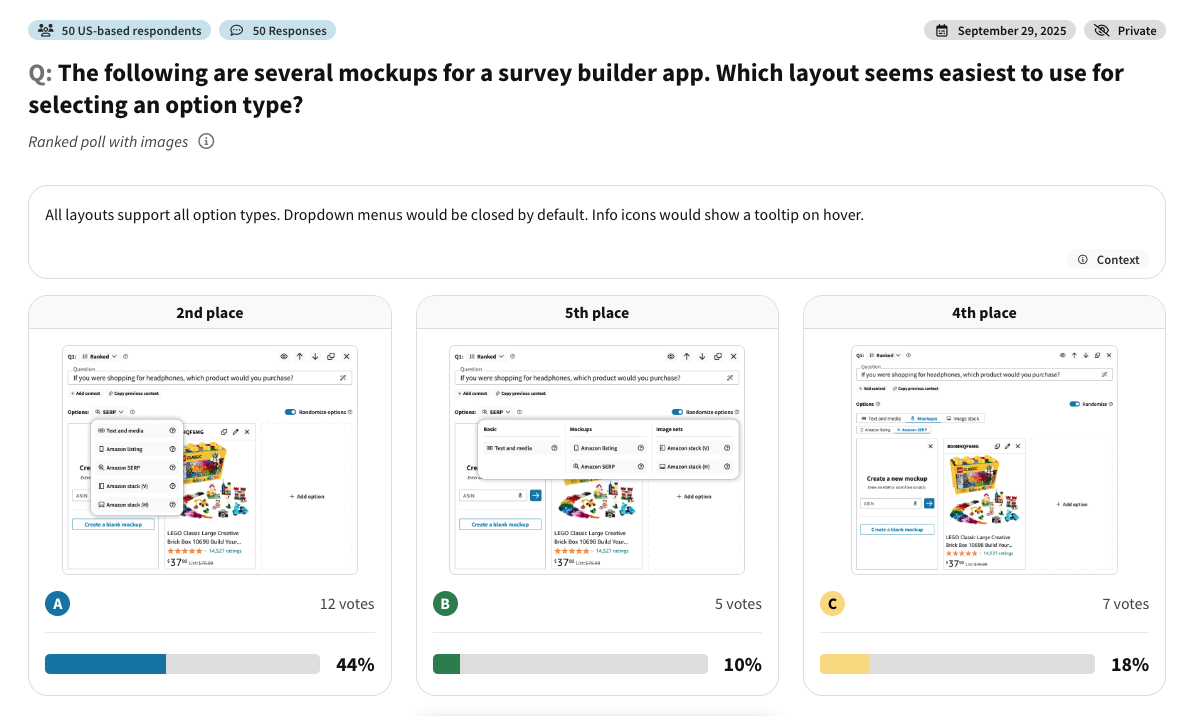
📊 Survey example — app mockup test: PickFu’s own team used this exact process on our product. We showed 50 U.S. respondents six UI mockups for the survey builder and asked which layout was easiest to use. See which layout people found clearest.
What the results showed:
- Layout E won with 56% of the ranked vote, ahead of a familiar dropdown layout at 44%.
- People preferred E because it showed every option up front with clear radio buttons: “I like E and D best as they show all the choices and one just has to select the best button option, not find a hidden or less obvious menu.”
- The comments also surfaced a fixable problem nobody on the team had clocked. The term “SERP” confused several respondents, the kind of detail a vote count alone would never reveal.
What types of mockups can you test?
Mockup testing applies to almost any customer-facing decision where visual presentation affects trust, clarity, or action. The most commercially relevant use cases tend to sit across e-commerce, product development, advertising, branding, and digital experience design.
| Mockup type | What to test | Example question |
| Product mockup | Design, color, shape, features | Which product would you be more likely to buy? |
| Packaging mockup | Label, box, claims, shelf appeal | Which package looks more trustworthy? |
| Website mockup | Hero section, layout, headline, CTA | Which page makes the product easier to understand? |
| App mockup | Screen layout, onboarding, navigation | Which screen feels easier to use? |
| Ad mockup | Image, headline, CTA, offer | Which ad would you be more likely to click? |
| Logo mockup | Symbol, typography, color | Which logo looks more professional? |
| Book cover mockup | Title, cover art, genre fit | Which cover would you be more likely to pick up? |
| Amazon listing mockup | Main image, infographic, A+ content | Which image makes the product more appealing? |
| E-commerce PDP mockup | Product gallery, trust signals, layout | Which product page gives you more confidence to buy? |
| Email mockup | Design, subject line, CTA | Which email would you be more likely to open or click? |
This is also where mockup testing overlaps with related research. Package design testing helps teams choose between labels, boxes, bottles, or claims before printing. You can watch it play out in a honey bottle packaging test. You can test company logo decisions before committing to a brand identity, and broader logo and design testing can compare colors, typography, symbols, and taglines. App store screenshot and icon testing helps mobile teams pick the screenshots most likely to drive downloads.
For e-commerce sellers, building a realistic listing mockup doesn’t require Photoshop. PickFu’s Amazon mockup tools let you create up to eight editable listings with custom product images, titles, prices, star ratings, and review counts. You can import a real product by ASIN or Amazon URL, or build a hypothetical one from scratch, then show each option as an individual listing or inside a simulated search results page. That way shoppers react to your product the way they would while actually browsing, not in isolation.
AI has expanded how many mockups teams can create. With AI creative testing, you can generate several creative directions quickly, then use PickFu to validate which ones real people actually understand and prefer. That matters because polished AI output can still feel generic, unrealistic, or off-brand.
This is the case for human-in-the-loop product research for AI: use AI to create more options, and use real people to decide which ones deserve to move forward.
Mockup testing across digital, physical, and built environments
Most marketers think of mockup testing as a digital or e-commerce process, but the term has a longer history. In construction and architecture, a pre-construction mockup is used to evaluate a building envelope, curtain wall, water penetration, thermal cycling, installation quality, and field testing requirements before the full system is built. There, mockup testing looks more like performance testing, because the mockup gets measured against physical standards. Testing labs run exactly this kind of work; UL Solutions, for instance, describes its building envelope and façade mockup testing in those terms.
That sounds far from an e-commerce product image or a website mockup, but the principle is the same. A team builds a realistic representation before full commitment. The construction team wants to find problems before they spread across a whole building. The marketing team wants to find problems before a product, page, ad, or package reaches the market.
For business owners and marketers, the point is practical. Mockup testing reduces risk. Whether you’re testing bottle mockups, billboard mockups, macbook mockups, an iphone mockup, packaging mockups, or a storefront layout, the goal is to learn while the cost of change is still low.
Mockup testing examples
The clearest way to understand mockup testing is to watch it shape a real decision. These examples show how teams use audience feedback before launching, manufacturing, or spending budget.
Example 1: Packaging mockup test
A beverage brand has two cold brew can designs. Option A uses a minimal, dark layout with small flavor text. Option B uses brighter color, larger flavor naming, and a playful character illustration.
The question: which package would you be more likely to buy if you saw them side by side, and what about the design influenced your choice?
When we ran this with shoppers, Option B won 73% to 27%. Respondents could read the flavor faster and found the brighter design more inviting, while a few still preferred A’s premium, “silky and luxurious” feel. The lesson went beyond “colorful beats minimal.” It was really about shelf communication. The final package could keep A’s cleaner design language while borrowing B’s stronger flavor hierarchy.
Example 2: Website mockup test
A SaaS company has two homepage hero mockups. Option A leads with a clever headline and an abstract product illustration. Option B uses a direct headline, a product screenshot, and a clearer call to action.
The question: which version more clearly explains what this product does?
Imagine Option B wins because people can describe the product after a quick look, while A reads as more polished but leaves the clever copy doing too much work. The takeaway is that faster comprehension matters more than visual flourish here, and that insight usually shapes the company’s broader messaging, not just the page.
Example 3: Product mockup test
An e-commerce brand is choosing between three product colorways. The team prefers the most unusual color because it feels distinctive. Before ordering inventory, they test all three with likely shoppers.
The question: which product color would you be most likely to buy?
Picture the bold color getting attention while the more neutral color wins, because people can imagine using it more often. Several shoppers say the bold version would be fun as a limited edition but not their first choice. That splits the decision cleanly: the neutral color becomes the launch SKU, the bold one a smaller test batch or campaign asset.
Example 4: Book mockup test
An author or publisher has three book mockup options for a fantasy novel: character-led, symbol-led, and landscape-led.
The question: which cover would you be most likely to pick up if you saw it online or in a bookstore?
A character-led design often wins with genre readers because it signals the category fastest, while an elegant symbol-led option can read as literary fiction instead of fantasy. The cover has to land on the right shelf before anyone admires it as a design object. You can see a real version of this in a book cover comparison for an Italian phrasebook, and authors can dig deeper on PickFu’s publishing page.
Example 5: App mockup test
A founder has a mobile app idea and wants to know whether the onboarding screen makes the value clear. The mockups are static screens first, not a clickable prototype.
The question: which onboarding screen makes you more interested in trying this app?
A version that explains the outcome in plain language usually beats one that leans on aspirational but vague copy. For founders wondering how to sell app ideas, that’s the lesson: people don’t only react to the idea, they react to how quickly the idea becomes understandable. PickFu’s app concept feedback example shows the same dynamic with real ratings.
Mockup testing question templates
Good mockup testing questions are specific. They should guide respondents toward the decision you need to make without pushing them toward the answer you want.
Preference. Which mockup do you prefer, and why? Useful early in the design process when you need a general read on which direction has more appeal.
Purchase intent. Which version would you be more likely to buy? Works for product mockups, packaging mockups, Amazon images, e-commerce PDP mockups, and physical product concepts.
Click intent. Which ad or page would you be more likely to click? Useful for ad creative, landing page mockups, social posts, search ads, or promotional graphics.
Clarity. Which mockup more clearly explains the product or offer? One of the strongest questions for SaaS, e-commerce, apps, and new product categories, because confusion is often the hidden conversion killer.
Trust. Which design feels more trustworthy? Useful for online stores, health and wellness products, financial products, premium goods, and any brand that needs credibility before conversion.
Professionalism. Which version looks more polished and professional? Works for B2B websites, software brands, agency pages, pitch decks, and test company logo decisions.
Brand fit. Which mockup feels more aligned with a premium brand? Useful when you’re testing whether a concept supports a higher price point or more refined positioning.
Shelf appeal. Which package would stand out more on a store shelf? Useful for package design testing, bottle mockups, food packaging, supplements, cosmetics, and beverages.
Usability. Which app or website screen looks easier to use? Useful for a mobile app, website mockup, user interface, wireframe, or prototype when the design needs to communicate a clear next step.
Objection discovery. What, if anything, feels confusing or unconvincing about this mockup? This one reveals what to fix. Often the fix is small. A clearer headline, a better product image, larger text, a stronger CTA, or a more realistic mockup can be enough.
A simple mockup testing process
Mockup testing works best as a decision process, not a popularity contest. The goal isn’t the prettiest design. It’s the version that better supports the business outcome.
Start by defining the decision. Are you choosing between creative directions? Improving clarity? Validating purchase intent? Hunting for trust issues? The question comes before the test.
Then create two or more mockup variations. You can build these in Figma, Canva, Photoshop, e-commerce design tools, AI image tools, or product rendering tools. Some teams start with psd mockups for early presentation; others create macbook mockups, iphone mockup screens, packaging mockups, bottle mockups, or storefront visuals to show the design in context.
Next, cut the obviously weak options. Testing too many low-quality mockups creates noisy results. Strong tests compare options that could realistically win.
After that, choose the audience. Testing baby product packaging? Talk to parents. A fantasy book cover? Talk to fantasy readers. A B2B SaaS homepage? Talk to business professionals or software buyers. The closer the audience is to your real market, the more useful the feedback.
Finally, read both the winning percentage and the comments. Don’t stop at which mockup won. The written feedback explains what confused people, what made one mockup more persuasive, and what to improve before launch.
Test mockups with the right audience
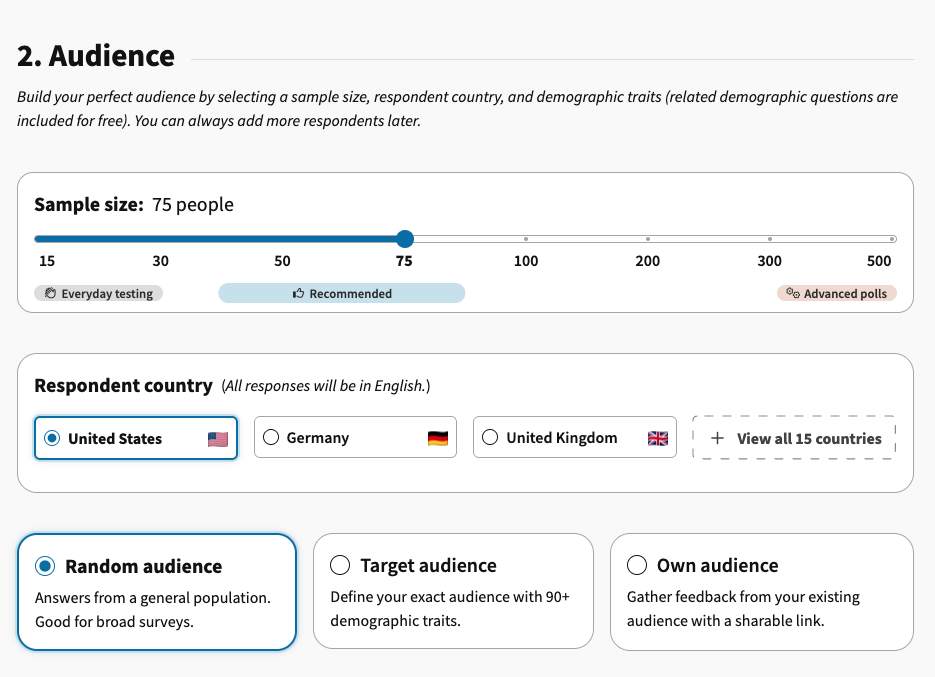
The best mockup feedback comes from people who resemble your target audience. A design that lands with one group may miss another. PickFu lets you choose respondents by relevant audience traits, so feedback is more useful than asking friends, coworkers, or social followers.
| Mockup | Recommended audience |
| Baby product packaging | Parents |
| Fitness app screen | People interested in health and fitness |
| Premium skincare label | Beauty and skincare buyers |
| B2B SaaS homepage | Business professionals or software buyers |
| Fantasy book cover | Readers of fantasy or fiction |
| Pet product packaging | Pet owners |
| Amazon product image | Online shoppers in the relevant category |
| Logo mockup | People in the intended target market |
| App store screenshot | Users of similar apps |
| Poster mockup | People interested in the event, category, or offer |
Audience targeting matters because feedback isn’t equally useful from everyone. A founder’s friend may love a design because they like the founder. A designer may judge the craft. A coworker may vote based on internal politics. A real target customer judges the mockup on whether it helps them understand, trust, and act.
This is also why the synthetic respondents vs real consumer feedback question matters. Synthetic respondents can help teams brainstorm or pressure-test early ideas, especially in AI-assisted workflows. But when the decision affects production, spend, inventory, or brand trust, feedback from real people in your target audience gives a stronger signal.
PickFu vs other ways to test mockups
There are several ways to test mockups, and each has a role. The right method depends on the decision, the timeline, the audience, and the level of confidence you need. Many teams come to PickFu looking for focus group alternatives that are faster and less constrained by geography.
| Method | Pros | Limitations |
| Internal team review | Fast and familiar | Biased, limited perspective |
| Friends and family | Easy to access | May not match target audience |
| Social media poll | Quick feedback | Audience may be skewed or biased |
| Designer feedback | Expert creative input | May not represent customers |
| Usability testing | Strong for flows and behavior | Often requires more setup |
| A/B test after launch | Real behavioral data | Requires traffic and live assets |
| PickFu test | Fast audience feedback with written explanations | Best used before, or alongside, live performance testing |
PickFu is useful before launch because it helps teams narrow options and improve creative before they invest in production, development, media spend, or inventory. It doesn’t replace every kind of research. If you need to watch people complete a task inside a product, usability testing fits better. If you need live conversion data, A/B testing is the move. If you need to test a fully interactive product, a prototype test will tell you more.
When the question is “which mockup is clearer, more appealing, more trustworthy, or more likely to drive action?”, that’s the decision PickFu is built for.
Mockups, wireframes, and prototypes
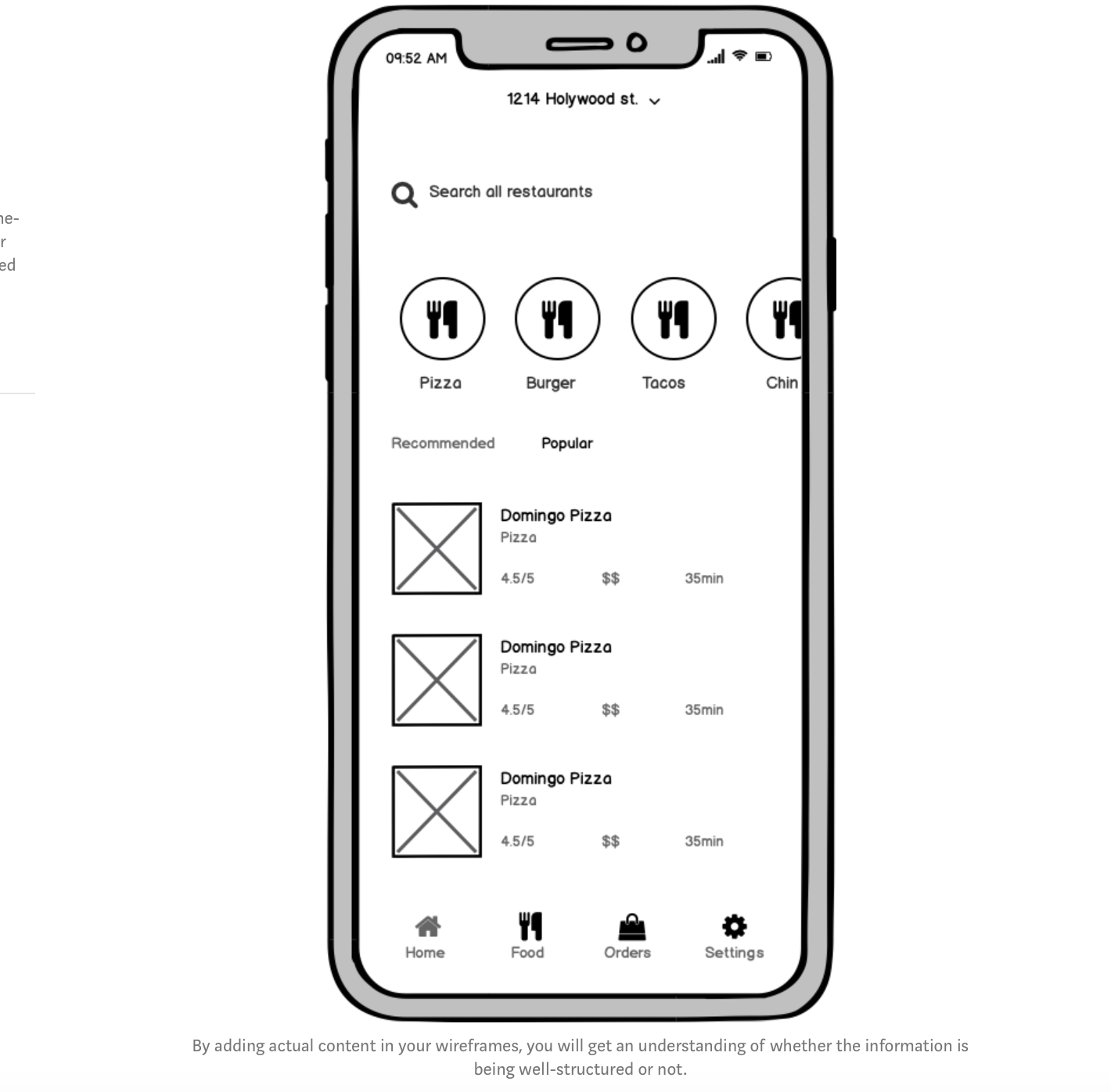
Mockups, wireframes, and prototypes are related, but they’re not the same. Knowing the difference helps you pick the right test.
A wireframe is usually a low-detail layout. It shows structure, hierarchy, and placement without finished visuals. It’s useful while the team is still deciding what belongs on the page or screen.
A mockup is more visually complete. It shows design direction, typography, color, images, copy, and layout. It may be static, but it gives people enough context to judge appeal, clarity, trust, and brand fit.
A prototype is usually interactive. It lets users click, tap, scroll, or move through a flow. It’s useful when you want to understand behavior, navigation, or usability.
Nielsen Norman Group’s research on prototype fidelity explains that the right level of detail depends on the test’s goals, how complete the design is, and the tools you’re using. Tools like Figma support clickable prototypes, which makes it easier to turn static screens into interactive experiences for usability testing.
For PickFu, static mockups are often enough when you want preference, clarity, trust, message comprehension, or purchase-intent feedback. If you need to know whether someone can complete a task, interactive usability testing is the next step.
How mockup testing supports product and brand decisions
Mockup testing is most useful when it connects to a real decision. A mockup isn’t just a design artifact, it’s a way to make an idea visible enough for people to react to.
A startup might use mockup testing for prototype market validation. Before building a full product, the team can test product concepts, app screens, landing page mockups, feature messaging, or pricing-page layouts. That doesn’t prove the whole business will work, but it shows whether people understand the promise and find it relevant.
A brand team might use it for a brand name test, to test business name options, test slogans, or run logo and design testing. The mockup adds context. A name feels stronger paired with a logo, a slogan reads differently on packaging, and a logo earns more trust on a real website or product label.
An e-commerce team might use mockup testing before Amazon split testing. Instead of testing every weak image live, the team uses PickFu to narrow down stronger product images, infographics, comparison charts, and A+ content concepts first, then takes the best candidates to market.
A content team asking how to create original content for GEO / SEO can use mockup testing too. They might test article titles, featured images, diagrams, comparison tables, or content angles before publishing. That helps them avoid generic AI-assisted content and back the piece with audience data instead.
Where can I post a survey?
If you’re asking where you can post a survey, the answer depends on the feedback you need. You can post a survey cost effectively with PickFu. You can also post a survey to your email list, customer community, LinkedIn audience, a Reddit community, a Slack group, a Discord server, a website popup, your social following, or your existing customer base. You can also use tools like Google Forms, Typeform, or SurveyMonkey.
The catch with those audiences is that they aren’t neutral. Existing customers already know your brand. Friends are too kind. Social followers may not match your buyers. Reddit users are honest but not always representative. Internal teams are biased by strategy and preference.
PickFu is useful when you want feedback from people outside your existing circle and closer to your target market. That makes the feedback more relevant for decisions where buyer perception matters.
Common mockup testing mistakes
The most common mistake is a vague question. “Which is better?” works for a quick preference check, but it won’t tell you whether the winner is clearer, more trustworthy, more premium, easier to use, or more likely to convert.
Testing too many options at once is another. Show respondents too many mockups and the feedback gets shallow. Several focused tests usually beat one overloaded test.
Teams also weaken tests by comparing mockups with different levels of polish. If one looks finished and the other looks rough, people may choose the polished version even when the underlying concept is weaker. Keep the options equally realistic.
Changing too many variables at once is a related trap. If one website mockup has a different headline, image, CTA, layout, and color palette, it’s hard to know what drove the result. Sometimes that’s fine, because you’re testing whole creative directions. But if you need to isolate one decision, keep the rest of the design consistent.
The biggest mistake is ignoring the written feedback. The winner matters, but the comments tell you what to improve. Sometimes the losing mockup has a stronger headline. Sometimes the winner has a trust issue worth fixing. Sometimes people prefer one option but say neither feels fully convincing. Mockup testing should drive better iteration, not just crown a winner.
What mockup testing can and cannot tell you
Mockup testing is a pre-launch decision tool. It helps teams pick stronger concepts and spot issues early, and it works best paired with live performance data when you have it.
Mockup testing can help you understand preference, clarity, trust, visual appeal, perceived value, message comprehension, purchase intent, click intent, and the reasons behind audience reactions.
It can’t fully guarantee final conversion rate, long-term brand performance, actual sales volume, production quality, in-market ad performance, or customer retention. A test can show that people prefer one package design, but not that it will sell through at retail. It can show that people trust one homepage mockup more, but not that it will fill your pipeline. It can show that one Amazon image feels more appealing, but it won’t replace marketplace performance data.
That limit isn’t a weakness. It’s a reminder to use mockup testing at the right stage, to avoid preventable mistakes before launch. After launch, combine the insight with analytics, A/B testing, sales data, reviews, and customer behavior.
Test your mockup with PickFu
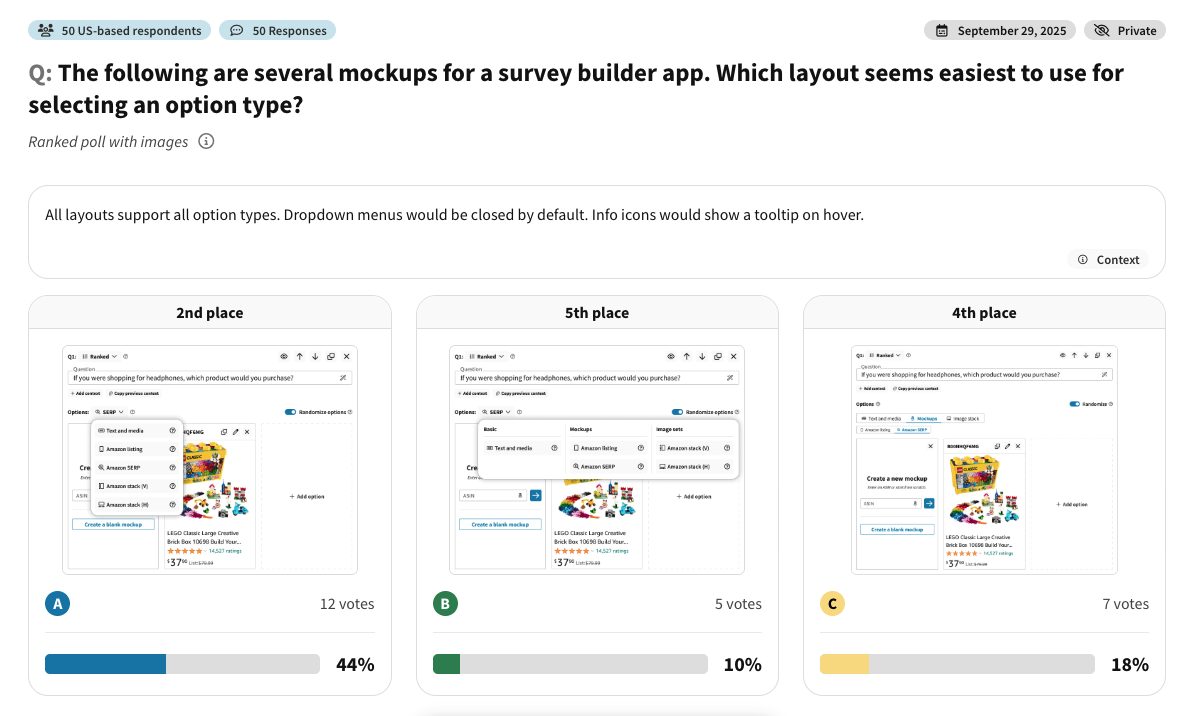
Have two or more mockup options? Upload them to PickFu and get feedback from real people before you launch. Compare designs, choose your target audience, and learn why respondents prefer one version over another.
📊 Survey example — Amazon SERP mockup test: We built four protein bar listings into a simulated Amazon search results page and asked 50 U.S. Amazon Prime shoppers which they’d click, and why. See which listing won the click.
What the results showed:
- Listing A won 40% of clicks, ahead of three competing listings in the same search-results view.
- Clicks followed clarity. Shoppers liked that A showed the actual bars and put nutrition facts front and center: “Very clear close up of both the box and the text and, more importantly, the actual bars.”
- Price and protein callouts pulled votes too. The cheapest listing and a “20g protein” headline each peeled off shoppers, a reminder that the main image isn’t the only thing competing for the click.
Use PickFu for product mockups, packaging designs, website layouts, app screens, ads, logos, book covers, Amazon images, storefront concepts, poster mockups, bottle mockups, and more. You can browse more first-party results in the PickFu examples gallery, or start from a use-case playbook.
Create your free PickFu account to run your first mockup test.
FAQ
What is mockup testing?
Mockup testing is the process of collecting feedback on a visual or written concept before it’s finalized. A mockup might be a product design, packaging concept, website layout, app screen, logo, ad, book cover, Amazon image, or e-commerce product page. The goal is to learn which version your target audience finds clearer, more appealing, more trustworthy, or more likely to drive action.
Why should I test a mockup?
Internal teams often miss issues that real customers notice right away. A mockup can look polished but still be confusing, untrustworthy, hard to read, off-brand, or less persuasive than another option. Testing catches those issues before you spend on production, development, media, printing, or inventory.
Can I test product mockups with PickFu?
Yes. You can test product mockups in PickFu, including colors, shapes, product images, packaging, labels, Amazon listing images, ads, and e-commerce product page layouts. You can ask which product people would be more likely to buy, which version looks more useful, or which mockup feels higher quality.
How many mockups should I test?
You can test two or more, but the best number depends on the decision. Choosing between two clear directions? Test two. Have several early options? Test three or more, then run a follow-up between the strongest versions. Avoid testing too many complex mockups at once, since too many choices make feedback less detailed.
What should I ask in a mockup test?
Ask a question tied to the decision you need to make — which mockup is more appealing, clearer, more trustworthy, more professional, more likely to be clicked, or more likely to be purchased. A strong question is specific. “Which product page gives you more confidence to buy?” beats “Which one is better?”
Is mockup testing the same as A/B testing?
No. Mockup testing usually happens before launch and collects audience feedback on concepts or designs. A/B testing usually happens after launch and compares live versions using real performance data. Mockup testing helps you decide which options are strong enough to A/B test later.
What is a mockup in software testing?
In software testing, a mockup is often a visual representation of a user interface before the final product is built. It shows screens, layouts, buttons, copy, and visual design without full functionality. It lets teams gather feedback on the interface before investing in development. If the design needs interaction, the next step is a clickable prototype.
What does mockup mean?
A mockup is an early representation of a design, product, page, screen, package, or concept. It shows what something will look like before the final version is produced, so teams can discuss, test, and improve ideas while changes are still easy to make.
What is the meaning of mock testing?
Mock testing means different things in different fields. In education or interviews, it’s a practice test. In product, design, and marketing, people sometimes use “mock testing” to mean testing a mockup before launch. In this article, mockup testing refers to collecting feedback on early visual or written concepts.
What is a mockup?
A mockup is a visual draft of something that hasn’t been finalized, like a website page, mobile app screen, product image, package design, book cover, logo, ad, storefront, or physical product concept. It’s useful because it makes an idea concrete enough to evaluate.
Which is correct, mockup or mock-up?
Both are used. In digital design, marketing, e-commerce, and software, “mockup” as one word is most common. In some formal, editorial, or construction writing, “mock-up” with a hyphen appears too. For SEO and readability, use “mockup” as the primary spelling while keeping “mock-up” and “mock up testing” as variations.
Is mock-up one word or hyphenated?
“Mock-up” is hyphenated. “Mockup” is the one-word version. Both are understandable, but “mockup” is more common in design and product marketing. The right choice depends on your audience and style guide.
What is a mockup image?
A mockup image shows how a design, product, package, app screen, website, book cover, poster, or ad will look in context. A logo on a storefront sign, a label on a bottle, or an app design inside an iPhone frame are all mockup images. They help people react to a concept in a realistic setting.
Why do mockup testing?
Mockup testing reduces risk before launch. It gives you feedback on clarity, trust, visual appeal, message comprehension, purchase intent, and design preference before the final version is built or published. It’s especially valuable when getting the decision wrong is expensive, like packaging, product images, app screens, website pages, ads, or brand identity assets.
What is the difference between mockups and wireframes?
A wireframe is usually a simple layout showing structure and hierarchy with minimal design detail. A mockup is more visually complete and shows color, typography, imagery, copy, and direction. Use wireframes while planning structure; use mockups when you want feedback on the visual and messaging direction.
How do mockups improve the testing process?
Mockups make an idea easier to evaluate. Instead of asking people to imagine a product, page, package, or screen, you show them a realistic version and ask for feedback. That helps respondents give specific comments about what they like, understand, trust, and find confusing.
How do mockups fit into the design and testing process?
Mockups usually come after early sketches or wireframes and before final production or development. They help teams evaluate visual direction, messaging, layout, and customer perception before committing. After mockup testing, teams may revise the design, build a prototype, run usability testing, or move into production.
How do mockups differ from prototypes in testing?
Mockups are usually static visual representations. Prototypes are often interactive and let users click, tap, scroll, or move through a flow. Use mockup testing for feedback on look, clarity, trust, or preference. Use prototype testing when you need to understand interaction, navigation, usability, or task completion.
How do mockups contribute to the design process?
Mockups make design decisions concrete. They reveal whether a concept works visually, whether the message is clear, and whether the audience reacts as expected. They bridge strategy and execution, so teams can test realistic options instead of debating abstract ideas.
How do I create clickable mockups for user testing?
You can create clickable mockups with tools like Figma, Adobe XD, Sketch, or InVision. In Figma, for example, you connect screens, set interactions, and share a clickable prototype with users. Clickable mockups help when you need to test navigation, onboarding, app flows, or website interactions. For static preference testing, a non-clickable mockup is often enough.
What is the difference between a mockup and a prototype?
A mockup shows what something will look like. A prototype shows how something will work. A mockup is usually static and good for testing visual direction, message clarity, and preference. A prototype is usually interactive and good for testing usability, flow, and functionality. In practice, teams often use both: mockups first to choose the strongest visual direction, then a prototype to test the experience.