
本文目前只有英文版。
发布于
Everything you can do with the PickFu Agent: your always-on research assistant
The PickFu Agent plans research, builds and launches surveys, generates images, runs synthetic tests, and analyzes results. Here's the full list, with prompts you can copy.
目录
Most people meet the PickFu Agent on a results page, ask it one question about their survey, and stop there. That's a good use of it, but it's a small part of what it does.
The Agent can take you from "I'm not sure what to test" to a finished survey, break down the results, and suggest what to do next. This post covers all of it, with prompts you can copy.
The short version. You can ask the PickFu Agent to:
- Plan your research: audience, question wording, survey setup, multi-step workflows
- Build and launch surveys to real people in your target audience
- Run a Synthetic Audiences test to narrow your options first
- Generate new image concepts to test, from scratch or variations of existing images
- Analyze results: votes, demographics, themes, and the comments worth reading
- Recommend what to do next: changes to make or future tests to run
- Organize related surveys with projects and tags
- Search your team's past surveys
- Find patterns across your survey results
- Answer questions about PickFu and research best practices
- Work the way you want it to – add instructions, permissions, spending limits, and custom skills for your team's workflows
What is the PickFu Agent?
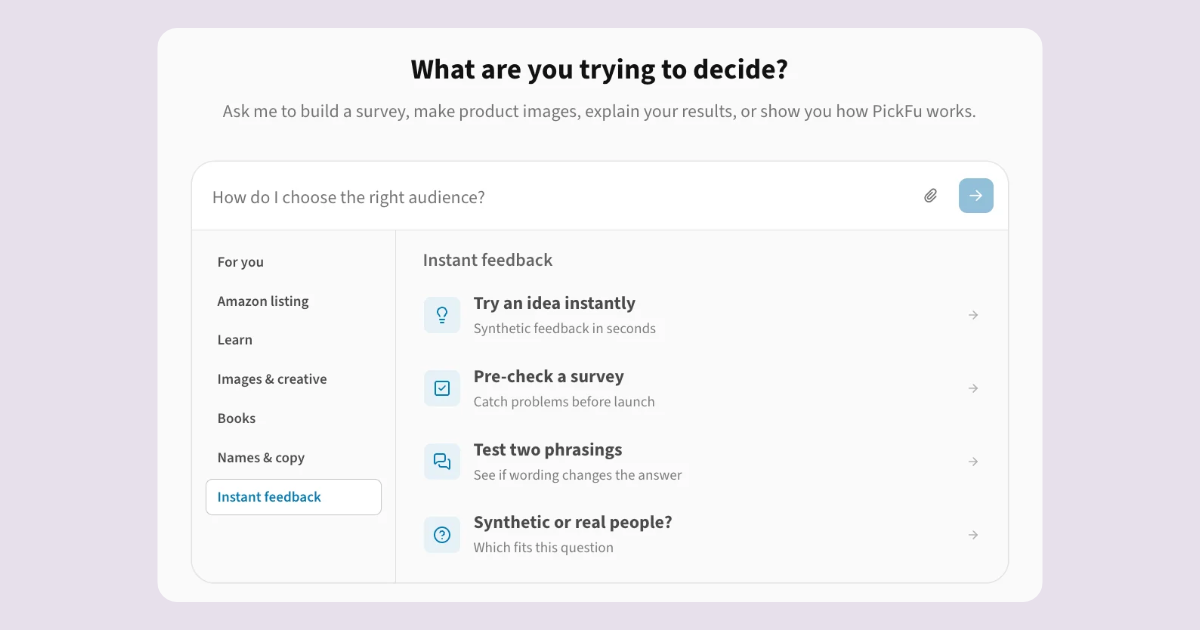
The PickFu Agent is a research assistant built into PickFu. Tell it what you want to do or learn in plain language, and it handles the research know-how: picking the right questions, finding the audience, setting up the survey, and making sense of the answers.
It's the same Agent wherever you use it:
- In the PickFu web app: on your dashboard, or in the Agent tab in the right sidebar.
- In Slack: tag @PickFu in a channel or thread, or send it a direct message. Learn how to install the Slack app.
- In ChatGPT: install the PickFu app from Plugins, then mention @PickFu in any chat. Learn how to install the ChatGPT app.
- In your other AI tools: connect PickFu to Claude, Cursor, Notion, and other tools through the PickFu MCP. Learn how to set up the MCP.
Chatting with the Agent is free on every account. You pay for the surveys you launch to real people, and some features (like image generation and synthetic tests) use platform credits. More on that in the FAQ.
Plan your research
You don't need to show up with a finished survey. Describe the decision you're trying to make and the Agent will suggest how to test it: which question type fits, who to ask, how many respondents you need, and how to word the question so you don't lead people toward an answer.
For bigger goals, it starts from a playbook. If you want more clicks on a marketplace listing, for example, it lays out the steps: baseline your main image against competitors, test variations, then validate the winner.
Try asking:
- "I'm choosing between three names for a protein bar aimed at runners. How should I test this?"
- "What audience should I target for a $60 dog bed?"
- "Walk me through testing an app store listing before launch."
- "Is this question biased? 'How much do you love our new packaging?'"
Build and launch surveys to real people
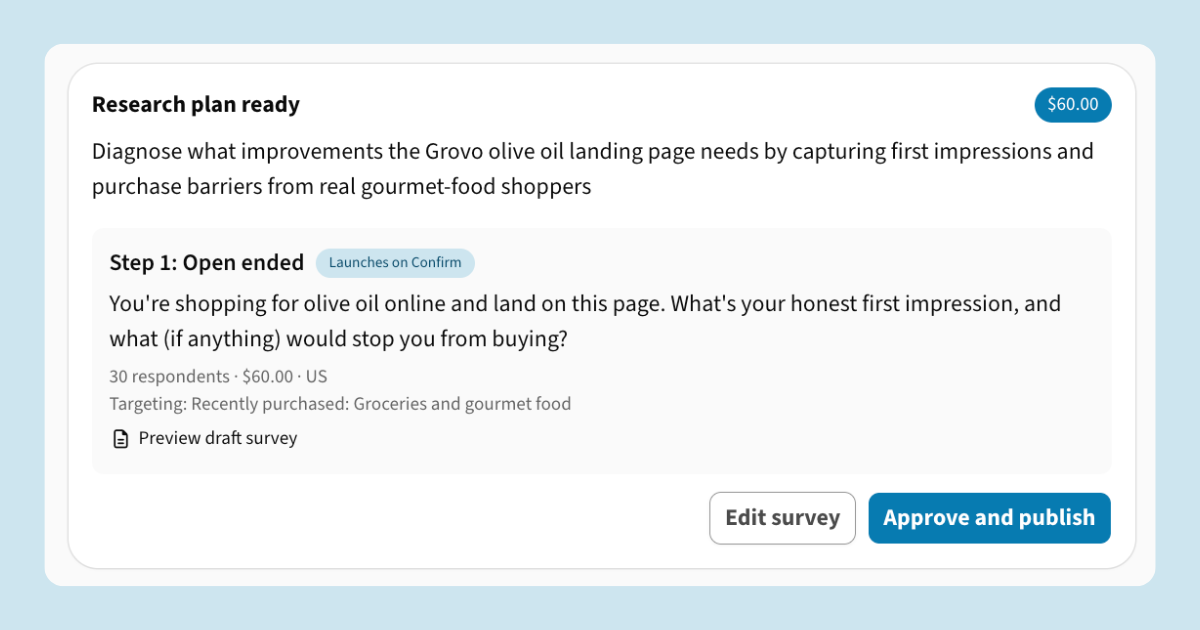
Once you have a plan, the Agent builds the survey for you: the questions, your options, the audience targeting, and the sample size. It shows you the plan and the cost, and gives you a preview link. By default, nothing goes live until you approve it. If you'd rather skip that step for smaller surveys, you can set limits in your Agent settings (more below).
After you approve, your survey goes to PickFu's panel of real people in any of 15 countries, and most surveys finish within a few hours. The Agent can let you know when the results are in.
Try asking:
- "Build a head-to-head test of these two headlines with 50 U.S. coffee drinkers."
- "Set up a ranked test of these four packaging designs with dog owners, and ask why they picked their favorite."
- "Add a follow-up question asking what they'd expect to pay."
Run a Synthetic Audiences test
If you have a long list of options, you can ask the Agent to screen them with Synthetic Audiences (beta) before you survey real people.
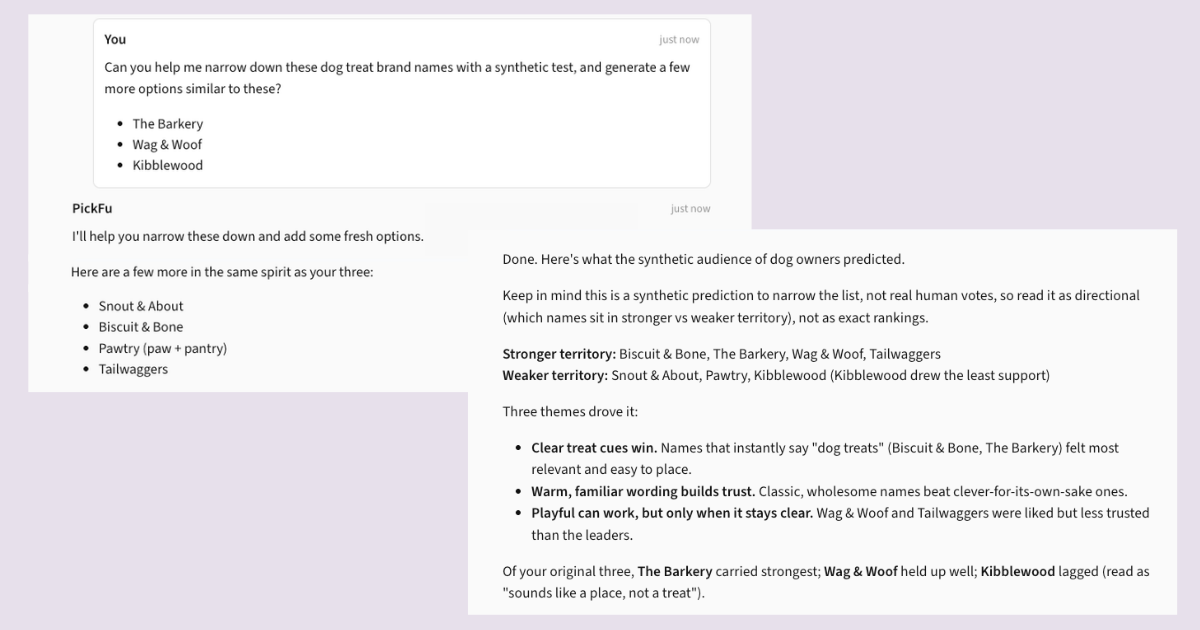
Synthetic Audiences predicts what real people would choose. Each synthetic respondent is built from real PickFu panelists and the choices people like them made on past surveys. You give the Agent a question and 2 to 10 options, pick from more than 300 U.S. audiences, and get results in the chat in under a minute: which options landed in the stronger half, which landed in the weaker half, and the themes behind the split.
It works best for narrowing a list and for text comparisons like names, titles, taglines, and claims. Treat the result as direction. For anything with real money behind it, the Agent will offer a ready-to-run survey with real people on your stronger options. Synthetic results are always labeled, and they're never mixed with responses from real people.
Try asking:
- "Run a synthetic test on these eight product names with dog owners."
- "Get synthetic reactions to this product concept before I survey real people."
Learn more about Synthetic Audiences.
Generate images and concepts to test
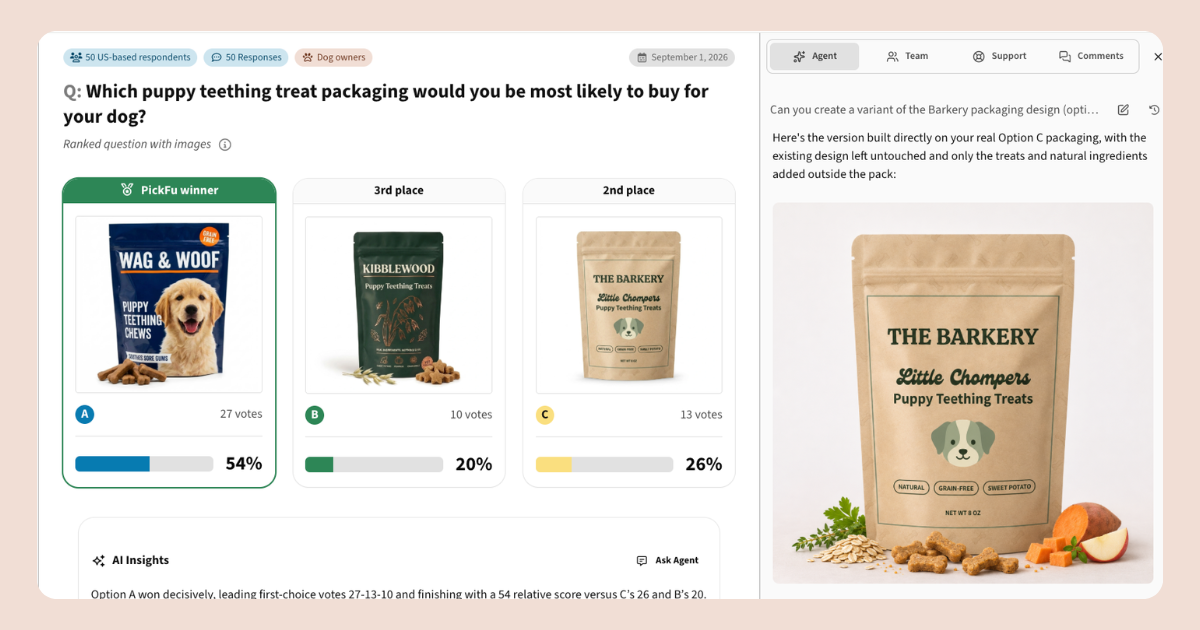
You don't need finished creative to start testing. The Agent can generate images in the chat and drop them straight into a survey.
- From scratch: describe what you want ("a matte black coffee bag on a white background with the name Midnight Roast") and it creates the image.
- Variations of an existing image: share your current image and tell it what to change, such as a different angle, background, or color.
- Variations based on feedback: point it at a finished survey and ask it to create new versions that address what respondents didn't like.
This is useful for early concepts, when you want a reaction before you pay for a photo shoot or a designer's time. Treat generated images as drafts to test and learn from, then hand the winning direction to your designer.
Try asking:
- "Generate three packaging concepts for a kids' sunscreen: one playful, one clinical, one eco-friendly."
- "Create two variations of this main image with a lifestyle background."
- "Respondents said our packaging looks generic. Generate two versions that fix that, then test them against the original."
Analyze your survey results
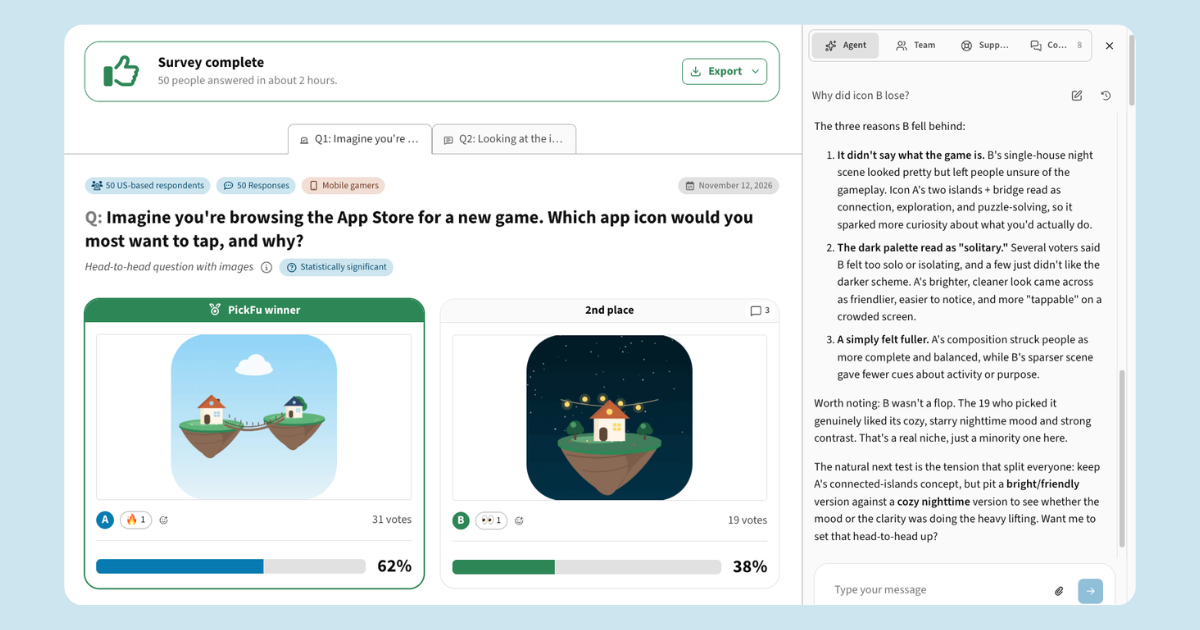
When a survey finishes, ask the Agent what happened. It reads every response, including the written explanations, so you don't have to start from a wall of comments. It can:
- Break down the votes: who won, by how much, and how each option scored.
- Compare demographic groups: whether women and men split differently, or whether one age group drove the result.
- Summarize the themes: what people liked and disliked about each option, and how often each point came up.
- Pull the comments worth reading: specific responses that explain the result, with links back to the source so you can check them yourself.
Try asking:
- "Why did Option C lose?"
- "Did people under 35 answer differently?"
- "What were the top three reasons people preferred Option B?"
- "Show me the most useful negative comments."
Get a recommendation on what to do next
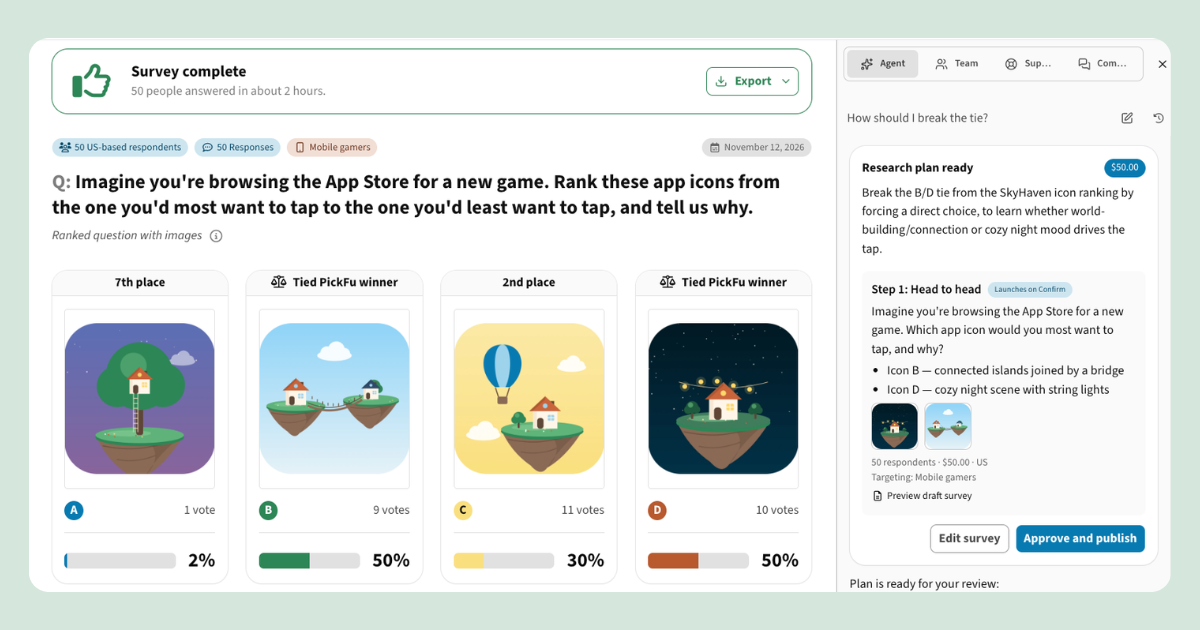
A result is only useful if you know what to do with it. Ask the Agent what it would do next and it'll give you a specific step: go with the winner, change something and retest, or run a follow-up to settle an open question. If the next step is another survey, it can build that one too.
Try asking:
- "What should I test next?"
- "What should I change before I retest this?"
- "The top two options tied. How do I break the tie?"
Find patterns across surveys
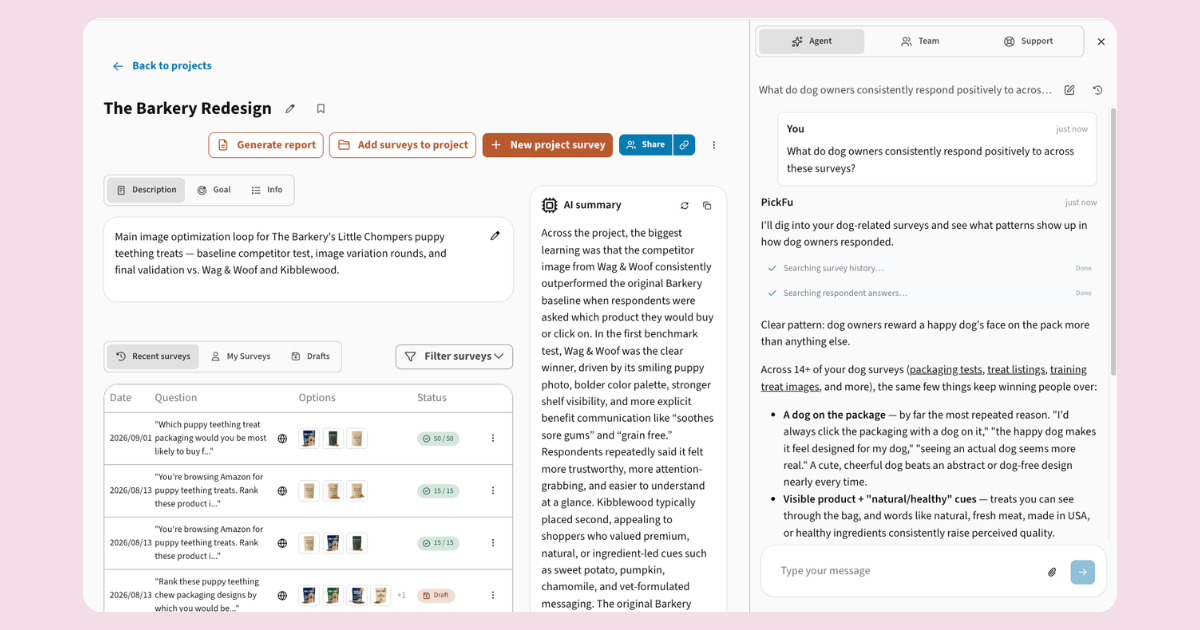
One survey answers one question. The bigger lessons usually show up across several. If you keep related surveys together in a project or tag them, the Agent can look across the group and tell you what keeps coming up.
Try asking:
- "Look at every survey in my packaging project. What do people consistently respond to?"
- "Across our main image tests this year, which changes actually moved the result?"
- "What have we learned about how our audience reacts to price?"
If you need a write-up to share, you can also generate a report from any finished survey or from a whole project.
Search your team's past surveys
Before you run something new, check whether your team already has the answer. The Agent can search every survey on your account by topic, so you don't need to remember the survey's name or who ran it.
Try asking:
- "Have we tested subscription pricing before?"
- "Find our logo tests from last year."
- "What were the last three surveys my team published?"
Ask it for help
The Agent knows PickFu's help center and research best practices, so you can ask it product questions and get an answer with links to the relevant articles.
Try asking:
- "What's the difference between a Ranked question and a Multi Select question?"
- "How many respondents do I need?"
- "What targeting is available in Germany?"
- "How do platform credits work?"
Set up the Agent to work your way
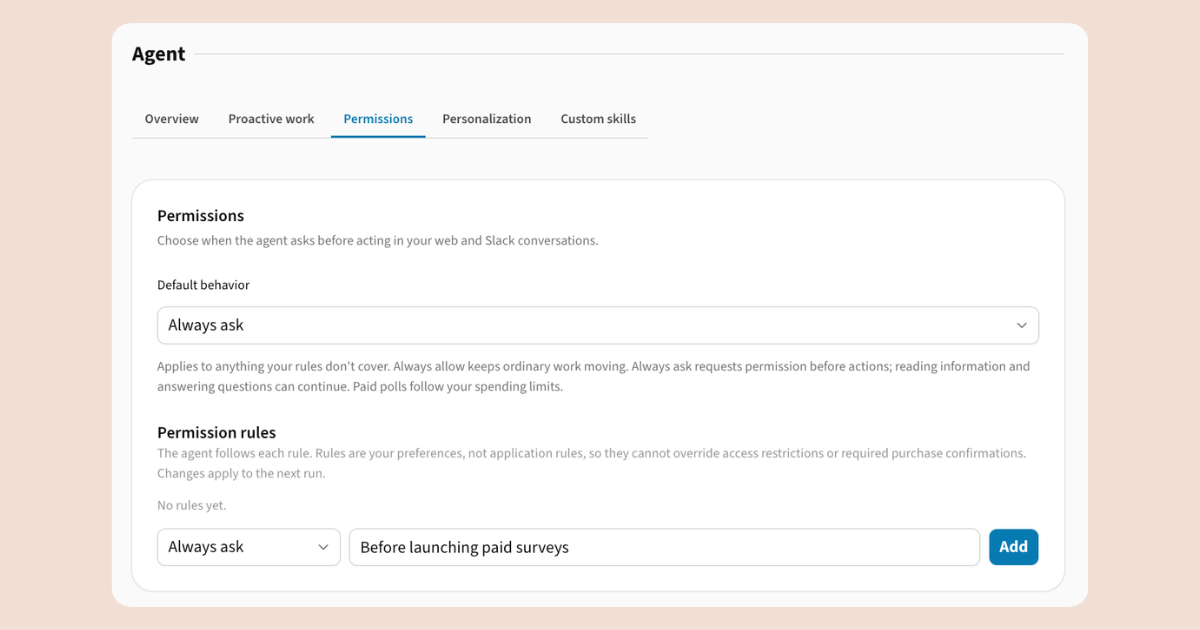
Under Settings > Agent, you can change how the Agent works for you and your team:
- Agent guidance: standing instructions for how it should respond, such as "be concise."
- Notifications: get an analysis when a survey finishes, sent to the channel you choose.
- Permissions: choose whether the Agent asks before taking actions or goes ahead on its own, then add exceptions in plain language. For example, let it work freely but ask before generating images or running a Synthetic Audiences test.
- Survey approval: skip the approval step for surveys under an amount you set, and cap how much the Agent can launch without asking each month. For example, surveys under $100 launch automatically, up to $500 a month.
- Personalization: turn memory on or off. With it off, the Agent won't use what it remembers or look at your past chats.
- Custom skills: write down a workflow your team repeats, like how you test A+ content images, and tell the Agent when to use it. Keep a skill to yourself or share it with your team, and roll back to an earlier version if you need to.
What this looks like in practice
Here's a recent example from our own team, run from start to finish in a chat with the Agent. We were choosing an app icon for SkyHaven, a cozy island-building mobile game.
1. Narrow the field. We asked the Agent to test eight icon concepts. It set up a Ranked question with 50 mobile gamers. Results came back in under two hours. Two icons tied for first: one showing two islands connected by a bridge, and one showing a single house at night under string lights.
2. Ask what happened. The Agent's analysis pointed to a pattern: icons that hinted at something to do (a bridge, a hot-air balloon) beat icons that were only pretty. Plain house icons were read as generic, and some people said they looked more like a housing app than a game.
3. Run the follow-up. The Agent recommended a head-to-head between the two leaders, plus an open-ended question asking what kind of game people expected. The bridge icon won 31 to 19. Respondents said it suggested connection and exploration, while the night scene was appealing but didn't tell them what the game was.
4. Use what you learned. The open-ended answers confirmed most people read the winning icon as a cozy building game, which is what it is. A few expected puzzles or multiplayer, which is worth clearing up in the store screenshots.
Two surveys, 100 respondents, under four hours from the first launch to the final result, and a decision the team could explain.
Try it
Log in to PickFu and tell the Agent what you're trying to decide. If you don't have an account yet, create one for free.
Not sure where to start? Ask the Agent: "What can you help me with?"
Frequently asked questions
Is the PickFu Agent free?
Yes. Chatting with the Agent is free on every PickFu account, including through Slack, the ChatGPT app, and the PickFu MCP. You pay for surveys you launch to real people, and a few AI tools use platform credits: generating an image, running a Synthetic Audiences test, and creating a report. Every account gets 1,000 platform credits a month.
Does the Agent answer my surveys?
No. Every response to a PickFu survey comes from a real person on PickFu's panel. Synthetic Audiences is a separate tool that only runs when you ask for it, and its results are always labeled as synthetic.
Will the Agent spend money without asking?
Not unless you tell it to. By default, before it publishes a survey, it shows you the plan and the cost and waits for your approval. If you'd rather skip that step, you can set a per-survey amount and a monthly limit under Settings > Agent, and the Agent will only launch surveys on its own within those limits.
Can I teach the Agent my team's process?
Yes. Under Settings > Agent, you can create custom skills: written instructions for a workflow your team repeats, plus a note on when the Agent should use it. You can keep a skill private or share it with your team, and update it over time.
Does the Agent remember my business?
Yes. Tell it your product category, your audience, or how you like answers written, and it'll use that in later conversations. Your memory is private to you, and you can ask the Agent to show, correct, or forget what it remembers at any time. You can also add standing instructions under Settings > Agent, or turn personalization off there if you don't want the Agent to use memory or past chats.
Where can I use the Agent?
In the PickFu web app (your dashboard and the Agent tab in the sidebar), in Slack, in ChatGPT through the PickFu app, and in AI tools like Claude through the PickFu MCP. It's the same Agent in each place, so you can start a survey in Slack and check the results in the web app.