
Feature
PickFu Reports
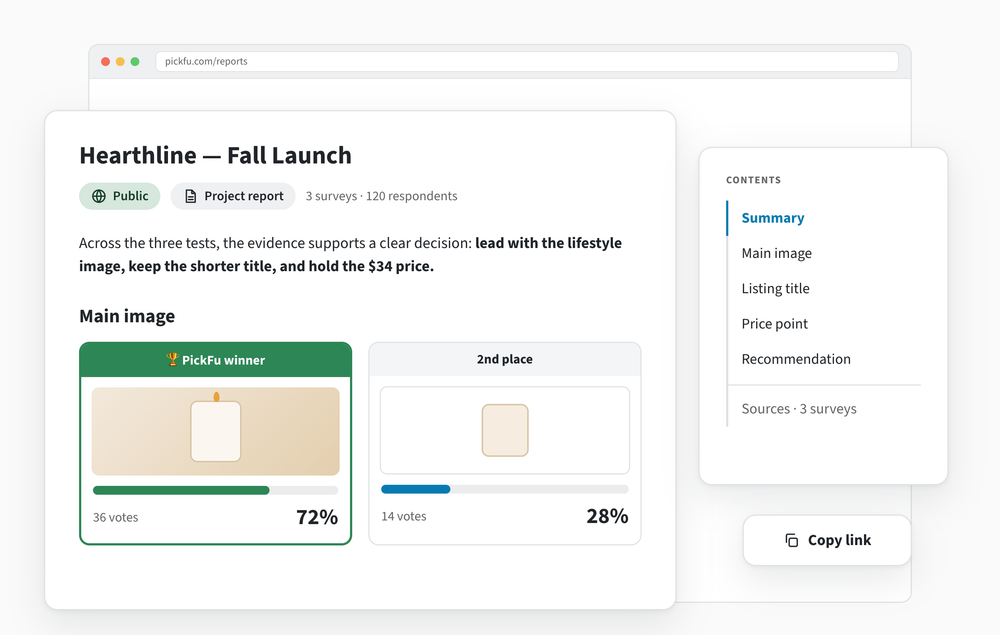
Turn survey results into a shareable, presentation-ready write-up in one click. Reports pulls the charts and responses from your surveys into a clear document you can bring to your boss, client, or team, without building slides by hand.
The world's top companies just PickFu it.






How Reports work
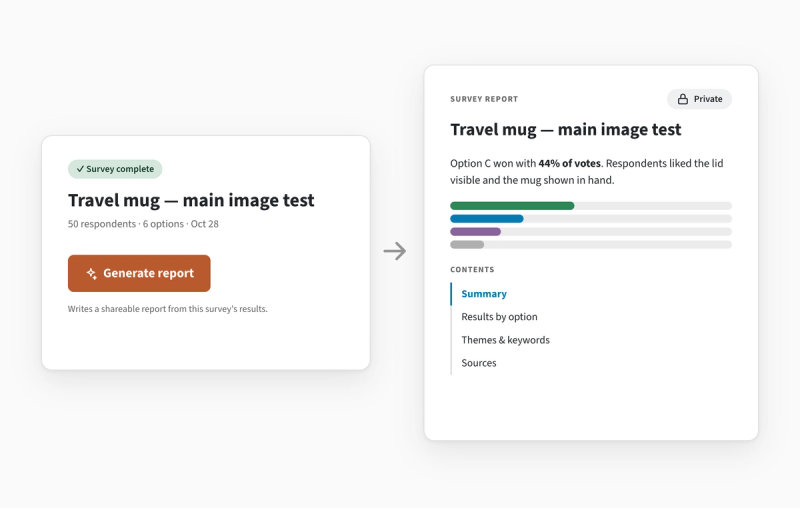
On any completed survey, click Generate report. For the bigger picture, open a Project with at least three completed surveys and generate a Project report that summarizes findings across all of them. Every Report is an AI write-up of your research, written from your survey data and built with PickFu's own results elements. The charts and responses your reader sees are the real ones, not a retyped summary. You get a document with a table of contents, a Themes & Keywords section, and an appendix listing the source surveys. Rename it, keep it private, or share it with your team or anyone with the link. All your reports live on the Reports page in the app sidebar.
When to use Reports
Whenever someone who didn't run the survey needs to understand what it found.
Presenting to leadership or HQ
Walk in with a finished write-up instead of screenshots pasted into a deck.
Reporting to an agency client
Send a public link to the findings, with the charts and responses behind them. No PickFu login needed.
Wrapping up a product launch
Generate one Project report that summarizes every image, title, and price test you ran.
Aligning your team on a test
Share to Team so everyone reads the same findings and the same source data.
What you get in every Report
Reports is different from the AI Insights summary on your results page. That summary helps you read one survey. A Report is a standalone write-up you can hand to someone else.
Written from your data, built with your charts
A Report is an AI write-up of your research, built from your survey data with PickFu's own results elements. Charts and responses appear as they do on your results page, not as plain text.
Share it on your terms
Reports are private by default. Switch to Team so your teammates can open it, or Public to get a link anyone can open, no PickFu login needed.
Organized for the reader
Every Report has a table of contents and an appendix listing the source surveys. A Themes & Keywords section breaks the top themes down by option and counts keywords, so readers see the why, not just the winner.
What customers say
I love PickFu's Reports feature! I tested it with our latest poll and it will be incredibly helpful for my HQ presentation. I don't think I've ever felt so confident heading into a presentation like this before.
 Andriana de la VegaMarketing Strategy, Reolink
Frequently asked questions
What is PickFu?
PickFu is a consumer insights platform that gets you feedback from real people in your target audience — within hours, not weeks. Teams use it to test product concepts, game designs, packaging, listings, and marketing copy, then iterate before spending on a launch.
Who is PickFu for?
Product, creative, and marketing professionals who want to make confident, insight-driven decisions. Some have no dedicated research team; others just want answers quickly without commissioning a full study. It's used most in e-commerce and CPG, gaming and mobile apps, and publishing — but it works anywhere you need real people to react to your ideas.
How much does PickFu cost?
It’s free to sign up for a PickFu account, and surveys start at $1 per response. Survey pricing is based on the complexity of your question type and audience targeting, as well as your sample size. You can also subscribe to a plan for a monthly allowance of panel and platform credits, with standard targeting included on Pro and Team.
How long do my results take to come in?
You'll start to get results within minutes. Surveys usually finish that same day, in a few hours or less. The larger and more targeted your audience, the longer it takes to collect all the responses.
What's the difference between a Report and the AI Insights summary?
AI Insights is the summary on every survey's results page: a quick read of one survey's results, for you. A Report is a standalone write-up of your research that you can share. It's built from your survey data with PickFu's own charts and responses, has a table of contents and a Themes & Keywords section, lists its source surveys in an appendix, and can cover a single survey or a whole Project.
Who can see my Report?
Only you, by default. Every Report is private when it's created. From the report, switch its visibility to Team to let your teammates open it, or to Public to get a link anyone can open without a PickFu login. All your reports live on the Reports page in the app sidebar.
How do I create a Project report?
Open a Project that has at least three completed surveys and generate a report from there. The Project report summarizes findings across all the surveys in the Project, with the charts and responses behind them, and lists each source survey in an appendix. For a single survey, open its results and click Generate report instead.