
本文目前只有英文版。
2022-10-26
Best Google survey alternatives for forms, feedback, and market research
Google survey alternatives fall into two groups: form builders like Tally, Typeform, Jotform, Microsoft Forms, and SurveyMonkey that replace Google Forms, and respondent platforms like PickFu, SurveyMonkey Audience, Pollfish, and Prolific that replace the discontinued Google Surveys. Here's how to choose.
"Google survey alternatives" can mean two different things. You might want a replacement for Google Forms, the free form builder that's still going strong. Or you might want a replacement for Google Surveys, Google's paid market research product, which Google shut down on November 1, 2022.
Those are different jobs. If you already have people to send a survey to, a form builder like Tally, Typeform, Jotform, Microsoft Forms, or SurveyMonkey gives you more design control, logic, payments, or automation than Google Forms. If you need people to answer it, you need a platform that supplies respondents, such as PickFu, SurveyMonkey Audience, Pollfish, or Prolific.
So start with one question: do you need to build a survey, find respondents, or both?
Best Google survey alternatives at a glance
Look at the "Replaces" column. A form builder helps you write the questions. A respondent platform helps you find qualified people to answer them.
Google Forms vs. Google Surveys: what are you replacing?
The names sound interchangeable, but the products weren't.
If you mean Google Forms
Google Forms is a current Google Workspace product. You can build forms with several question types, change colors and images, send people to different sections based on their answers, see response summaries, and push the raw data into Google Sheets.
For event registrations, a quick customer questionnaire, or internal feedback, that may be all you need.
People start looking at Google Forms alternatives when the form becomes part of something bigger. It needs custom branding. A new lead should land in HubSpot or Salesforce. The business needs payment collection, an e-signature, a custom domain, or an approval step. At that point you've moved from "survey" to form infrastructure.
If you mean Google Surveys
Google Surveys solved a different problem. Companies used it to run custom market research with people outside their customer base. Google sent questions to readers on partner publisher sites and to users of its Google Opinion Rewards app. A one-question survey to the general population cost 10 cents per complete.
So if you relied on Google Surveys, a better online form builder won't fill the gap. You need a source of respondents, with targeting, screening, and quality controls on who answers. That's why one search turns up such different products. A Tally form and a PickFu survey both ask questions online, but Tally assumes you have the audience. PickFu supplies it.
Why teams outgrow Google Forms
Google Forms is popular because it's quick. You build a questionnaire, share it, collaborate through Google Workspace, and analyze results in Google Sheets. The reasons to leave usually show up once the form matters more to the business.
The form is part of the customer experience
Say a design agency sends a new-client intake form. It's one of the first things the client sees after signing. If the agency wants branded typography, richer layouts, custom domains, and a smoother mobile experience, the form is now part of the brand.
But don't assume "more designed" means "more likely to get finished." We asked 15 U.S. consumers whether they'd rather fill out a 10-question quote form one question at a time, with a progress bar, or all on one page. Thirteen of 15 picked the single page.
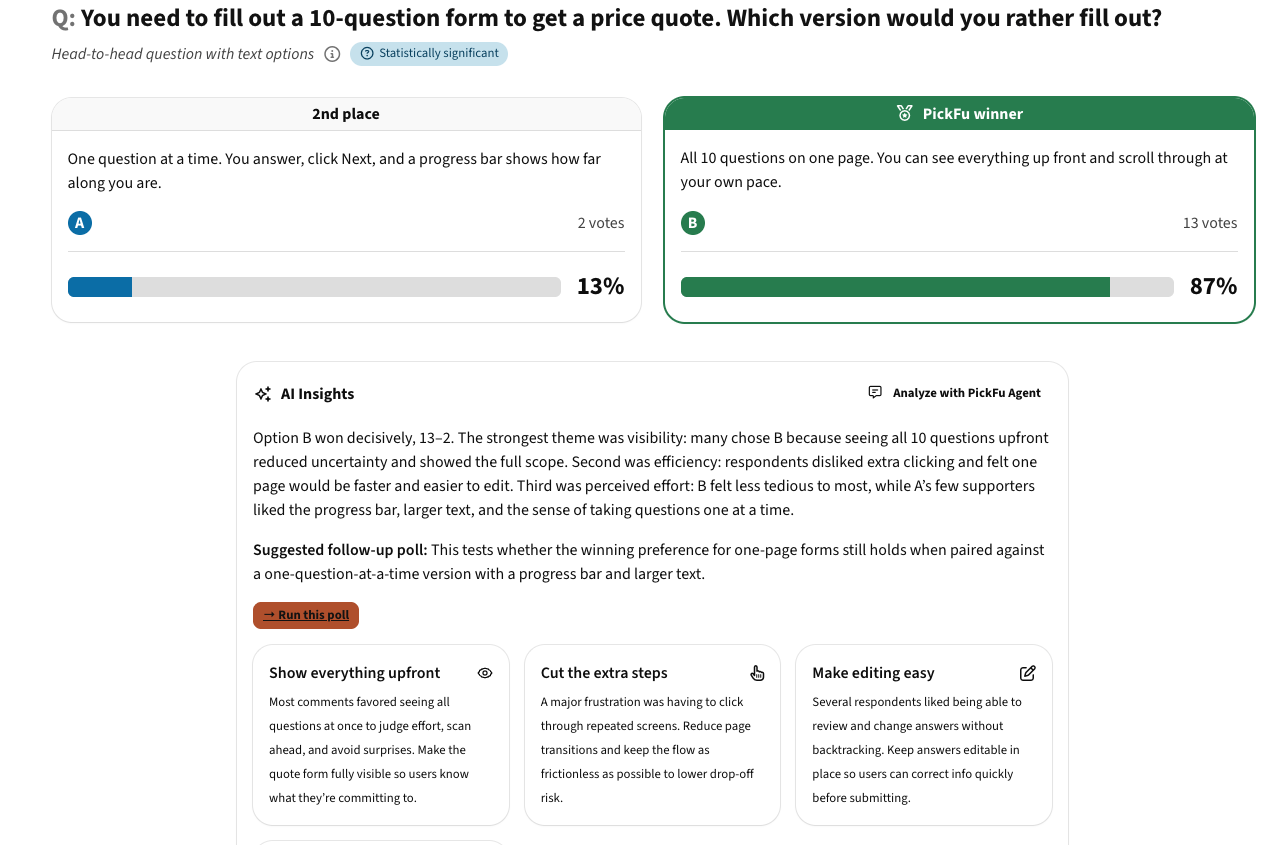
📊 Survey example: one question at a time vs. all on one page
What the results showed:
- People wanted to see the whole form up front. "I can judge how tedious the questions will be and I can decide to bail from there, not 8 questions in," one respondent wrote.
- Extra clicks felt like friction: "If I have to click through ten pages just for the sake of you generating clicks I will just leave early."
- The two people who chose one-at-a-time liked the progress bar and bigger text, so it's not a lost cause for every audience.
It's a small sample, so treat it as a gut check, not a rule. The takeaway is that format is a choice to test, not a default to buy.
The questions need to change based on the answer
Google Forms supports basic branching. More complex flows need deeper conditional logic or skip logic. A consultancy might ask which service a prospect wants, then show strategy questions to one group and branding questions to another. Without logic, everyone sees every question and the form gets long and irrelevant.
Logic can go too far, though. A form with 40 hidden branches is hard to quality-check, and one wrong rule sends people down the wrong path. Test every branch before you send it.
A submission needs to start a process
Forms often turn into workflow tools. A request needs manager approval. A sales inquiry needs to become a CRM contact. A purchase needs a Stripe or PayPal step. An application needs a signed PDF. When that happens, integrations and workflow automation matter as much as the fields themselves.
You need respondents, not another form
This mistake is common. A founder compares Typeform alternatives, builds a beautiful questionnaire, publishes it, and then realizes nobody is there to answer. The next search is usually "Where can I post a survey?"
If you have customers, subscribers, or site visitors, distribution is manageable. If you need 50 buyers who fit a specific profile, form software won't get you there.
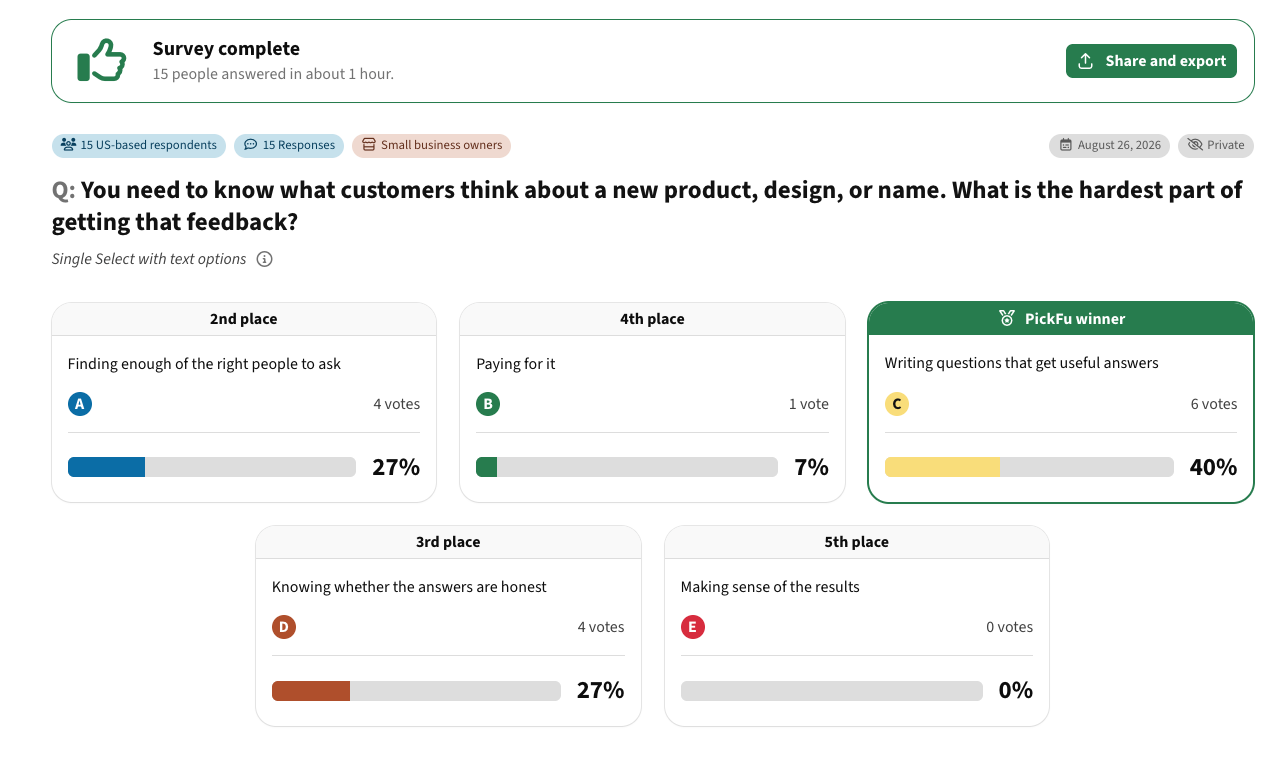
Finding people is only part of it. We asked 15 U.S. small business owners what's hardest about getting customer feedback on a new product, design, or name. Writing questions that get useful answers came first (6 of 15). Finding the right people to ask and knowing whether answers are honest tied for second (4 each). Only one picked cost.
📊 Survey example: hardest part of getting customer feedback
That's why SurveyMonkey alternatives, Prolific alternatives, Pollfish alternatives, UserTesting alternatives, Maze alternatives, and focus group alternatives all show up near the same search. They serve different needs. Our guide to SurveyMonkey alternatives goes deeper on the builder-versus-audience split.
How we evaluated the alternatives

We reviewed each tool's current pricing pages and documentation, focusing on the jobs founders, marketers, and product teams are likely to handle. For form builders, we looked at design, question types, logic, reporting, exports, integrations, branding, mobile experience, privacy, and plan limits. For respondent platforms, the questions change, much as they do across types of market surveys: who the respondents are, how they're targeted and verified, how fast results arrive, and what it costs per response.
Pricing and plan limits were checked in October 2026. They change often, so confirm on the vendor's site before you buy.
Best Google Forms alternatives
Tally: best free Google Forms alternative
Tally is the easiest upgrade for anyone who likes the price and simplicity of Google Forms but wants more. Its free plan includes unlimited forms and submissions, conditional logic, calculations, payments, signatures, file uploads, and integrations with Google Sheets, Airtable, Zapier, and webhooks. Tally Pro ($24 a month on monthly billing) removes Tally branding and adds custom domains, team members, and drop-off analytics. Tally also has a free AI form generator that drafts a form from a plain-language description.
Picture a freelancer running paid-consultation intake through Google Forms. They want a cleaner form, follow-up questions that depend on earlier answers, and a Stripe payment step. Tally covers that without a subscription.
The catch is that Tally solves the form problem, not the respondent problem. It'll collect unlimited answers, but it won't find the people to give them.
Typeform: best for conversational, design-led forms
Typeform made forms feel less like spreadsheets. Its one-question-at-a-time format works well for lead capture, customer intake, and branded questionnaires where presentation affects whether people finish. Logic is available on the free plan. Paid plans add file uploads and payment questions through Stripe or PayPal, plus integrations like Mailchimp.
The limit is volume. Typeform's free plan allows 10 responses a month, and its Basic plan allows 100. Typeform says it's experimenting with pricing, so check the current numbers.
That's why people looking for Typeform alternatives often end up comparing Tally, Fillout, Jotform, and Paperform. Our Typeform alternatives guide covers those tradeoffs, and the one-page result above is a reason to test the conversational format before paying for it.
Jotform: best for payments and business workflows
Jotform is a broader business-form platform. Its free Starter plan includes five forms and 100 monthly submissions, with Jotform branding. Paid plans start at $19 a month.
The bigger difference is what happens after someone hits submit. Jotform Workflows handles approval workflows, task assignments, conditional actions, payment requests, and e-signatures. Take a conference collecting exhibitor applications: the form captures company details, a manager approves, the exhibitor pays, legal documents get signed, and operations gets notified. You could stitch that together with Google Forms, email, and spreadsheets. It's also easy for something to fall through.
For health data, check plans carefully. Jotform's pricing page lists HIPAA features only on its Gold and Enterprise tiers.
Microsoft Forms: best for Microsoft 365 teams
Microsoft Forms is the obvious pick for organizations already on Microsoft 365. You can create surveys, polls, and quizzes, watch results come in, add branching, and export to Excel. It's free with a personal Microsoft account, too.
For an HR team running a post-training questionnaire, that's plenty. Everyone already signs in with Microsoft, and reporting ends up in Excel anyway. It falls short when you need heavily branded public forms, payments, or serious research features.
SurveyMonkey: best general-purpose survey tool
SurveyMonkey is much closer to dedicated survey software than Google Forms. Its free plan includes unlimited surveys with up to 10 questions each and a cap on how many responses you can view. Paid plans add skip logic, data exports, custom design, integrations like Zapier, and statistical tools.
That makes sense when surveys are a regular part of the job: event feedback one week, a brand study the next. The tradeoff is plan complexity. Features that are standard in simpler tools can sit behind a paid tier, and respondents through SurveyMonkey Audience are sold separately.
Qualtrics: best for advanced research
Qualtrics is where a survey stops being a business form and becomes research infrastructure. Its paid research products add randomization, advanced question types, crosstabs, weighting, and text analysis. Qualtrics also offers a free account, though its marketing page and support documentation list different limits, so check what you'll actually get.
Use it when the study needs research-grade controls, like showing randomized concepts to different groups and exporting for statistical analysis. Buying it for a 10-question customer survey means paying for rigor you won't use.
Other Google Forms alternatives worth knowing
Not every tool needs a full review. These fit narrower jobs:
- SurveySparrow is built for ongoing customer feedback, with conversational surveys, NPS, and CSAT. Its free plan is small and caps responses per quarter.
- Alchemer sits between business survey software and enterprise research. Its Collaborator plan is $55 per user a month (or $315 per user a year), with unlimited surveys and 75,000 responses a year.
- QuestionPro has a free Essentials plan with 200 responses per survey and an Advanced plan at $99 per user a month, billed annually. Its Research Suite adds conjoint, MaxDiff, and audience access as your needs grow.
- Zoho Survey fits teams already on Zoho. The free plan allows 100 responses per survey, while the Zoho CRM integration and panel responses sit on higher paid plans. Zoho also sells a separate form builder, Zoho Forms.
- Formstack makes sense when a form has to produce documents, approvals, and signatures. Forms start at $83 a month, billed annually.
- Paperform treats forms like pages, which works for quotes, bookings, and order forms. Its free plan allows unlimited forms but 30 submissions a month.
- Fillout connects forms directly to the tools a team works in. The free plan allows 1,000 responses a month and connects to Airtable, Notion, and Google Sheets; Salesforce requires a higher tier.
- Cognito Forms includes payments on every plan, adds e-signatures and approvals on paid tiers, and offers HIPAA compliance on Enterprise.
- forms.app has a free plan with conditional logic, payments, and AI features, capped at five forms.
- Wufoo, now part of SurveyMonkey, still works for traditional online forms.
- HubSpot Forms is built for lead generation. Submissions are added to the HubSpot CRM automatically.
If your site runs on WordPress, WPForms, Formidable Forms, Gravity Forms, Ninja Forms, and Fluent Forms live inside the site itself. These WordPress plugins help when a form needs to work with site content, users, or payments. Ninja Forms, for example, sells payment add-ons for Stripe and Authorize.net.
There's no universal winner here. "Best form builder" depends on the job the form has to do.
Best Google Surveys alternatives for getting survey responses
Replacing Google Forms is a software decision. Replacing Google Surveys is a research decision. What matters shifts from the editor to the people answering.
PickFu: best for product, creative, and marketing decisions
PickFu is a consumer insights platform built for decisions with money behind them. You upload your options, choose who you want to hear from, and get votes plus a written explanation from every respondent. Sample sizes run from 15 to 500 respondents, 50 is a common starting point, and results come back in hours, not weeks.
The respondents are identity-verified people in 15 countries, sourced from enterprise research panels and quality-checked through a mix of AI and human review. You can target by more than 100 traits, such as age, income, pet ownership, or shopping habits, and combine up to four. You can also ask several questions in one survey. Pricing starts at $1 per response, or $15 per survey, with no subscription required.
Say an e-commerce brand is preparing a launch with three package designs, five product images, two names, and a handful of claims. It doesn't need to build four Google Forms and recruit its own respondents. It can run package design testing, logo and design testing, a brand name test, or mockup testing with its target buyers, then read the vote split alongside the reasons. If 60% pick Package B, the number tells you which way to lean. The comments tell you what to fix next.
PickFu has tradeoffs. It's digital-only, so respondents can't download your app, create an account, or handle a physical sample. It isn't a lead form or registration tool. And it doesn't replace hands-on usability testing.
SurveyMonkey Audience: best if your surveys already live in SurveyMonkey
SurveyMonkey Audience keeps the questionnaire and the respondents in one system. SurveyMonkey says its panel reaches 335 million people in more than 130 countries, with targeting by traits like age, gender, job function, and region. Pricing starts at $1 per response.
It's convenient for teams already using SurveyMonkey: build the survey, buy responses, and analyze without moving data. Convenience isn't always the cheapest route for every audience, so compare per-response costs for the people you actually need.
Pollfish: best for broad consumer survey research
Pollfish is much closer to the old Google Surveys than Typeform or Jotform are. It's built around finding consumer respondents, and it's still sold as a do-it-yourself product under Prodege. Pollfish pricing starts at $0.95 per response, with extra charges for screening questions, quotas, and advanced targeting.
When you compare tools in this category, including Pollfish alternatives, focus on the respondent source, targeting, quality controls, and total cost per study. The button styling matters a lot less.
Prolific: best for academic and behavioral studies
Prolific is another respondent-first platform, with a different center of gravity. It's widely used for academic, behavioral, and AI research, and you plug in your own study tool, like Qualtrics, by URL. Prolific's pricing sets a minimum participant pay of $8 an hour, plus a platform fee.
Teams comparing Prolific alternatives should start with the participant pool, not the interface. Our Prolific alternatives guide breaks down the different models.
B2B and UX research need different tools
A consumer panel isn't the best way to reach finance directors or IT buyers. For verified professionals, platforms like Respondent or User Interviews make more sense.
UserTesting alternatives and Maze alternatives are usually searched by teams that need to watch people use a product or prototype. That's usability research, not a survey. (UserTesting's parent company rebranded as Auros in September 2026, and User Interviews is now part of the same company.) Our UserTesting alternatives guide covers that workflow. A survey tells you what people think. A usability test shows you what they do.
Where consumer research fits before the form
A form usually collects information. The business decision often happens earlier, and that's where a consumer insights platform can sit upstream of Typeform, Jotform, or Google Forms.
Test the idea before you build the funnel
Say a founder has two landing-page directions for a new product. The team could build both, connect the forms, set up CRM automation, and buy traffic. Or it could first run a quick concept test to see whether people understand the idea. That's prototype market validation, and it helps you decide what deserves more investment. It also gives founders evidence when they're figuring out how to sell app ideas to partners or investors.
In one test, we showed 15 U.S. consumers two hero sections for a fictional productivity tool. The one that showed real charts and interface previews beat the one with a simple promise, 12 to 3. "A makes me a promise, B shows me tools I can actually use and how they work," one respondent wrote.
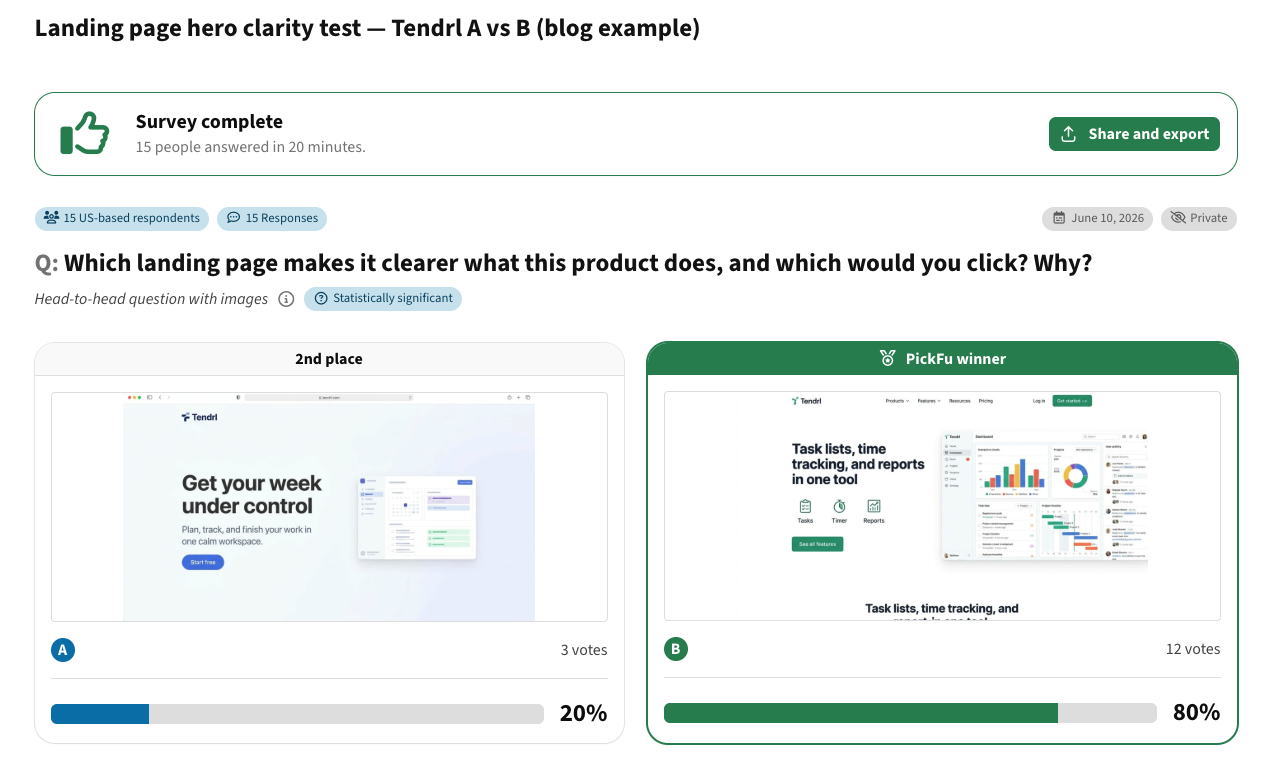
📊 Survey example: landing page hero clarity test
Test the brand before you ask people to convert
You can test business name options, test slogans, or test company logo concepts before they're baked into a lead-generation funnel. A form tells you whether someone submitted. Early research tells you why the page deserved their attention in the first place. That matters anywhere people judge fast: app store screenshot and icon testing, product pages, packaging, and ads. Our guides to logo testing and message testing go further.
Narrow creative before live experiments
The same order works in e-commerce. A seller with six candidate product images doesn't have to split live traffic six ways. Consumer research can narrow the field, and the strongest options move into Amazon split testing or another live split test, where real purchase behavior adds a second layer of evidence.
For example, 15 U.S. consumers with dry skin compared a studio shot and a bathroom lifestyle shot for a fictional moisturizer. The lifestyle image won 10 to 5. People said the counter, towel, and plant made the product feel "more real." The five who chose the studio shot said the bottle and label were easier to see, which is a useful note for the next round.

📊 Survey example: studio vs. lifestyle product image
Consumer research tells you what people notice, understand, and prefer. A live test shows what they buy. Neither replaces the other.
AI makes the human check more important
Generative AI makes options cheap. A team can produce 20 headlines and 30 ad concepts before lunch, so the bottleneck becomes picking the right one. That's the case for AI creative testing: AI generates, and real people react. It's also the idea behind Human-in-the-Loop Product Research for AI, where people provide judgment at the points where audience reaction matters. Our post on human-in-the-loop validation covers how that works.
It also shapes the debate over synthetic respondents vs. real consumer feedback. Synthetic answers can help with brainstorming, but they shouldn't be passed off as what customers said. People notice the difference. When we showed 15 consumers a polished, generic answer and a specific, slightly messy one, 14 said the specific one sounded like a real customer. "A sounds like it came from a corporate boardroom," one wrote.

📊 Survey example: which answer sounds like a real customer?
Google survey alternatives pricing comparison
Pricing checked: October 2026. These tools sell different things, so prices don't line up neatly. Form builders tend to charge by submissions, respondent platforms by response, and workflow tools by users, forms, or documents.
Don't compare price without the workflow. A free form followed by three hours of manual data entry a week can cost more than a paid form that feeds your CRM. Likewise, a $15 test is cheap only if 15 directional responses are enough for the decision. Bigger bets need bigger samples.
How to choose the best Google survey alternative
Start with the job, then match the tool to it:
- You already have respondents and just need to collect answers: a form builder like Tally, Google Forms, or Microsoft Forms.
- The form is customer-facing marketing: prioritize mobile experience, custom branding, and integrations. Typeform, Paperform, and HubSpot Forms fit here.
- A submission kicks off work: prioritize workflow automation, approvals, signatures, and integrations. Look at Jotform, Formstack, or Fillout.
- You need customer feedback over time: choose software built around recurring programs, like SurveySparrow or SurveyMonkey.
- You need people outside your audience: stop comparing form builders and compare respondent sources. That's PickFu, Pollfish, or SurveyMonkey Audience for consumers; Prolific for academic work; Respondent or User Interviews for professionals.
- The study needs formal methodology: Qualtrics, Alchemer, or QuestionPro.
- You need to explore motivation in depth: customer interviews or an online focus group.
A few requirements can rule tools in or out fast. Health data can make HIPAA compliance a hard requirement. Serving European users puts GDPR and data location on the list. Some teams need QR codes for physical signage, multi-page forms, or a drag-and-drop builder non-technical teammates can use. An AI form builder can speed up the first draft, but it can't tell you whether a question is biased or whether the flow matches how your business actually works.
Common mistakes when choosing a Google survey alternative
Confusing the builder with the respondents. Building a great questionnaire and recruiting the right sample are separate jobs. Solve both.
Choosing on the free plan alone. Free plans work until a must-have feature, like exports, logic, branding removal, or an integration, turns out to be paid. Map the whole workflow first. Some tools cap responses per form, others per month or year, and a free plan that's fine internally can max out the day you embed it on a busy site.
Asking for too much. We asked 15 U.S. consumers why they abandon online forms. Nine of 15 ranked "it's asking for too much information" first, ahead of a sketchy-looking design (4) and phone usability (1). Several tied long, nosy forms to scams: "If they ask too much information on multiple pages, then I believe it to be a scam."
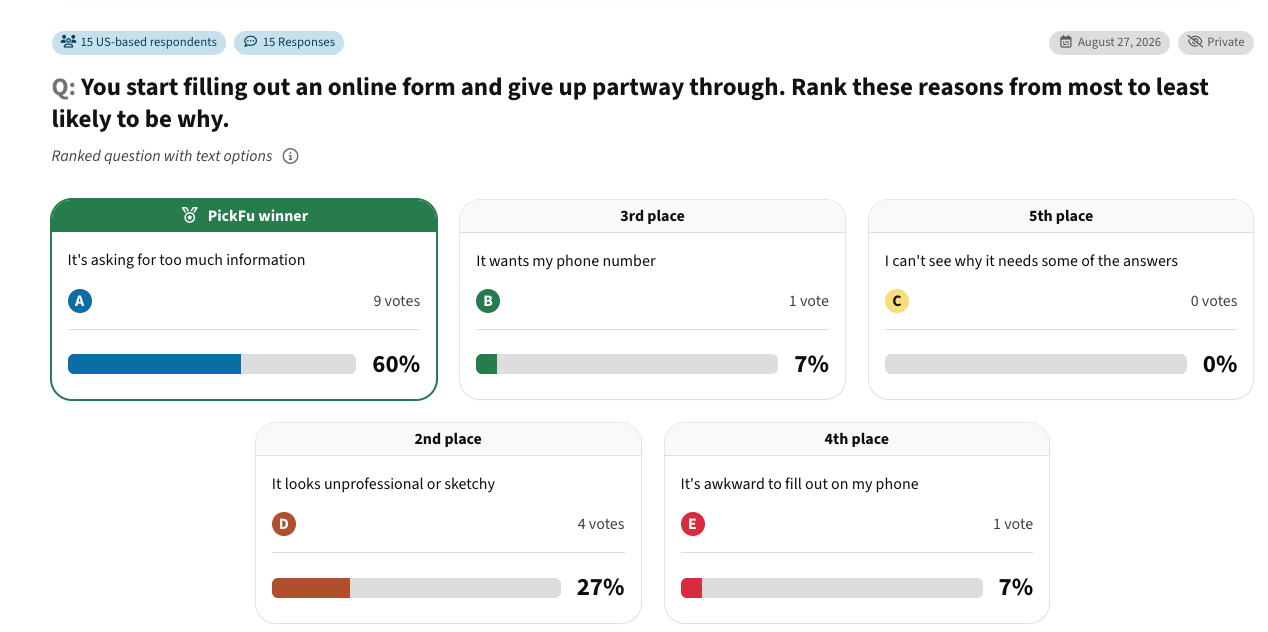
📊 Survey example: why people abandon online forms
Assuming more responses mean better evidence. A thousand responses from the wrong people aren't better than 30 from the people who matter. Research quality starts with the audience.
Expecting the tool to fix a bad question. "How much do you love our easy-to-use product?" is a leading question on any platform. Our guide to unbiased survey questions shows how to fix it.
Frequently asked questions about Google survey alternatives
Does Google have a free survey tool?
Yes. Google Forms is free with a Google account and is Google's general-purpose tool for online forms and surveys. It supports multiple question types, answer-based branching, response summaries, and Google Sheets integration. It doesn't include respondents, though. Google Surveys, which did, shut down in 2022.
What replaced Google Surveys, and what are the top alternatives?
Google didn't launch a direct replacement. For consumer research, options include PickFu, SurveyMonkey Audience, Pollfish, and QuestionPro's audience services. For academic and behavioral studies, Prolific is a common choice. Pick based on the respondent source that matches the audience you need, not on which interface looks most like the old one.
What is the best Google Forms alternative?
It depends on what Google Forms can't do for you. Tally is the strongest free option. Typeform suits branded, conversational forms. Jotform and Formstack handle payments, approvals, and documents. Fillout connects forms to your database. SurveyMonkey, Alchemer, QuestionPro, and Qualtrics make more sense as research needs grow. Compare the job, not the length of the feature list.
Is SurveyMonkey or Google Forms better?
Google Forms is better for simple, free surveys, especially if you work in Google Workspace. SurveyMonkey is better when you need deeper logic, structured analysis, research features, or paid respondents. Its free plan is more limited than Google Forms in some ways, so "better" depends on whether you'll use those extras.
Why choose Typeform over Google Forms?
Choose Typeform when the form faces customers and the experience matters. It offers a one-question-at-a-time format, more branding control on paid plans, logic, and Stripe or PayPal payments. Google Forms is simpler and free, which makes it the better pick for internal or low-stakes data collection.
Is there a Microsoft tool like Google Forms?
Yes. Microsoft Forms lets you create surveys, polls, and quizzes, see results in real time, add branching, and export to Excel. It's free with a personal Microsoft account and built into Microsoft 365.
Is Jotform free?
Yes. Jotform's free Starter plan includes five forms and 100 submissions a month, with Jotform branding. Paid plans raise those limits and start at $19 a month.
How do I cancel SurveyMonkey?
For a self-service paid account, SurveyMonkey says to go to My Account, open Billing Details, select Manage Subscription, and downgrade to the free plan. You keep paid features until the end of your billing period. Accounts set up through SurveyMonkey's sales team need to contact SurveyMonkey directly.
How does Fluent Forms handle conditional logic?
Fluent Forms lets WordPress users show or hide fields based on earlier answers. Rules can match any condition, all conditions, or grouped conditions.
Build the survey around the decision
Google Forms is still a good way to collect information from people you can already reach. Replace it when your forms need to be more branded, connected, transactional, or research-heavy. Google Surveys is gone, and replacing it means choosing a source of respondents who match the people you need to hear from.
When the decision is which package, product image, logo, name, slogan, app store creative, ad, or concept will land with your audience, test it with real people before you spend on it. Create your free PickFu account and run your first test with your target buyers.