How to use the PickFu MCP: prompts, use cases, and best practices
 Adrienne Van Niman · April 15, 2026
Every product decision is a bet — on a name, a design, a price point, a message. Consumer research helps you make smarter bets, but traditionally it’s been slow, expensive, and hard to set up without expertise.
The PickFu MCP changes that. It brings consumer research directly into the AI tools you’re already using, so you can go from question to answer in minutes instead of days — no survey design experience required.
Our MCP server connects your AI assistant — Claude, ChatGPT, Cursor, Notion, or any MCP-compatible tool — directly to PickFu. That means you can plan research, target your ideal audience, launch surveys, and analyze results without ever leaving the conversation you’re already in. Just describe what you want to do, and AI handles the rest.
Whether you’re a product manager validating a new concept, an e-commerce agency testing packaging designs, or a marketer choosing between taglines, the PickFu MCP turns your AI assistant into your research partner. Here’s what you can ask it to do.
PS – We’re hosting a live webinar series walking through different ways to use PickFu with AI tools. Learn more and sign up here.

Related guide
What is PickFu? How the consumer insights platform works
TL;DR: PickFu is a consumer insights platform. You build a poll or survey, choose the audience you want to hear from, and get written feedback from real people who match …
Prompt examples for anyone
These prompts work for anyone, regardless of industry. You don’t need to know PickFu’s poll types or settings — just describe what you want to learn, and the MCP figures out the setup.
Planning and designing research
- “I have a business idea for a pet subscription box. Can you help me figure out what to research first?”
- “Help me design a study to find out which of these branding concepts people trust most.”
- “I want to target millennials who play mobile strategy games. Can you pull all the audience targeting traits available on PickFu that might be relevant?”
- “Show me what research playbooks are available — I want to see if there’s a template for what I’m trying to do.”
Creating and launching surveys
- “Here are four book blurb options. I want to know which one science fiction readers like best.”
- “Compare these two landing page designs with people in Germany to see which one is more engaging.”
- “I want to understand where people look first on this image. Can you set up a test for that?”
- “Generate a few variations of this image [add image URL] and then test them against each other targeting wine drinkers.”
- “Ask 50 people what they think this company does based on the brand name.”
Analyzing and working with results
- “Pull the results from my most recent survey and summarize the key takeaways.”
- “Break down the responses from my polls under [PickFu project name] by age and gender — are there any patterns?”
- “Look at all the surveys about [specific product/campaign] – based on the feedback themes, what test should I run next?
- “Can you add 30 more respondents to my poll about X that I ran last week?”
Staying organized
- “Show me all the polls my team ran this month.”
- “Add all polls about [product/campaign] to a new project.”
- “Add the ‘Q2 rebrand’ tag to my last three surveys.”
E-commerce prompt ideas
If you sell on Amazon, Walmart, Shopify, or any other marketplace, these prompts are for you. The PickFu MCP is especially powerful for e-commerce workflows because it can pull live product data from ASINs, generate image variations, and target real shoppers.
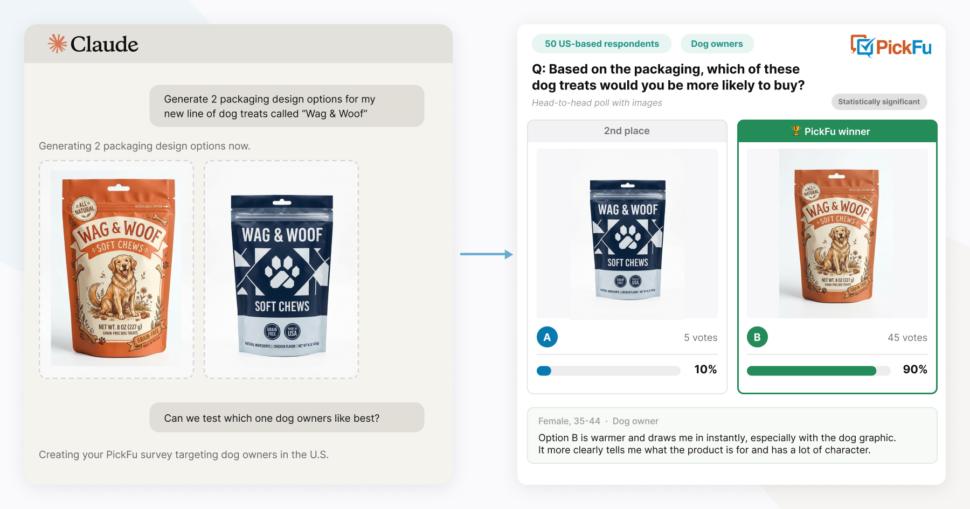
Image optimization
- “Here’s my ASIN. Pull my current main image, generate a few variations, and set up a test to see which one shoppers prefer.”
- “I just got new product photography. Test these shots against my current image stack.”
- “I’ve been running image tests for a few weeks. Pull my recent results and help me figure out which direction is winning.”
Listing and content testing
- “Create product mockups for my ASIN and these 3 competitors. Use an Amazon SERP test to see which listing shoppers would click on and why.”
- “I updated my A+ content. Can you test the new layout to see where people focus first?”
- “Test these five bullet point variations to find out which ones communicate value best.”
Product launch research
- “I’m launching a new supplement. Help me figure out my target audience, test the product name, and then optimize the packaging design — walk me through it step by step.”
- “I want to start selling in Japan. Help me test my current product listing with Japanese consumers to learn what I should adjust.”
- “I have three price points in mind. Set up a study to see which one feels right to my target customer.”
Competitive analysis
- “I want to understand why shoppers might choose my competitor over me. Set up a poll showing both listings and ask people to explain their choice.”
- “Compare my brand’s packaging to these competitors to learn which one stands out and why.”
- “Pull the results from my last competitor test and find what my competitors’ top strengths are. Generate a new main image variant for my product based on that feedback and re-test against the same competitors.”
Tips for getting the most out of the PickFu MCP
You don’t have to be a research expert
You don’t need to know PickFu’s question types, audience panels, or survey settings. Just describe what you want to learn and who you want to hear from. The MCP will recommend the right question format, suggest audience targeting (e.g., “dog owners” if you’re testing dog treats), and configure the poll for you. You can always adjust before it launches.
Let it run multi-step workflows
You don’t have to micro-manage each step. Try prompts like “help me optimize my main image end to end” or “walk me through a full product launch research plan.” The AI can chain multiple polls together, analyze results between steps, and adjust the next study based on what it learns. It will also reference and follow existing PickFu playbooks (step-by-step testing workflows for specific use cases) when relevant.
Pick up where you left off
The MCP can access your entire PickFu history. Ask it to pull past results, re-analyze old data, or add more respondents to a completed poll — no need to start from scratch.
How image handling works depends on your AI client
Web-based clients — Claude on claude.ai, ChatGPT, Notion — can’t pass local files to PickFu’s MCP tools. Dragging an image into the chat makes it visible to the AI, but the AI can’t send it to PickFu. For these clients, provide a hosted image URL instead.
Terminal-based tools like Claude Code can read local files directly, so you can reference images from your computer.
Either way, you can also give the AI a product listing or image URL and ask it to generate variations — no uploading needed.
You’ll need to check in on results
The MCP won’t notify you when your poll is done collecting responses. Once a survey is launched, you’ll need to come back to your conversation and ask your AI assistant to check on the results — something like “Are my results in yet?” or “Pull the results from my latest poll.” Most PickFu polls complete within a few hours depending on sample size and complexity.
It always asks before spending money
The MCP will never launch a PickFu survey without your explicit permission. Before anything goes live, it will show you the survey setup and cost, then ask you to confirm. Once you do confirm, it will use your PickFu credits or charge your payment method — so make sure you’re ready before you say yes.
Add credits or a payment method to your PickFu account first
If your account doesn’t have credits or a payment method on file, the MCP will direct you to PickFu’s checkout to complete the purchase in-app. You’ll save yourself a step by setting this up before you start.
Give feedback directly
We’re always working to improve the MCP. If something doesn’t work the way you expect, just tell your AI assistant: “Send PickFu feedback about this.” It goes straight to the PickFu team.
Get started
The PickFu MCP works with Claude, ChatGPT, Cursor, Notion, and any other MCP-compatible AI tool. Setup takes about a minute — just add the server URL and sign in:
Server URL: https://mcp.pickfu.com/mcp
For step-by-step setup instructions for your specific tool, visit the PickFu MCP developer docs. No paid plan is required to connect — you just need a PickFu account with credits to launch polls.
Try one of the prompts above and see what your AI assistant can do with real consumer feedback.